PowerProtect Health Check Score påverkas av DNS-upplösning
Summary: PowerProtect Data Manager-enheten distribuerades med den första miljöinformationen. Hälsokontrollen visar ett komponentfel som indikerar att det fanns ett DNS-konfigurationsproblem (Domain Name Server). Det uppstod ett stavfel och standardnätverksinställningarna kanske inte har uppdaterats. ...
Symptoms
På sidan Standardnätverksinställningar visas:
The DNS Servers below cannot resolve the domain name of the virtual machine to the specific IP address.
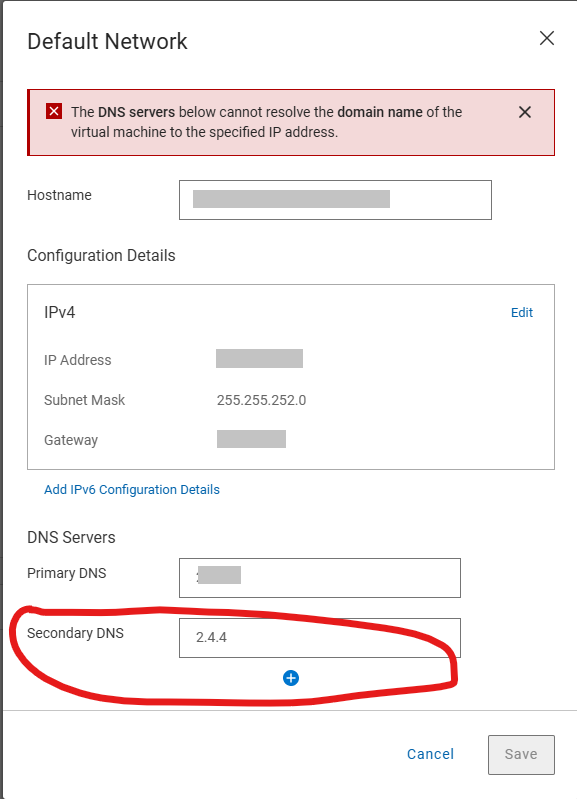
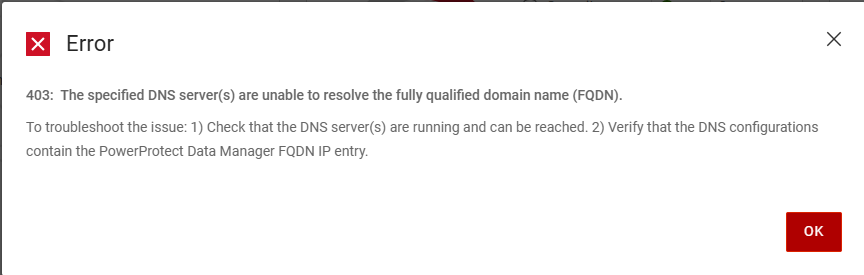
Följande fel genereras när du försöker spara rätt information om DNS-servern på sidan Standardnätverksinställningar
Error
403: The specific DNS server(s) are unable to resolve the fully qualified domain name (FQDN).
To troubleshoot the issue: 1)Check that the DNS server(s) are running and can be reached. 2) Verify that the DNS configurations contain the PowerProtect Data manager FQDN IP entry.
Informationen /var/log/brs/sysmgr/sysmgr-health-check.log Visar:
YYYY-MM-DD HH:MM:SS INFO [] [Health-Check] [][][][TRACE_ID:bbd731535f2a4450][] [c.e.b.s.s.h.CDRSHealthCheck.check(72)] -  Start CDRS health check
YYYY-MM-DD HH:MM:SS INFO [] [Health-Check] [][][][TRACE_ID:bbd731535f2a4450][] [c.e.b.s.s.h.CDRSHealthCheck.check(77)] -  CDRA is not enabled, will not perform CDRS health check.
YYYY-MM-DD HH:MM:SS INFO [] [Health-Check] [][][][TRACE_ID:bbd731535f2a4450][] [c.e.b.s.s.h.CDRSHealthCheck.check(97)] -  End CDRS health check
YYYY-MM-DD HH:MM:SS INFO [] [Health-Check] [][][][TRACE_ID:bbd731535f2a4450][] [c.e.b.s.s.h.DiskHealthCheck.check(61)] -  Start disk health check
YYYY-MM-DD HH:MM:SS INFO [] [Health-Check] [][][][TRACE_ID:bbd731535f2a4450][] [c.e.b.s.s.h.ESSettingsHealthCheck.check(40)] -  Start ES settings health check.
YYYY-MM-DD HH:MM:SS INFO [] [Health-Check] [][][][TRACE_ID:bbd731535f2a4450][] [c.e.b.s.s.h.DumpHealthCheck.check(45)] -  Start dump health check
YYYY-MM-DD HH:MM:SS INFO [] [Health-Check] [][][][TRACE_ID:bbd731535f2a4450][] [c.e.b.s.s.h.MemoryHealthCheck.check(73)] -  Start memory health check
YYYY-MM-DD HH:MM:SS INFO [] [Health-Check] [][][][TRACE_ID:bbd731535f2a4450][] [c.e.b.s.s.h.ESSettingsHealthCheck.check(42)] -  ES settings health check finished.
YYYY-MM-DD HH:MM:SS INFO [] [Health-Check] [][][][TRACE_ID:bbd731535f2a4450][] [c.e.b.s.s.h.OsAccountHealthCheck.check(70)] -  Start Os account health check
YYYY-MM-DD HH:MM:SS INFO [] [Health-Check] [][][][TRACE_ID:bbd731535f2a4450][] [c.e.b.s.s.h.NTPHealthCheck.check(62)] -  Start NTP Servers health check.
YYYY-MM-DD HH:MM:SS INFO [] [Health-Check] [][][][TRACE_ID:bbd731535f2a4450][] [c.e.b.s.s.h.ReportingHealthCheck.check(67)] -  Start Reporting health check
YYYY-MM-DD HH:MM:SS INFO [] [Health-Check] [][][][TRACE_ID:bbd731535f2a4450][] [c.e.b.s.s.h.DNSHealthCheck.check(57)] -  Start DNS Servers health check.
YYYY-MM-DD HH:MM:SS INFO [] [Health-Check] [][][][TRACE_ID:bbd731535f2a4450][] [c.e.b.s.s.h.SearchClusterHealthCheck.check(69)] -  Start Search Cluster health check
YYYY-MM-DD HH:MM:SS INFO [] [Health-Check] [][][][TRACE_ID:bbd731535f2a4450][] [c.d.p.c.c.h.e.s.i.ESCatalogHealthCheck.check(51)] -  Start ES Catalog cluster health check.
YYYY-MM-DD HH:MM:SS INFO [] [Health-Check] [][][][TRACE_ID:bbd731535f2a4450][] [c.d.p.c.c.h.e.d.ESHealthCheckDao.checkESShardsHealth(43)] -  es connection port is 14300
YYYY-MM-DD HH:MM:SS INFO [] [Health-Check] [][][][TRACE_ID:bbd731535f2a4450][] [c.d.p.c.c.h.e.s.i.ESCatalogInspector.inspect(54)] -  The cluster status is green
YYYY-MM-DD HH:MM:SS INFO [] [Health-Check] [][][][TRACE_ID:bbd731535f2a4450][] [c.d.p.c.c.h.e.s.i.ESCatalogHealthCheck.check(53)] -  ES Catalog cluster health check finished.
YYYY-MM-DD HH:MM:SS INFO [] [Health-Check] [][][][TRACE_ID:bbd731535f2a4450][] [c.e.b.s.s.h.DumpHealthCheck.check(59)] -  End dump health check
YYYY-MM-DD HH:MM:SS INFO [] [Health-Check] [][][][TRACE_ID:bbd731535f2a4450][] [c.e.b.s.s.h.ReportingHealthCheck.check(90)] -  End Reporting health check
YYYY-MM-DD HH:MM:SS INFO [] [Health-Check] [][][][TRACE_ID:bbd731535f2a4450][] [c.e.b.s.s.h.SearchClusterHealthCheck.check(97)] -  End Search Cluster health check
YYYY-MM-DD HH:MM:SS INFO [] [Health-Check] [][][][TRACE_ID:bbd731535f2a4450][] [c.e.b.s.s.h.OsAccountHealthCheck.check(89)] -  End Os account health check
YYYY-MM-DD HH:MM:SS INFO [] [Health-Check] [][][][TRACE_ID:bbd731535f2a4450][] [c.e.b.s.s.h.MemoryHealthCheck.check(112)] -  End memory health check
YYYY-MM-DD HH:MM:SS INFO [] [Health-Check] [][][][TRACE_ID:bbd731535f2a4450][] [c.e.b.s.s.h.DNSHealthCheck.check(81)] -  Cannot resolve the host my-ppdm.my-domain.com with dns server XXX.XXX.XXX.XXX.
YYYY-MM-DD HH:MM:SS INFO [] [Health-Check] [][][][TRACE_ID:bbd731535f2a4450][] [c.e.b.s.s.h.DNSHealthCheck.check(81)] -  Cannot resolve the host my-ppdm.my-domain.com with dns server XXX.XXX.XXX.
YYYY-MM-DD HH:MM:SS INFO [] [Health-Check] [][][][TRACE_ID:bbd731535f2a4450][] [c.e.b.s.s.h.DNSHealthCheck.check(84)] -  End DNS Servers health check.
YYYY-MM-DD HH:MM:SS INFO [] [Health-Check] [][][][TRACE_ID:bbd731535f2a4450][] [c.e.b.s.s.h.DiskHealthCheck.check(82)] -  End disk health check
YYYY-MM-DD HH:MM:SS INFO [] [Health-Check] [][][][TRACE_ID:bbd731535f2a4450][] [c.e.b.s.s.h.NTPHealthCheck.isNTPServersValid(93)] -  Specified ntp server is valid my-timeserver.my-domain.com
YYYY-MM-DD HH:MM:SS INFO [] [Health-Check] [][][][TRACE_ID:bbd731535f2a4450][] [c.e.b.s.s.h.NTPHealthCheck.check(75)] -  End NTP Servers health check.
YYYY-MM-DD HH:MM:SS INFO [] [Health-Check-Request] [][][][TRACE_ID:bbd731535f2a4450][] [c.d.p.c.c.h.s.i.HealthAlertService.handleResult(52)] -  health check total 11, success 10, failed 1
YYYY-MM-DD HH:MM:SS INFO [] [Health-Check-Request] [][][][TRACE_ID:bbd731535f2a4450][] [c.d.p.c.c.h.s.i.HealthAlertService.onEvent(38)] -  On event SYS0075 None of the specified DNS servers are accessible. []
YYYY-MM-DD HH:MM:SS INFO [] [Health-Check-Request] [][][][TRACE_ID:bbd731535f2a4450][] [c.d.p.c.c.h.s.i.HealthCheckPersistenceSubscriber.onComplete(66)] -  health check entity 02538bab-2ff8-4ee4-bc57-0a40c1061ca1 is completed and persisted
Cause
Det uppstod ett stavfel och standardnätverksinställningarna under den första distributionen. POST-konfigurationen för standardnätverket har validering för DNS-serverposterna, men den första distributionen gör ingen validering. Verifieringen misslyckas för stavfel och tillåter inte att inställningarna ändras.
Resolution
DNS-servrarna kan uppdateras med hjälp av PowerProtect /usr/local/brs/puppet/manifests/extdata/common.json konfigurationsfilen. Se till att det inte körs några säkerhetskopieringar eller återställningsjobb i miljön eftersom det krävs en omstart av PowerProtect-enheten för att tillämpa ändringarna.
- Kontrollera att det inte finns några aktiva säkerhetskopieringar eller återställningssessioner.
- Öppna en SSH-session för att PowerProtect Data Manager och autentisera med administratörskontot.
- Bekräfta de aktuella inställningarna för
common.jsonKonfigurationsfil:cat /usr/local/brs/puppet/manifests/extdata/common.json - Öppna
common.jsonkonfigurationsfilen och redigeradnsServersvärden:vi /usr/local/brs/puppet/manifests/extdata/common.json

- Bekräfta de aktuella inställningarna för
common.jsonKonfigurationsfil:cat /usr/local/brs/puppet/manifests/extdata/common.json - Starta om PowerProtect-enheten:
sudo reboot - Låt PowerProtect-enheten initieras helt
- Kontrollera att standardnätverksinställningarna har uppdaterats.