Dell EMC Unity: Domain Administrator get Permission denied when accessing a CIFS share on a Multi-Protocol NAS server. (User Correctable)
This article applies to
This article does not apply to
This article is not tied to any specific product.
Not all product versions are identified in this article.
Symptoms
On a multi-protocol NAS server setup with NIS/LDAP and Active Directory, when the domain administrator attempts to access a CIFS share, user get permission denied.
Cause
Administrator account need a UID, just like any other user account.
If NIS/LDAP does not have a user account called "Administrator", you need either
1. Create a manual ntxmap entry to map administrator to a real user account on NIS/LDAP.
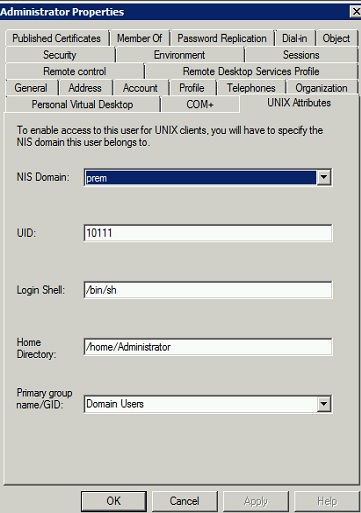
2. Create account called Administrator on LDAP/NIS,
if your LDAP is also the Active Directory just add UID to the schema.
for example:
Resolution
A common mistake is to map user administrator to root, this mapping will fail as user root does not exist either on NIS/LDAP side, so a real NIS/LDAP account is needed.
ntxmap has the following entry
:administrator:>:root
this will result in permission denied for user administrator.
change mapping to
:administrator:>:unixuser
when unixuser is a real NIS/LDAP user account.
ntxmap has the following entry
:administrator:>:root
this will result in permission denied for user administrator.
change mapping to
:administrator:>:unixuser
when unixuser is a real NIS/LDAP user account.
Additional Information
Good reference for LDAP troubleshooting on Unity: KB article Link Error 488258
Affected Products
Dell EMC Unity FamilyProducts
Dell EMC Unity Family, VNXe2 SeriesArticle Properties
Article Number: 000054793
Article Type: Solution
Last Modified: 07 Nov 2025
Version: 4
Find answers to your questions from other Dell users
Support Services
Check if your device is covered by Support Services.