OptiPlex 3040 MFFマイクが認識されない
Summary: この記事では、Dell OptiPlex 3040マイクロ フォーム ファクター(MFF)システムでマイクロフォンが認識されない問題を解決する方法について説明します。
This article applies to
This article does not apply to
This article is not tied to any specific product.
Not all product versions are identified in this article.
Symptoms
OptiPlex 3040 MFFシステムで、システムに接続されているマイクが認識されない問題が発生する可能性があります。
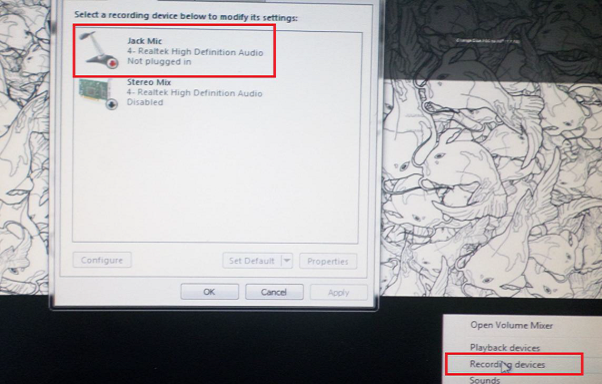
図1: マイクロフォン設定
Cause
通常、この問題はオーディオ ソフトウェア設定のオーディオ構成の問題に関連しています。
Resolution
-
Dellオーディオ スピーカー アイコンを右クリックし、[ Sound Manager]を選択します。

-
「Advanced(詳細設定)」をクリックします。
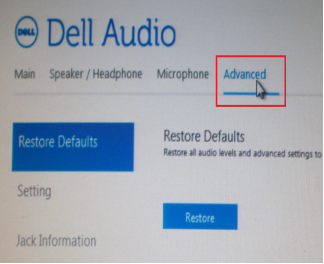
-
[Jack Information]をクリックし、[Enable auto popup dialog when a device has been plugged on]の横にあるチェックボックスをオンにします。
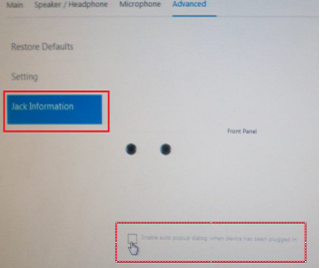
- マイクロフォンをシステムに接続します。
- 表示されるメニューで、[ マイク入力]を選択します。
- マイクをテストします。
Affected Products
OptiPlex 3040 MicroArticle Properties
Article Number: 000149418
Article Type: Solution
Last Modified: 07 Oct 2024
Version: 7
Find answers to your questions from other Dell users
Support Services
Check if your device is covered by Support Services.