無法辨識 OptiPlex 3040 MFF 麥克風
Summary: 本文提供如何解決 Dell OptiPlex 3040 微機型 (MFF) 系統無法識別麥克風問題的相關資訊。
This article applies to
This article does not apply to
This article is not tied to any specific product.
Not all product versions are identified in this article.
Symptoms
OptiPlex 3040 MFF 系統連接至系統時,可能會遇到無法辨識麥克風的問題。
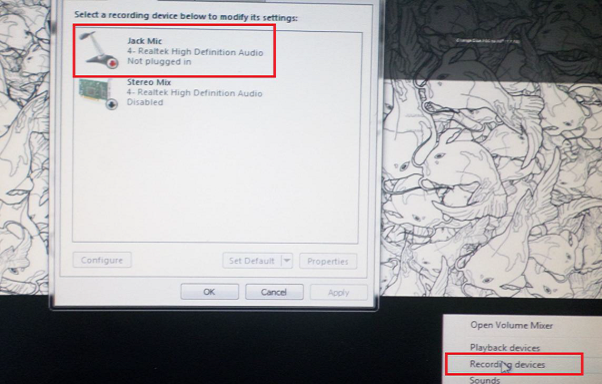
圖 1:麥克風設定
Cause
通常此問題與音訊軟體設置中的音訊配置問題有關。
Resolution
-
以滑鼠右鍵按一下 Dell 音訊喇叭圖示,然後選取 音效管理員。
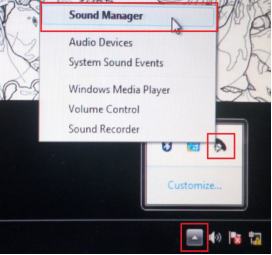
-
按一下進階。
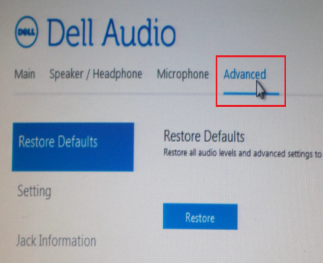
-
按一下 插孔資訊 ,然後勾選裝置插入電源時啟用自動彈出對話方塊旁的方塊。
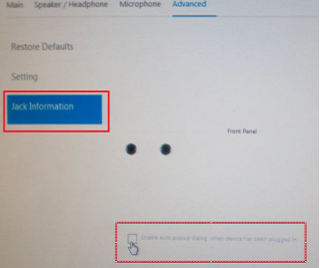
- 將麥克風連接至系統。
- 在出現的功能表中,選取 麥克風輸入。
- 測試麥克風。
Affected Products
OptiPlex 3040 MicroArticle Properties
Article Number: 000149418
Article Type: Solution
Last Modified: 07 Oct 2024
Version: 7
Find answers to your questions from other Dell users
Support Services
Check if your device is covered by Support Services.