无法识别 OptiPlex 3040 MFF 麦克风
Summary: 本文提供有关如何解决戴尔 OptiPlex 3040 微型机 (MFF) 系统上无法识别麦克风的问题的信息。
This article applies to
This article does not apply to
This article is not tied to any specific product.
Not all product versions are identified in this article.
Symptoms
OptiPlex 3040 MFF 系统可能会遇到麦克风在连接到系统时无法识别的问题。

图 1:麦克风设置
Cause
通常,此问题与音频软件设置中的音频配置问题有关。
Resolution
-
右键单击 Dell 音频扬声器图标,然后选择 Sound Manager。

-
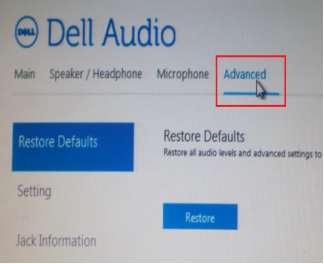
单击高级。
-
单击 插孔信息 ,然后选中在插入设备时启用自动弹出对话框旁边的框。

- 将麦克风连接到系统。
- 在出现的菜单中,选择 麦克风输入。
- 测试麦克风。
Affected Products
OptiPlex 3040 MicroArticle Properties
Article Number: 000149418
Article Type: Solution
Last Modified: 07 Oct 2024
Version: 7
Find answers to your questions from other Dell users
Support Services
Check if your device is covered by Support Services.