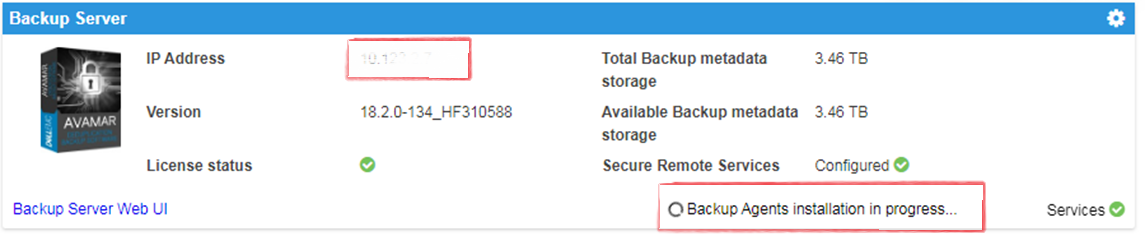
IDPA:UI 顯示備份代理程式安裝正在進行中,部署後會旋轉圓圈
Summary: 整合式資料保護裝置 (IDPA) 使用者介面 (UI) 顯示代理程式安裝進行中,安裝程式已完成。缺少成功標識使UI認為正在安裝代理。
This article applies to
This article does not apply to
This article is not tied to any specific product.
Not all product versions are identified in this article.
Symptoms
- A
Backup Agents installation in Progress訊息會出現在 Appliance Configuration Manager (ACM) 上。 - AVI 顯示沒有準備安裝的套件。歷程記錄顯示套件已完成,而在 ACM 上
- A
Backup Agents installation in Progress出現訊息:
Cause
經過新部署後,就會發生此問題。
Resolution
- 登入 Avamar:
https://<Avamar_IP>/avi
Avamar 的已驗證 AVI 安裝程式使用者介面不會顯示任何等待安裝的套件,且歷程記錄顯示套件已完成。
- 登入 Avamar SSH。
已驗證狀態 dpnctl 狀態與所有服務均正常運作。
執行命令: dpnctl status
- 登入 ACM SSH 並執行下列命令以清除
Backup Agents installation in Progress訊息:touch /usr/local/dataprotection/var/av_ucd_install_success
- 使用以下命令重新啟動 ACM 網路應用程式服務:
Stop webapp
停止 Web 應用程式服務:
啟動 Web 應用程式服務:
service dataprotection_webapp
啟動 Web 應用程式服務:
service dataprotection_webapp start
Affected Products
Integrated Data Protection Appliance FamilyProducts
PowerProtect Data Protection Software, Integrated Data Protection Appliance FamilyArticle Properties
Article Number: 000170900
Article Type: Solution
Last Modified: 20 Jan 2026
Version: 4
Find answers to your questions from other Dell users
Support Services
Check if your device is covered by Support Services.