戴尔 Pro 台式机上的“HYPERVISOR_ERROR”蓝屏
Summary: 了解如果戴尔 Pro 微型QCM1255、戴尔 Pro 轻薄QCS1255或戴尔 Pro 塔式QCT1255出现“HYPERVISOR_ERROR”蓝屏该怎么办。
This article applies to
This article does not apply to
This article is not tied to any specific product.
Not all product versions are identified in this article.
Symptoms
配备 AMD Ryzen 5 8500G CPU 的 Dell Pro 台式计算机可能会遇到“HYPERVISOR_ERROR”蓝屏问题。该错误显示“您的设备遇到问题,需要重新启动。我们只是在收集一些错误信息,然后我们将为您重新启动。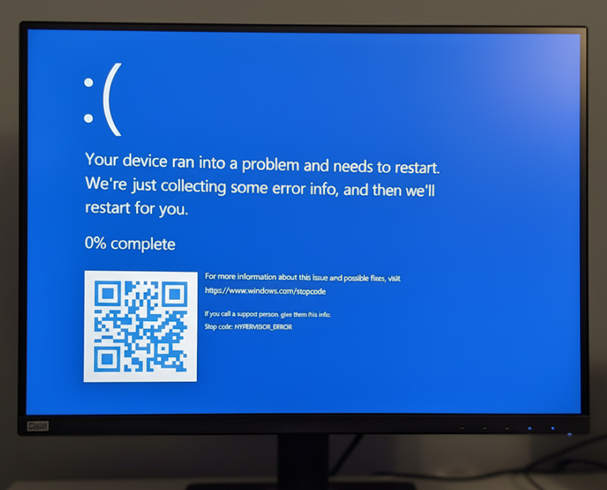
使用计算机时也可能会遇到垃圾显示问题。
受影响的平台:
- 戴尔 Pro Micro QCM1255
- 戴尔 Pro 轻薄QCS1255
- 戴尔 Pro 塔式QCT1255
受影响的 BIOS 版本:
- 1.0.5 版
- 1.1.3 版
- 1.2.1 版
- v1.3.2
- v1.4.1
- 1.4.2 版
- v1.5.0
Cause
AMD 处理器电源管理缺陷会导致此问题。
Resolution
在计算机上更新到 BIOS 版本 1.6.2 或更高版本可解决此问题。要下载并安装 BIOS,请参阅 戴尔 BIOS 和 UEFI 更新下载和安装指南。
Affected Products
Dell Pro Micro QCM1255, Dell Pro Slim QCS1255, Dell Pro Tower QCT1255Article Properties
Article Number: 000362072
Article Type: Solution
Last Modified: 18 Dec 2025
Version: 4
Find answers to your questions from other Dell users
Support Services
Check if your device is covered by Support Services.