NetWorker:Windows 2012 備份失敗,DISASTER_RECOVERY出現「儲存:儲存災難回復儲存集時發生錯誤」
Summary: 本文說明在 Windows 2012 備份期間因 Windows WMI 儲存庫損毀而導致 DISASTER_RECOVERY:\ 儲存集失敗。NetWorker 無法透過 WMI 擷取系統製造商資料,導致錯誤。修正或重新建置 WMI 儲存庫並更新 Windows 用戶端可解決此問題。
This article applies to
This article does not apply to
This article is not tied to any specific product.
Not all product versions are identified in this article.
Symptoms
DISASTER_RECOVERY:\ 無法在 Windows 2012 機器上備份。
所有其他儲存集 (例如磁碟機、資料夾或檔案) 已成功完成。
儲存集 WINDOWS ROLES AND FEATURES 和關鍵驅動器成功備份。
顯示的唯一錯誤是
save: Error occured while saving disaster recovery save sets
儲存輸出中的最後一個項目是 (未顯示錯誤):
create_ossr_info_file: Calling get_system_manufacturer_info
在偵錯層級 5 執行備份時,在記錄的末尾會注意到下列錯誤:
machine_name: WINDOWS ROLES AND FEATURES:\ level=full, 6636 KB 00:00:02     21 files
Completed savetime=1442493321
09/17/15 14:35:23.961661 Unregistered session id:2, fd:1420, idx:1, ssn_max_pollfd:1, 1(512)
09/17/15 14:35:23.992862 nsr/libwinclass/ossr_sysinfo_xml.cpp: NULL pointer passed to disk_free_list()
09/17/15 14:35:23.992862 nsr/libwinclass/ossr_sysinfo_xml.cpp: NULL pointer passed to pool_free_list()
09/17/15 14:35:23.992862 nsr/libwinclass/ossr_sysinfo_xml.cpp: NULL pointer passed to volume_free_list()
09/17/15 14:35:23.992862 nsr/libwinclass/ossr_sysinfo_xml.cpp: NULL pointer passed to partition_free_list()
09/17/15 14:35:23.992862 nsr/libwinclass/ossr_sysinfo_xml.cpp: NULL pointer passed to adapter_free_list()
86024:save: Error occured while saving disaster recovery save sets.
Cause
期間
問題出在 Windows WMI 上。當 NetWorker 使用 WMI 查詢取得系統製造商資訊以儲存在
DISASTER_RECOVERY:\ 備份後,NetWorker 會使用 WMI (作業系統元件) 取得用戶端機器資訊 (例如網域名稱、製造商、機器名稱和實體記憶體),然後將其填入 DISASTER_RECOVERY:\ 元數據。在這種情況下,機器的 WMI 已損毀,NetWorker 無法從 WMI 擷取資料,從而導致備份失敗。
問題出在 Windows WMI 上。當 NetWorker 使用 WMI 查詢取得系統製造商資訊以儲存在
DISASTER_RECOVERY:\ 存儲集元數據。
執行
Get-WmiObject Win32_Computersystem 從 Powershell 失敗並顯示無效的操作訊息。若要確認 WMI 是否損毀,請在該機器的 Windows Powershell 上執行下列命令。
一個好的輸出應該是:
PS C:\> Get-WmiObject Win32_Computersystem

Domain         : emc.com
Manufacturer   : VMware, Inc.
Model          : VMware Virtual Platform
Name                : LIME
PrimaryOwnerName    : Windows User
TotalPhysicalMemory : 2146951168
如果出現任何其他輸出,則表明 WMI 已損壞,無法回應 OS 呼叫。WMI 損毀的範例如下:
PS C:\Users\Adam.Boesl> Get-WmiObject Win32_Computersystem
Get-WmiObject : Invalid class
At line:1 char:14
+ Get-WmiObject <<<<  Win32_Computersystem
    + CategoryInfo          : InvalidOperation: (:) [Get-WmiObject], ManagementException
    + FullyQualifiedErrorId : GetWMIManagementException,Microsoft.PowerShell.Commands.GetWmiObjectCommand
Resolution
NetWorker 相容性指南中會列出支援 Windows Server 2012 備份。檢閱您 NetWorker 版本的相容性指南:E-Lab 互用性導覽 2.0-HOME (您必須使用 Dell 支援帳戶登入)。
但是,此問題會發生在 Windows 作業系統上。對於廠商不再支援的平台上的作業系統層級問題,支援功能受到限制。
請確定用戶端作業系統已安裝最新的作業系統更新。如果卷影複製服務 (VSS) 備份繼續失敗,則可以調查 VSS 元件。系統管理員必須調查 VSS 元件調查和作業系統功能。
如果作業系統問題無法解決,請在不使用 VSS 的情況下,執行用戶端的檔案系統資料備份。
- 設定用戶端的儲存作業以包括
VSS:*=OFF:
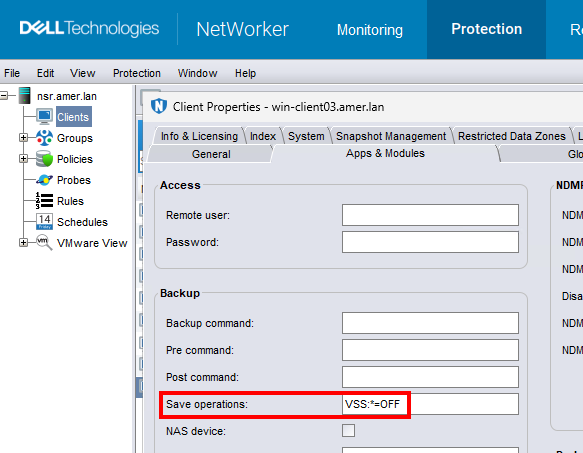 注意:檢視 -> NMC 中必須啟用診斷模式,才能查看儲存作業設定。
 - 更新用戶端的儲存集欄位,僅包括檔案、資料夾或卷。例如:
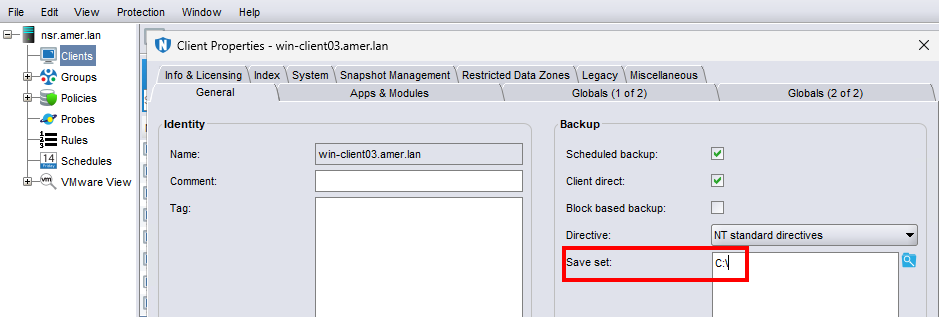
警告:如果沒有 VSS,則無法執行基於塊的備份 (BBB) 或 DISASTER_RECOVERY:\ 一致的備份。無需 VSS 即可備份文件系統數據;但是,如果沒有 DISASTER_RECOVERY:\ 備份,就無法執行裸機復原 (BMR)。
Additional Information
這適用於所有版本的 NetWorker,且僅適用於 Windows 2012 和 Windows 2012 R2 機器。
注意: 在 Windows Server 2008 中也觀察到了這一點;但是,NetWorker 備份不再支援此作業系統。
Affected Products
NetWorkerProducts
NetWorkerArticle Properties
Article Number: 000018662
Article Type: Solution
Last Modified: 27 Apr 2026
Version: 5
Find answers to your questions from other Dell users
Support Services
Check if your device is covered by Support Services.