How to create a new vApp for ViPR Controller
Summary: The ViPR Controller instance has lost its vApp and needs to be recreated.
This article applies to
This article does not apply to
This article is not tied to any specific product.
Not all product versions are identified in this article.
Symptoms
Migration of VIPR-C to a new vCenter.
The ViPR Controller instance has lost its vApp.
Cause
When migrating ViPR Controller from one vCenter to another, the ViPR-C VM's moved but the vApp is removed/deleted.
Resolution
To associate the existing ViPR-C instance to a new vApp, follow the steps below:
1. Perform a native backup of the VIPR-C.
2. Power off all ViPR VM's.
3. Deploy a new ViPR-C instance.
Note:
- The number of ViPR-C nodes be the same as the old ViPR-C instance.
- ViPR-C version must be the same as the old instance.
- Configure the settings on the new instance to be the same as old instance. ie. IP address/VIP.
4. After deployment is completed, delete the new VMs and move the original VMs into the new vApp.
5. In vCenter edit the settings on each VM:
a. vApp options, enable vApp.
b. In OVF settings, check ISO Image and VMware tools.
c. Under properties, edit as follows:
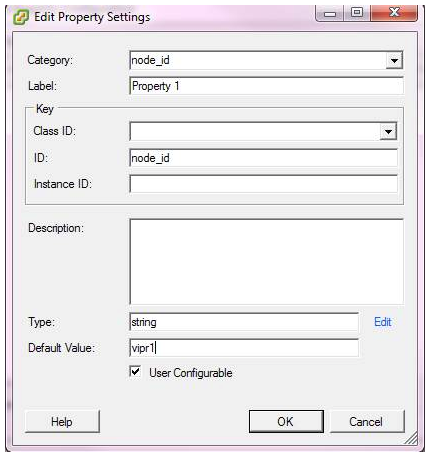
6. In vCenter ,edit the settings of the vApp. Under startup move all VM's into Group1.
7. Power on the new vApp.
Additional Information
Alternate Resolution (Restore from ViPR backup)
- Ensure you have a recent backup of ViPR-C.
- Ensure the ViPR backup(s) are copied to an external server or remote backup on an FTP server.
- Re-deploy ViPR with the same version & configuration as the previous install. (Note: Do not power on the new vApp when prompted)
- Power down the old ViPR nodes and Remove from VMWare Inventory.
- Power up the new vApp.
- Restore the ViPR database (see details in ViPR Controller System Disaster Recovery, Backup and Restore Guide).
Article Properties
Article Number: 000057117
Article Type: Solution
Last Modified: 20 Nov 2020
Version: 2
Find answers to your questions from other Dell users
Support Services
Check if your device is covered by Support Services.