NetWorker: 일부 VM에서 여러 VM에 대한 NMM Hyper-V 병렬 복원이 실패함
Summary: NetWorker: 여러 가상 머신에 대한 NMM Hyper-V 병렬 복원,
Symptoms
Hyper-V 가상 머신이 손상되어 여러 가상 머신을 복구해야 하는 경우:
NMM을 사용하면 여러 가상 머신을 원래(소스) 위치로 복구할 수 있습니다.
사전 구성 요소:
● 가상 머신을 소스 Hyper-V 서버로 복구하려면 가상 머신의 원래 드라이브 문자 또는 탑재 지점이 소스 서버에 있는지 확인합니다.
디렉토리 경로가 자동으로 생성됩니다. 가상 머신을 소스 서버로 복구하면 소스 가상 머신을 덮어씁니다.
● Hyper-V는 내부 GUID를 사용하여 가상 머신을 인식하므로 복구 작업 중에 가상 머신을 이동하거나 이름을 바꾸지 않도록 합니다.
여러 가상 머신에 대해 병렬 복원을 수행할 때 일부 가상 머신에 대한 복원이 실패합니다.
nsrnmmrc: Restore failed with the error: Failed to complete BBB restore.
Cause
복구 프로세스 중에 NMM은 PowerShell 명령을 사용하여 Hyper-V 관리자에서 VM을 중지하고 제거하려고 합니다. Get-VM -ComputerName '<hostname>' | Where-Object {$_.name -eq '<VMName>' } | Stop-VM -Force
이렇게 하면 일부 VM이 중지되고 제거되지 않아 복원이 실패합니다.
이벤트 로그 > Hyper-V VMMS 관리자 로그에 다음 오류가 표시됩니다.
Failed to perform the operation. The virtual machine is currently performing another operation
<VMName> failed to perform the 'Turning Off' operation. The virtual machine is currently performing the following operation: 'Shutting Down'.(Virtual machine ID GUID)
VM을 중지하려는 PowerShell의 시도는 다음과 같이 실패합니다.
Get-VM -ComputerName '<hostname>' | Where-Object {$_.name -eq '<VMName>' } | Stop-VM -Force
Stop-VM : '<VMName>' failed to shut down. (Virtual machine ID <GUID>)
Failed to perform the operation. The virtual machine is currently performing another operation.
+ ... '<hostname>' | Where-Object {$_.name -eq <VMName> } | Stop-VM -Force
+                                                            ~~~~~~~~~~~~~~
    + CategoryInfo          : NotSpecified: (:) [Stop-VM], VirtualizationException
    + FullyQualifiedErrorId : OperationFailed,Microsoft.HyperV.PowerShell.Commands.StopVM

PS C:\Using VHD> Get-VM -ComputerName '<hostname>' | Where-Object {$_.name -eq '<VMName>' } | Remove-VM -Force
Remove-VM : Deleting '<VMName>' failed.
Resolution
해결 방법:-
이 문제가 발생하면 가상 시스템을 수동으로 중지하고 제거한 다음 복원을 수행합니다.
PowerShell
에서1 단계 : - 가상 머신을 끕니다.Get-VM -ComputerName '<hostname>' | Where-Object {$_.name -eq '<VMName>' } | Stop-VM -TurnOff
참고: 가상 머신 <VMName>을 끕니다.
이 작업은 가상 머신에서 전원을 분리하는 것과 동일하며 저장되지 않은 데이터가 손실될 수 있습니다.
2단계:- VM을 제거합니다. Get-VM -ComputerName '<hostname>' | Where-Object {$_.name -eq '<VMName>' } | remove-VM
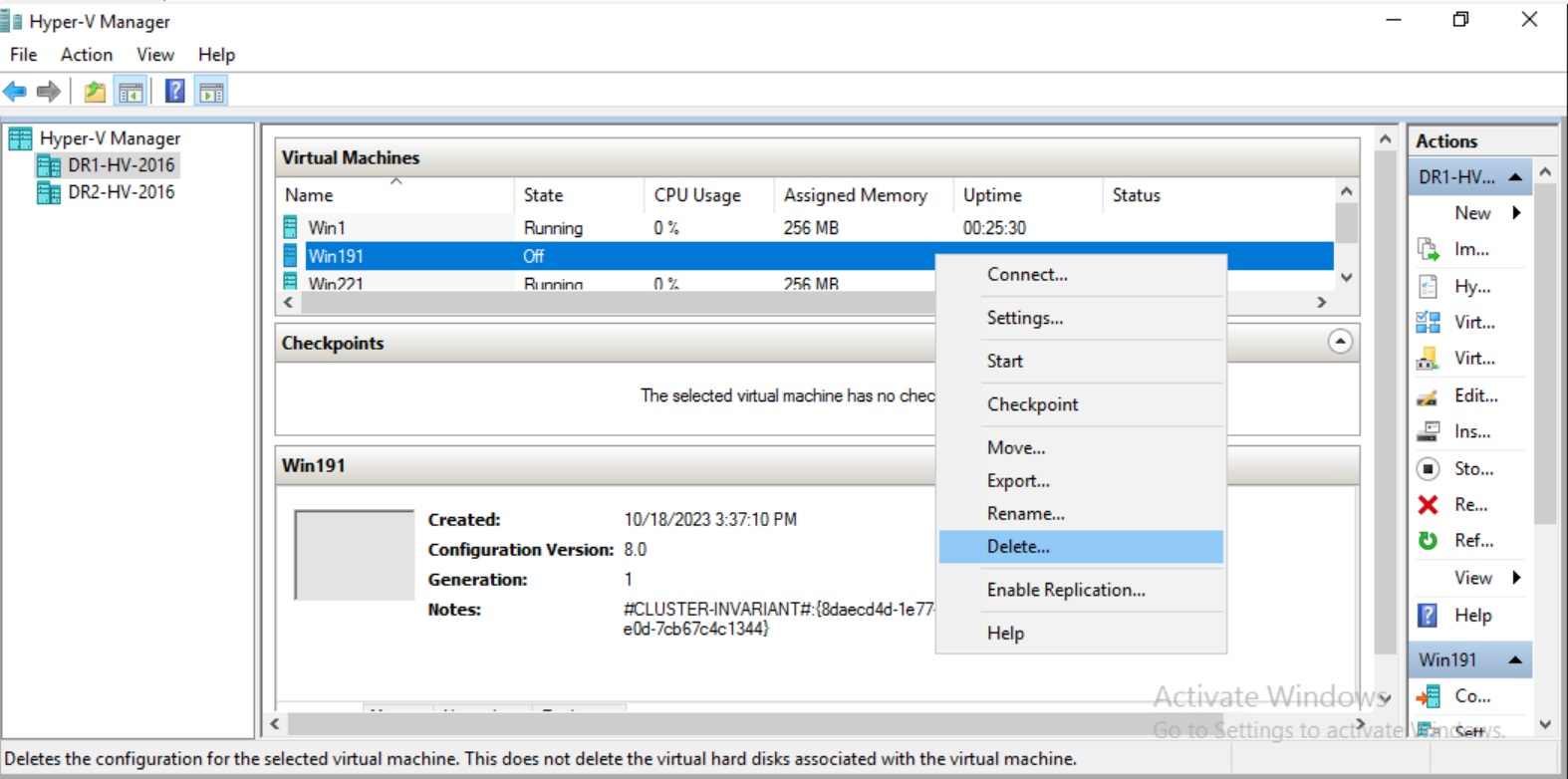
Hyper-V Manager
에서1 단계 : Hyper-V 관리자를 열고 VM을 마우스 오른쪽 버튼으로 클릭 한 다음 "끄기"를 클릭하십시오.
2 단계 : - "끄기"후 VM을 마우스 오른쪽 버튼으로 클릭하고 "삭제"를 클릭하십시오.