VxRail: Failed to upload meta bundle when creating advisory report
Summary: Failed uploading the meta bundle file meta_bundle since reject to save bundle since the current product version is in the unsupported list.
This article applies to
This article does not apply to
This article is not tied to any specific product.
Not all product versions are identified in this article.
Symptoms
Before Lifecycle Management (LCM), if a user tries to generate the advisory report from the user interface (UI), it may fail as shown below:
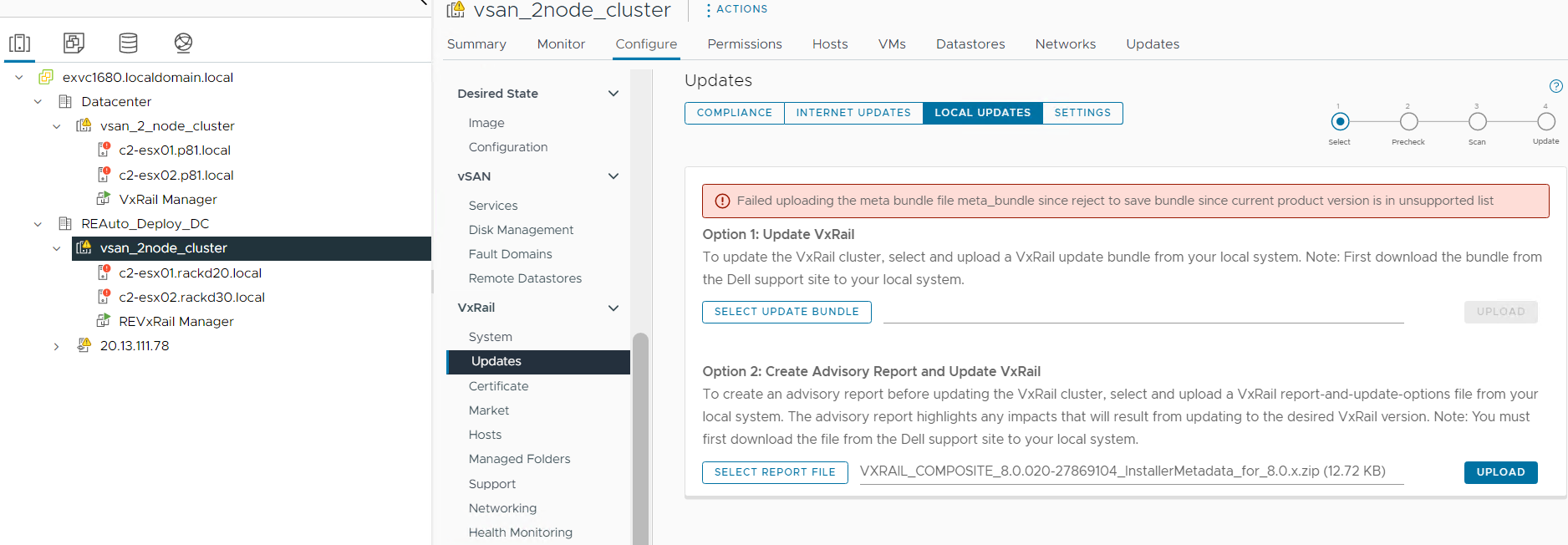
From the lcm-cvs.log:
2024-09-26 04:47:01,897 INFO [LCM] [tomcat-http--77] c.d.v.c.s.ComplianceCheckServiceImpl [ComplianceCheckServiceImpl.java:54] Start to get compliance status
2024-09-26 04:47:02,033 INFO [LCM] [tomcat-http--78] c.d.v.c.s.CvsReportServiceImpl [CvsReportServiceImpl.java:48] Get the 671 report
2024-09-26 04:47:17,934 INFO [LCM] [tomcat-http--80] c.d.v.c.c.a.AdvisoryControllerImpl [AdvisoryControllerImpl.java:147] get avaialable local updates
2024-09-26 04:48:02,614 INFO [LCM] [tomcat-http--82] c.d.v.c.c.a.AdvisoryControllerImpl [AdvisoryControllerImpl.java:109] receiving advisory meta bundle
2024-09-26 04:48:02,615 INFO [LCM] [tomcat-http--82] c.d.v.c.c.a.AdvisoryControllerImpl [AdvisoryControllerImpl.java:124] processing file: VXRAIL_COMPOSITE_8.0.213-28667925_InstallerMetadata_for_7.0.x.zip
2024-09-26 04:48:02,630 INFO [LCM] [tomcat-http--82] c.d.v.c.u.BaselineRepository [BaselineRepository.java:179] saving bundle VXRAIL_COMPOSITE_8.0.213-28667925_InstallerMetadata_for_7.0.x.zip
2024-09-26 04:48:03,681 ERROR [LCM] [tomcat-http--82] c.d.v.c.c.a.AdvisoryControllerImpl [AdvisoryControllerImpl.java:128] failed uploading meta bundle
java.io.IOException: reject to save bundle since current product version is in unsupported list
        at com.dellemc.vxrail.cvs.util.BaselineRepository.uploadMetabundle(BaselineRepository.java:205)
        at com.dellemc.vxrail.cvs.controller.advisory.AdvisoryControllerImpl.uploadMetaBundle(AdvisoryControllerImpl.java:126)
        at java.base/jdk.internal.reflect.NativeMethodAccessorImpl.invoke0(Native Method)
        at java.base/jdk.internal.reflect.NativeMethodAccessorImpl.invoke(NativeMethodAccessorImpl.java:62)
        at java.base/jdk.internal.reflect.DelegatingMethodAccessorImpl.invoke(DelegatingMethodAccessorImpl.java:43)
        at java.base/java.lang.reflect.Method.invoke(Method.java:566)
        at org.springframework.web.method.support.InvocableHandlerMethod.doInvoke(InvocableHandlerMethod.java:205)
        at org.springframework.web.method.support.InvocableHandlerMethod.invokeForRequest(InvocableHandlerMethod.java:150)
        at org.springframework.web.servlet.mvc.method.annotation.ServletInvocableHandlerMethod.invokeAndHandle(ServletInvocableHandlerMethod.java:117)
        at org.springframework.web.servlet.mvc.method.annotation.RequestMappingHandlerAdapter.invokeHandlerMethod(RequestMappingHandlerAdapter.java:895)
        at org.springframework.web.servlet.mvc.method.annotation.RequestMappingHandlerAdapter.handleInternal(RequestMappingHandlerAdapter.java:808)
        at org.springframework.web.servlet.mvc.method.AbstractHandlerMethodAdapter.handle(AbstractHandlerMethodAdapter.java:87)
        at org.springframework.web.servlet.DispatcherServlet.doDispatch(DispatcherServlet.java:1067)
Cause
When generating an advisory report, there is a checker to find if the current VxRail system version is the same major version as the unsupported version in the manifest.xml. This is a code defect that the checker is not working as expected.
The issue is fixed in VxRail versions 7.0.520, 8.0.300 and later releases. Generating advisory reports on clusters based on this code level (and later) will not encounter this issue.
Resolution
Skip the step to generate an advisory report. LCM is not affected.
Or use this workaround:
- Open the installer metadata as archive:
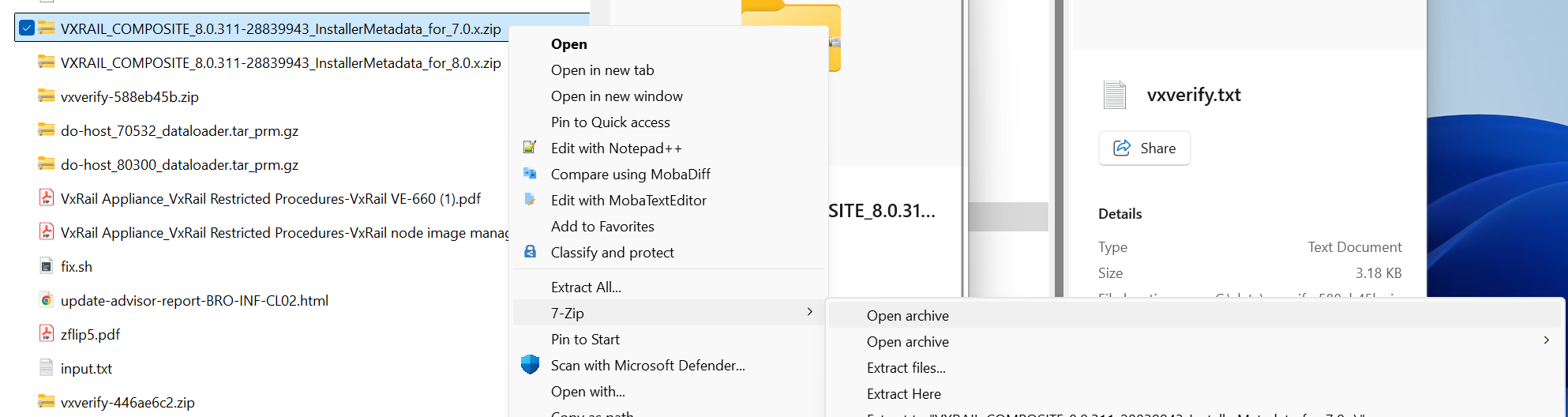
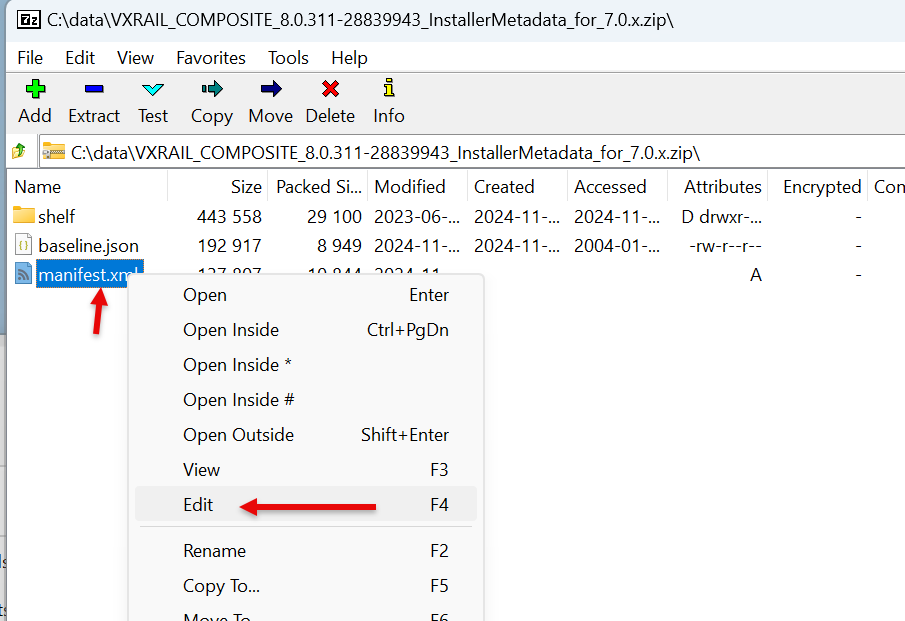
- Locate and edit the
manifest.xml:
- Change the unsupported version to a different major family:
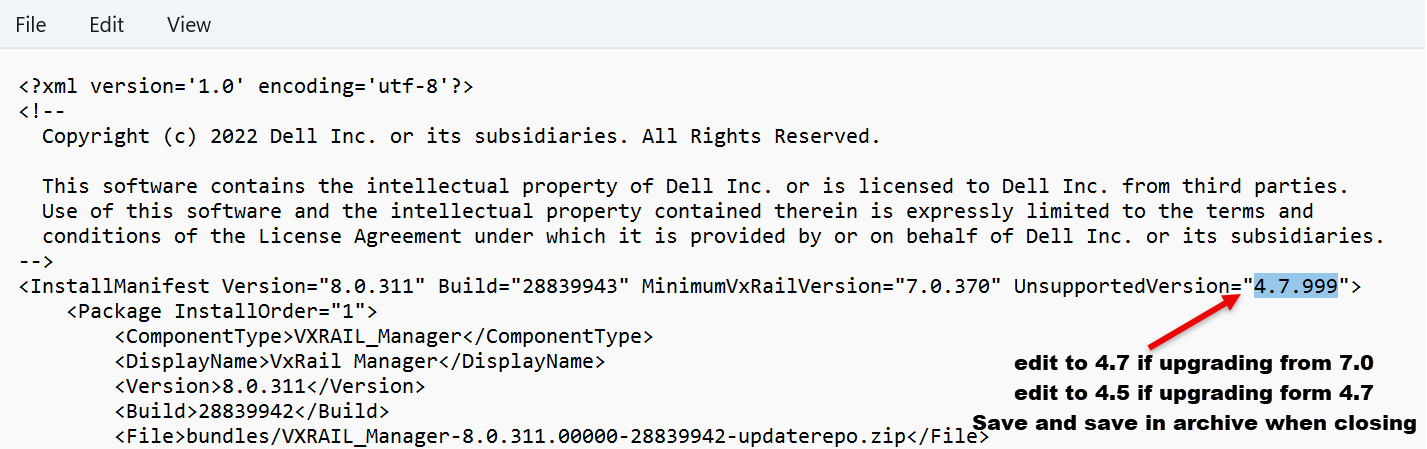
- Save the manifest and close the archive which asks to update the modified file in the
.zip. - Continue with the upload with the modified metadata file.
Affected Products
VxRail Appliance Series, VxRail SoftwareArticle Properties
Article Number: 000234595
Article Type: Solution
Last Modified: 21 Jan 2026
Version: 7
Find answers to your questions from other Dell users
Support Services
Check if your device is covered by Support Services.