Precision 7865 Wired 1Gbs Network Malfunction Under Ubuntu 20.04
Summary: This article describes what to do when the wired 1Gbs Ethernet port malfunctions on the Precision 7865 running Ubuntu 20.04.
This article applies to
This article does not apply to
This article is not tied to any specific product.
Not all product versions are identified in this article.
Symptoms
Precision 7865 computers experience a wired 1Gbs Ethernet malfunction after disconnecting and reconnecting a LAN cable under Ubuntu 20.04.
Note: The Precision 7865 has two Ethernet ports, a 1Gbs and a 10Gbs port. This issue only affects the 1Gbs port.
Note: The Precision 7865 has two Ethernet ports, a 1Gbs and a 10Gbs port. This issue only affects the 1Gbs port.
Cause
The Realtek LAN controller experiences Power Management defects affecting the 1Gbs port.
Resolution
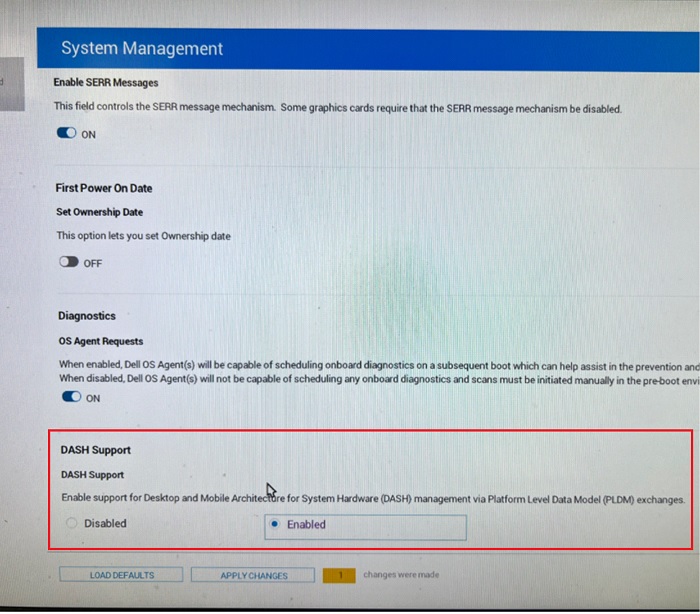
To resolve this issue, change the Realtek LAN 1Gbs TLP settings in Ubuntu and enable DASH in BIOS setup:
- In Ubuntu, run:
Sudo gedit /etc/tlp.conf
- Find the line with "
TLP_ENABLE=" and then modify it with "TLP_ENABLE=0". - Save and close the file.
- Reboot the computer.
- Enter BIOS setup.
- Under System Management, enable DASH Support.
- Save and exit the BIOS.
Affected Products
Precision 7865 TowerArticle Properties
Article Number: 000205992
Article Type: Solution
Last Modified: 29 Aug 2025
Version: 5
Find answers to your questions from other Dell users
Support Services
Check if your device is covered by Support Services.