介面上的 Dell Security Management Server 虛擬升級失敗。d
Summary: 升級 Dell Security Management Server Virtual Appliance 失敗,並出現引用 interfaces.d 目錄的錯誤。
This article applies to
This article does not apply to
This article is not tied to any specific product.
Not all product versions are identified in this article.
Symptoms
受影響的產品:
- Dell Security Management Server Virtual
受影響的版本:
- v10.2.9 至 v10.2.11
受影響的作業系統:
- Linux
Dell Security Management Server 虛擬升級停止,並出現訊息 「無法從備份檔案還原: 而這會在嘗試還原 etc/network/interfaces 目錄中的檔案之後發生。
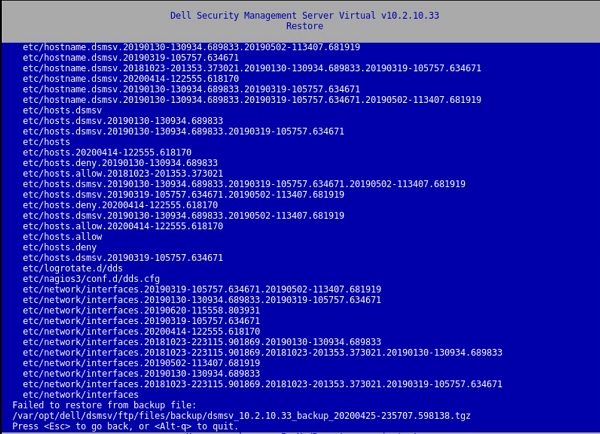
圖 1:(僅限英文)還原傳回失敗,無法從備份檔還原:
按下按鍵會導致視窗出現:
[Errno 21] Is a directory:
‘/etc/network/interfaces.d’.
/var/log/messages 檔案中也會出現此錯誤:
![[Errno 21]是目錄:「/etc/network/interfaces.d」](https://supportkb.dell.com/img/ka06P000000Put7QAC/ka06P000000Put7QAC_zh_TW_6.jpeg)
圖 2:(僅限英文版) [Errno 21] Is a directory: ‘/etc/network/interfaces.d’
Cause
不適用
Resolution
若要解決此問題,請依照指示重新命名 interfaces.d 目錄。
- 登入 Dell Security Management Server Virtual Console。
- 選取 Dell Security Management Server Virtual 管理主控台中的啟動 Shell。
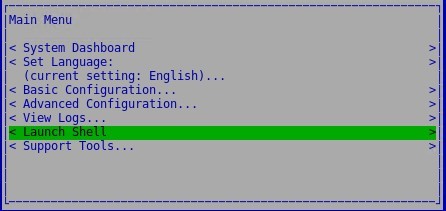
圖 3:(僅限英文版) 啟動 Shell
- 使用命令
su dellsupport切換至dellsupport使用者帳戶。

圖 4:(僅限英文)切換至 dellsupport
- 提供
dellsupport使用者的密碼。根據預設,密碼為dellsupport。

圖 5:(僅限英文)輸入密碼
- 使用下列命令重新命名 interfaces.d 目錄:
sudo mv /etc/network/interfaces.d /etc/network/interfaces.old

圖 6:(僅英文) 輸入 sudo mv /etc/network/interfaces.d /etc/network/interfaces.old
- 輸入
exit或使用ctrl-d兩次退出 Shell,然後透過使用者介面執行升級。
如要聯絡支援部門,請參閱 Dell Data Security 國際支援電話號碼。
請前往 TechDirect,以線上產生技術支援要求。
如需更多深入見解與資源,請加入 Dell 安全性社群論壇。
Additional Information
Videos
Affected Products
Dell EncryptionArticle Properties
Article Number: 000131146
Article Type: Solution
Last Modified: 06 jul 2023
Version: 10
Find answers to your questions from other Dell users
Support Services
Check if your device is covered by Support Services.