Jak zarządzać pamięcią masową w PowerPath dla Windows
Summary: Jeśli klient zgłasza, że dyski nie są widoczne i w opcjach wyświetlania Powermt, jeśli zauważysz, że macierz pamięci masowej jest niezarządzana, zapoznaj się z instrukcjami, jak sprawić, by była zarządzana ...
This article applies to
This article does not apply to
This article is not tied to any specific product.
Not all product versions are identified in this article.
Instructions
W niektórych sytuacjach, gdy klient zgłasza, że nie widzi żadnych dysków dostarczonych z macierzy pamięci masowej w PowerPath. Jeśli po uruchomieniu opcji wyświetlania PowerMT zauważysz, że macierz pamięci masowej jest "niezarządzana", w środowisku Windows z PowerPath. Postępuj zgodnie z zalecanym planem działania zawartym w tym artykule bazy wiedzy, aby zmieniać ustawienia tak samo jak "Zarządzane".
Oto scenariusz, w którym klient przedstawił dyski z macierzy pamięci masowej Symmetrix i zgłosił, że po uaktualnieniu nie jest w stanie wykryć żadnych dysków w PowerPath.
Dane wyjściowe " powermt display options " pokazują:
** OPCJE WYŚWIETLANIA POWERMT **
Pokaż nazwy jednostek LUN CLARiiON: Monitor
rzeczywistego opóźnienia ścieżki: Informacje o ścieżce wyłączonej
trwałości: Na
monitorze wydajności: wyłączono
funkcję automatycznego czuwania: Liczba operacji we/wy na awarię (IOPF): włączony
okres przedawnienia operacji IOPF: Limit IOPF 1 d
: 6000
Auto Host Registration: disabled
Storage
System Class Attributes
------------ ----------
Symmetrix periodic autorestore = on
reactive autorestore = on
status = unmanaged
proximity based autostandby = on
proximity based autostandby threshold = default
CLARiiON periodic autorestore = on
reactive autorestore = on
status = unmanaged
proximity based autostandby = N/A
Invista periodic autorestore = on
reactive autorestore = on
status = managed
proximity based autostandby = N/A
Hitachi periodic autorestore = on
reactive autorestore = on
status = unmanaged
proximity based autostandby = N/A
HP xp periodic autorestore = on
reactive autorestore = on
status = unmanaged
proximity based autostandby = N/A
Ess periodic autorestore = on
reactive autorestore = on
status = unmanaged
proximity based autostandby = N/A
Generic periodic autorestore = on
reactive autorestore = on
status = managed
proximity based autostandby = N/A
VPLEX periodic autorestore = on
reactive autorestore = on
status = managed
proximity based autostandby = on
proximity based autostandby threshold = default
VNX periodic autorestore = on
reactive autorestore = on
status = unmanaged
proximity based autostandby = N/A
NetApp periodic autorestore = on
reactive autorestore = on
status = unmanaged
proximity based autostandby = N/A
XtremIO periodic autorestore = on
reactive autorestore = on
status = managed
proximity based autostandby = N/A
Unity periodic autorestore = on
reactive autorestore = on
status = unmanaged
proximity based autostandby = N/A
SC periodic autorestore = on
reactive autorestore = on
status = managed
proximity based autostandby = off
Notice how some of the storage array and especially Symmetrix here is "unmanaged"
Here are the steps along with the screenshot from our lab server , how to make it "Managed"
Open Control Panel :
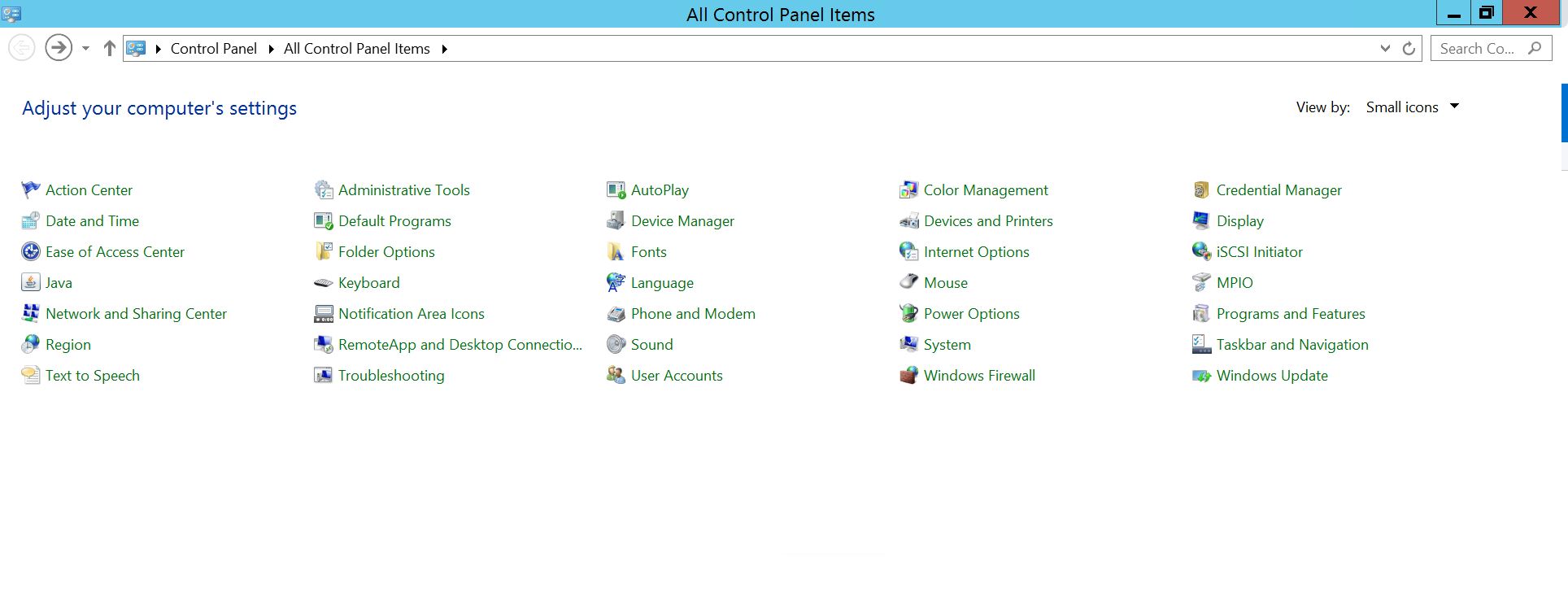
Wybierz pozycję Program i funkcje
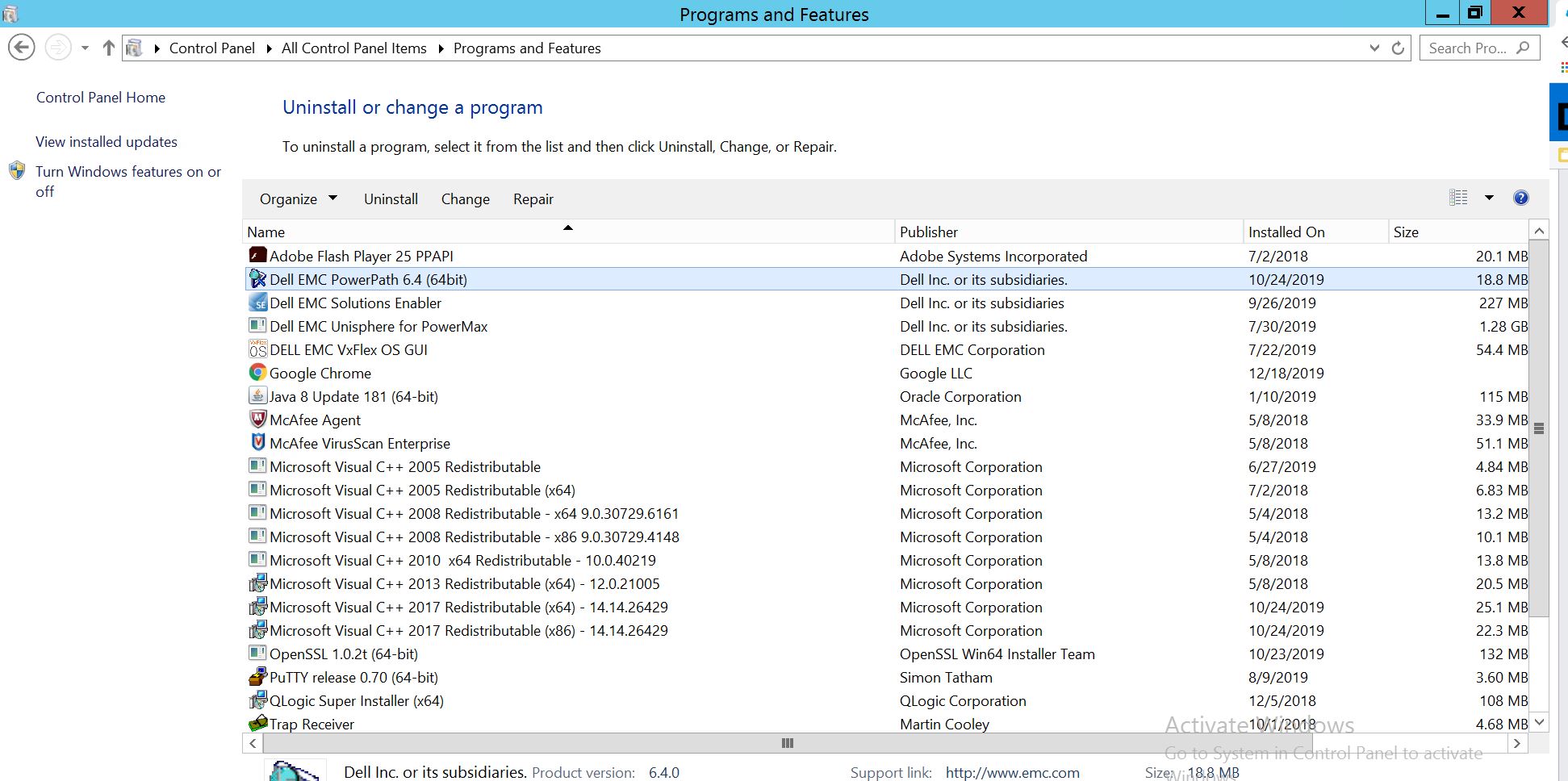
, wybierz pozycję PowerPath i wybierz opcję Modyfikuj/Zmień, co spowoduje otwarcie monitu instalatora:
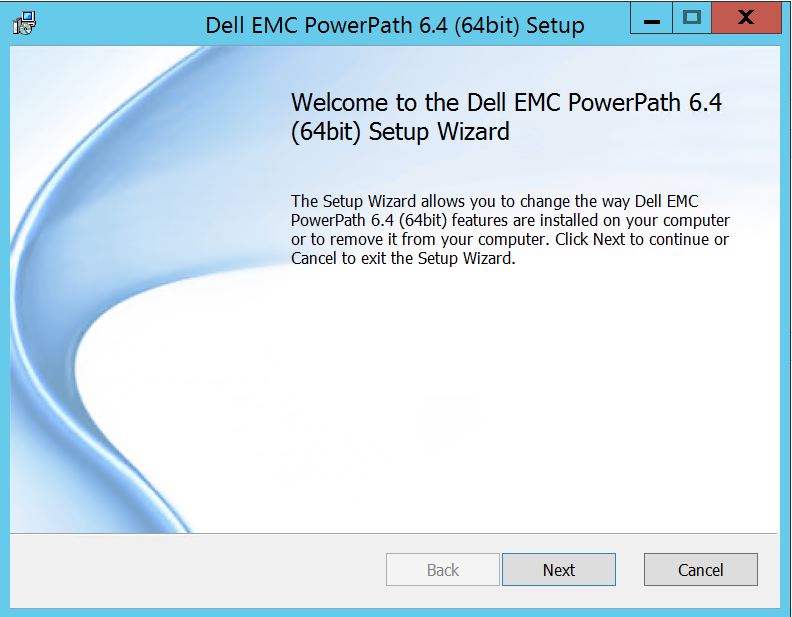
Kliknij przycisk Dalej i postępuj zgodnie z wybraną zmianą:
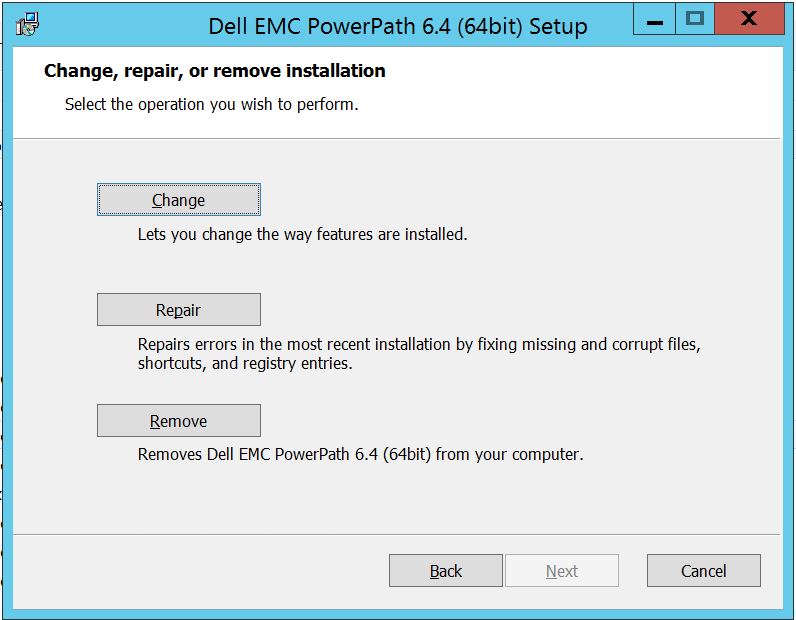
Co przeniesie Cię do konfiguracji niestandardowej:
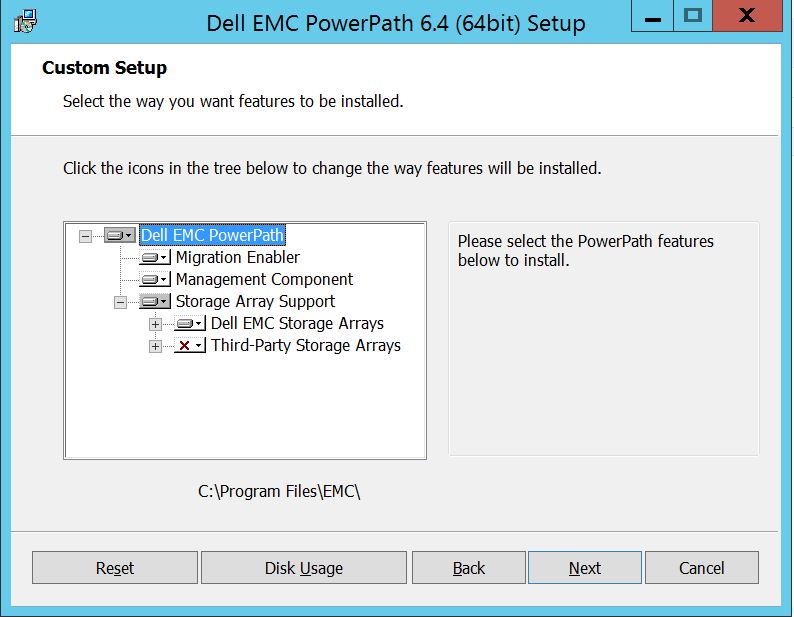
Możesz teraz rozszerzyć obsługę macierzy pamięci masowej, jeśli jeszcze tego nie zrobiono, a także rozwinąć macierze pamięci masowej Dell EMC, co spowoduje wyświetlenie wszystkich macierzy pamięci masowej obsługiwanych w PowerPath.
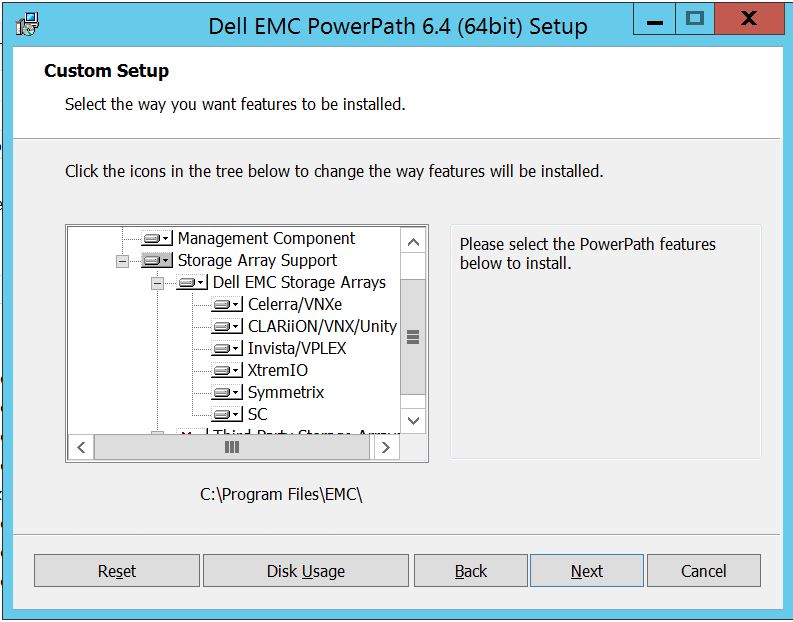
Następnie możesz dalej używać małego w dół obok dowolnej pamięci masowej. Na przykład weźmy tutaj Symmetrix. Dalej pokaże 2 opcje:
1. Zostanie zainstalowany na lokalnym dysku
twardym 2. Cała funkcja zostanie zainstalowana na lokalnym dysku
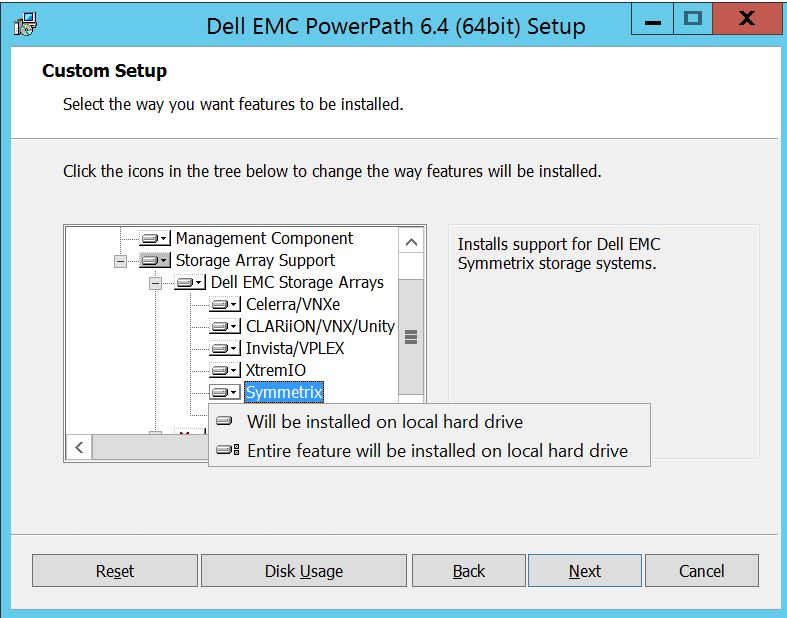
twardymJeśli chcesz, aby cała macierz pamięci masowej Dell EMC była zarządzana (co zasadniczo jest ustawieniem domyślnym).
Możesz zrobić to samo z rozwijanej listy macierzy pamięci masowej Dell EMC:
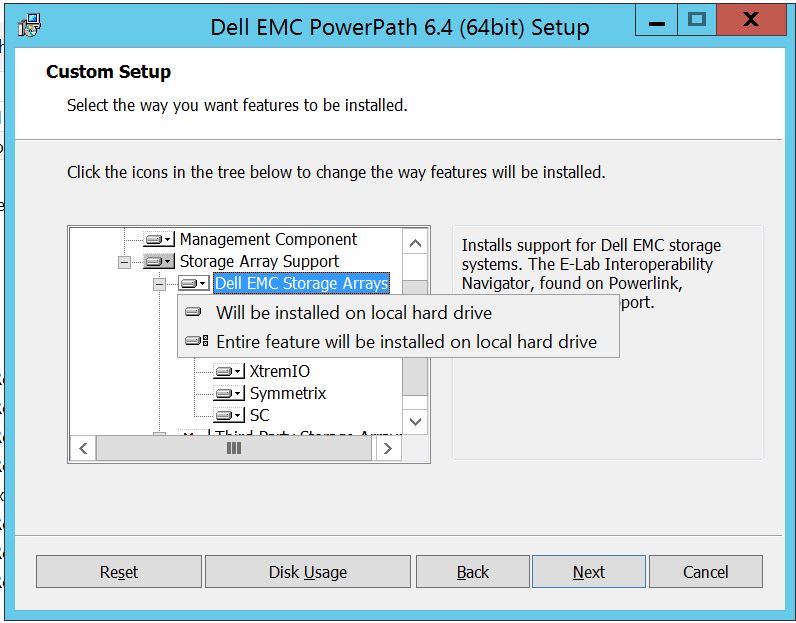
Po zakończeniu Wybierz dalej
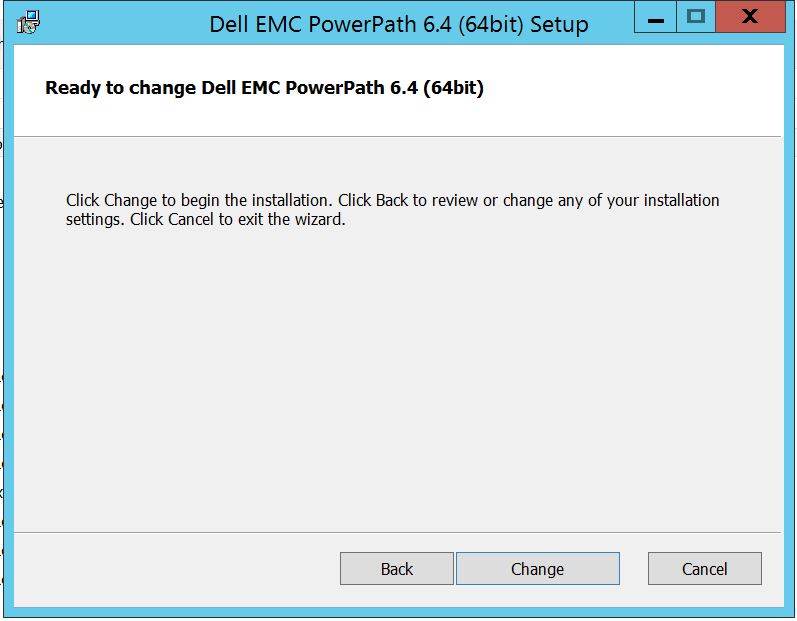
Kliknij przycisk Zmień, który spowoduje zakończenie niezbędnych zmian:
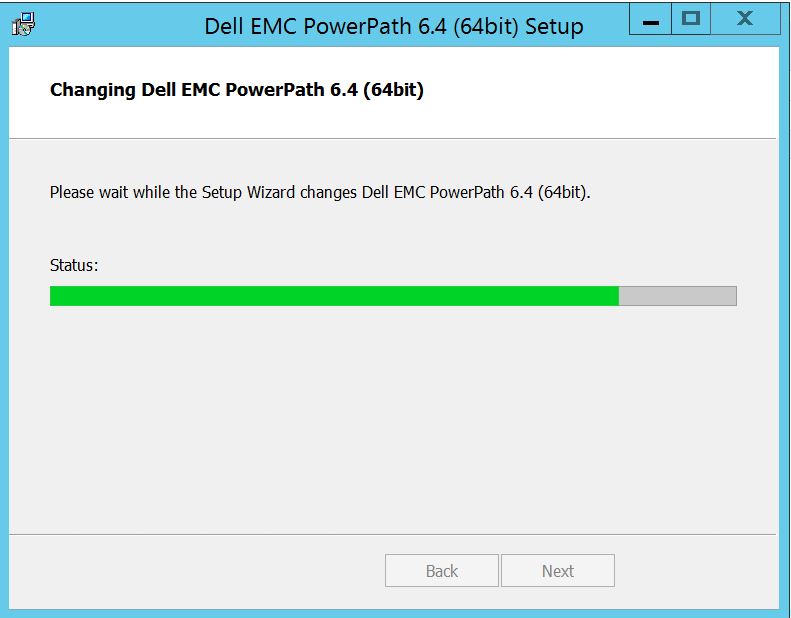
Post, który powinieneś zobaczyć, w którym możesz wybrać "Zakończ"
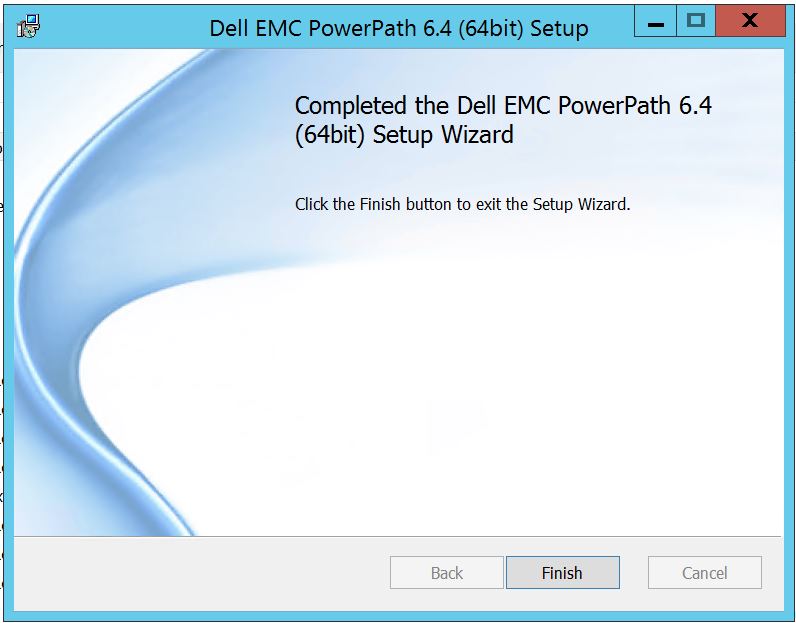 Po zakończeniu pojawi się wyskakujące okienko z prośbą o ponowne uruchomienie, wybierz ponowne uruchomienie serwera, ponieważ zmiany muszą zostać zaimplementowane na poziomie serwera, co spowoduje, że dyski macierzy pamięci masowej będą widoczne w PowerPath.
Po ponownym uruchomieniu po uruchomieniu opcji wyświetlania powermt, tak będzie wyglądać wynik:
** OPCJE WYŚWIETLANIA POWERMT **
Pokaż nazwy jednostek LUN CLARiiON: Monitor
rzeczywistego opóźnienia ścieżki: Informacje o ścieżce wyłączonej
trwałości: Na
monitorze wydajności: wyłączono
funkcję automatycznego czuwania: Liczba operacji we/wy na awarię (IOPF): włączony
okres przedawnienia operacji IOPF: Limit IOPF 1 d
: 6000
Storage
System Class Attributes
------------ ----------
Symmetrix periodic autorestore = on
reactive autorestore = on
status = managed
proximity based autostandby = off
auto host registration = enabled
app finger printing = enabled
device to array performance report = enabled
device in use to array report = enabled
CLARiiON periodic autorestore = on
reactive autorestore = on
status = managed
proximity based autostandby = N/A
auto host registration = disabled
app finger printing = N/A
device to array performance report = N/A
device in use to array report = N/A
Invista periodic autorestore = on
reactive autorestore = on
status = managed
proximity based autostandby = N/A
auto host registration = N/A
app finger printing = N/A
device to array performance report = N/A
device in use to array report = N/A
Hitachi periodic autorestore = on
reactive autorestore = on
status = unmanaged
proximity based autostandby = N/A
auto host registration = N/A
app finger printing = N/A
device to array performance report = N/A
device in use to array report = N/A
HP xp periodic autorestore = on
reactive autorestore = on
status = unmanaged
proximity based autostandby = N/A
auto host registration = N/A
app finger printing = N/A
device to array performance report = N/A
device in use to array report = N/A
Ess periodic autorestore = on
reactive autorestore = on
status = unmanaged
proximity based autostandby = N/A
auto host registration = N/A
app finger printing = N/A
device to array performance report = N/A
device in use to array report = N/A
Generic periodic autorestore = on
reactive autorestore = on
status = managed
proximity based autostandby = N/A
auto host registration = N/A
app finger printing = N/A
device to array performance report = N/A
device in use to array report = N/A
VPLEX periodic autorestore = on
reactive autorestore = on
status = managed
proximity based autostandby = on
proximity based autostandby threshold = default
auto host registration = N/A
app finger printing = N/A
device to array performance report = N/A
device in use to array report = N/A
VNX periodic autorestore = on
reactive autorestore = on
status = managed
proximity based autostandby = N/A
auto host registration = disabled
app finger printing = N/A
device to array performance report = N/A
device in use to array report = N/A
NetApp periodic autorestore = on
reactive autorestore = on
status = unmanaged
proximity based autostandby = N/A
auto host registration = N/A
app finger printing = N/A
device to array performance report = N/A
device in use to array report = N/A
XtremIO periodic autorestore = on
reactive autorestore = on
status = managed
proximity based autostandby = N/A
auto host registration = N/A
app finger printing = N/A
device to array performance report = N/A
device in use to array report = N/A
Unity periodic autorestore = on
reactive autorestore = on
status = managed
proximity based autostandby = N/A
auto host registration = disabled
app finger printing = N/A
device to array performance report = N/A
device in use to array report = N/A
SC periodic autorestore = on
reactive autorestore = on
status = managed
proximity based autostandby = N/A
auto host registration = N/A
app finger printing = N/A
device to array performance report = N/A
device in use to array report = N/A
Oto scenariusz, w którym klient przedstawił dyski z macierzy pamięci masowej Symmetrix i zgłosił, że po uaktualnieniu nie jest w stanie wykryć żadnych dysków w PowerPath.
Dane wyjściowe " powermt display options " pokazują:
** OPCJE WYŚWIETLANIA POWERMT **
Pokaż nazwy jednostek LUN CLARiiON: Monitor
rzeczywistego opóźnienia ścieżki: Informacje o ścieżce wyłączonej
trwałości: Na
monitorze wydajności: wyłączono
funkcję automatycznego czuwania: Liczba operacji we/wy na awarię (IOPF): włączony
okres przedawnienia operacji IOPF: Limit IOPF 1 d
: 6000
Auto Host Registration: disabled
Storage
System Class Attributes
------------ ----------
Symmetrix periodic autorestore = on
reactive autorestore = on
status = unmanaged
proximity based autostandby = on
proximity based autostandby threshold = default
CLARiiON periodic autorestore = on
reactive autorestore = on
status = unmanaged
proximity based autostandby = N/A
Invista periodic autorestore = on
reactive autorestore = on
status = managed
proximity based autostandby = N/A
Hitachi periodic autorestore = on
reactive autorestore = on
status = unmanaged
proximity based autostandby = N/A
HP xp periodic autorestore = on
reactive autorestore = on
status = unmanaged
proximity based autostandby = N/A
Ess periodic autorestore = on
reactive autorestore = on
status = unmanaged
proximity based autostandby = N/A
Generic periodic autorestore = on
reactive autorestore = on
status = managed
proximity based autostandby = N/A
VPLEX periodic autorestore = on
reactive autorestore = on
status = managed
proximity based autostandby = on
proximity based autostandby threshold = default
VNX periodic autorestore = on
reactive autorestore = on
status = unmanaged
proximity based autostandby = N/A
NetApp periodic autorestore = on
reactive autorestore = on
status = unmanaged
proximity based autostandby = N/A
XtremIO periodic autorestore = on
reactive autorestore = on
status = managed
proximity based autostandby = N/A
Unity periodic autorestore = on
reactive autorestore = on
status = unmanaged
proximity based autostandby = N/A
SC periodic autorestore = on
reactive autorestore = on
status = managed
proximity based autostandby = off
Notice how some of the storage array and especially Symmetrix here is "unmanaged"
Here are the steps along with the screenshot from our lab server , how to make it "Managed"
Open Control Panel :
Wybierz pozycję Program i funkcje
, wybierz pozycję PowerPath i wybierz opcję Modyfikuj/Zmień, co spowoduje otwarcie monitu instalatora:
Kliknij przycisk Dalej i postępuj zgodnie z wybraną zmianą:
Co przeniesie Cię do konfiguracji niestandardowej:
Możesz teraz rozszerzyć obsługę macierzy pamięci masowej, jeśli jeszcze tego nie zrobiono, a także rozwinąć macierze pamięci masowej Dell EMC, co spowoduje wyświetlenie wszystkich macierzy pamięci masowej obsługiwanych w PowerPath.
Następnie możesz dalej używać małego w dół obok dowolnej pamięci masowej. Na przykład weźmy tutaj Symmetrix. Dalej pokaże 2 opcje:
1. Zostanie zainstalowany na lokalnym dysku
twardym 2. Cała funkcja zostanie zainstalowana na lokalnym dysku
twardymJeśli chcesz, aby cała macierz pamięci masowej Dell EMC była zarządzana (co zasadniczo jest ustawieniem domyślnym).
Możesz zrobić to samo z rozwijanej listy macierzy pamięci masowej Dell EMC:
Po zakończeniu Wybierz dalej
Kliknij przycisk Zmień, który spowoduje zakończenie niezbędnych zmian:
Post, który powinieneś zobaczyć, w którym możesz wybrać "Zakończ"
Po zakończeniu pojawi się wyskakujące okienko z prośbą o ponowne uruchomienie, wybierz ponowne uruchomienie serwera, ponieważ zmiany muszą zostać zaimplementowane na poziomie serwera, co spowoduje, że dyski macierzy pamięci masowej będą widoczne w PowerPath.
Po ponownym uruchomieniu po uruchomieniu opcji wyświetlania powermt, tak będzie wyglądać wynik:
** OPCJE WYŚWIETLANIA POWERMT **
Pokaż nazwy jednostek LUN CLARiiON: Monitor
rzeczywistego opóźnienia ścieżki: Informacje o ścieżce wyłączonej
trwałości: Na
monitorze wydajności: wyłączono
funkcję automatycznego czuwania: Liczba operacji we/wy na awarię (IOPF): włączony
okres przedawnienia operacji IOPF: Limit IOPF 1 d
: 6000
Storage
System Class Attributes
------------ ----------
Symmetrix periodic autorestore = on
reactive autorestore = on
status = managed
proximity based autostandby = off
auto host registration = enabled
app finger printing = enabled
device to array performance report = enabled
device in use to array report = enabled
CLARiiON periodic autorestore = on
reactive autorestore = on
status = managed
proximity based autostandby = N/A
auto host registration = disabled
app finger printing = N/A
device to array performance report = N/A
device in use to array report = N/A
Invista periodic autorestore = on
reactive autorestore = on
status = managed
proximity based autostandby = N/A
auto host registration = N/A
app finger printing = N/A
device to array performance report = N/A
device in use to array report = N/A
Hitachi periodic autorestore = on
reactive autorestore = on
status = unmanaged
proximity based autostandby = N/A
auto host registration = N/A
app finger printing = N/A
device to array performance report = N/A
device in use to array report = N/A
HP xp periodic autorestore = on
reactive autorestore = on
status = unmanaged
proximity based autostandby = N/A
auto host registration = N/A
app finger printing = N/A
device to array performance report = N/A
device in use to array report = N/A
Ess periodic autorestore = on
reactive autorestore = on
status = unmanaged
proximity based autostandby = N/A
auto host registration = N/A
app finger printing = N/A
device to array performance report = N/A
device in use to array report = N/A
Generic periodic autorestore = on
reactive autorestore = on
status = managed
proximity based autostandby = N/A
auto host registration = N/A
app finger printing = N/A
device to array performance report = N/A
device in use to array report = N/A
VPLEX periodic autorestore = on
reactive autorestore = on
status = managed
proximity based autostandby = on
proximity based autostandby threshold = default
auto host registration = N/A
app finger printing = N/A
device to array performance report = N/A
device in use to array report = N/A
VNX periodic autorestore = on
reactive autorestore = on
status = managed
proximity based autostandby = N/A
auto host registration = disabled
app finger printing = N/A
device to array performance report = N/A
device in use to array report = N/A
NetApp periodic autorestore = on
reactive autorestore = on
status = unmanaged
proximity based autostandby = N/A
auto host registration = N/A
app finger printing = N/A
device to array performance report = N/A
device in use to array report = N/A
XtremIO periodic autorestore = on
reactive autorestore = on
status = managed
proximity based autostandby = N/A
auto host registration = N/A
app finger printing = N/A
device to array performance report = N/A
device in use to array report = N/A
Unity periodic autorestore = on
reactive autorestore = on
status = managed
proximity based autostandby = N/A
auto host registration = disabled
app finger printing = N/A
device to array performance report = N/A
device in use to array report = N/A
SC periodic autorestore = on
reactive autorestore = on
status = managed
proximity based autostandby = N/A
auto host registration = N/A
app finger printing = N/A
device to array performance report = N/A
device in use to array report = N/A
Affected Products
PowerPath for WindowsProducts
PowerPath for WindowsArticle Properties
Article Number: 000158477
Article Type: How To
Last Modified: 17 Oct 2025
Version: 4
Find answers to your questions from other Dell users
Support Services
Check if your device is covered by Support Services.