Jak spravovat úložiště v PowerPath pro Windows
Summary: Pokud zákazník nahlásí, že disky nejsou viditelné, a v možnostech zobrazení Powermt si všimnete, že pole úložišť je nespravované, jak je spravovat.
This article applies to
This article does not apply to
This article is not tied to any specific product.
Not all product versions are identified in this article.
Instructions
V určitých scénářích, když zákazník nahlásí, že si nemůže všimnout žádných disků z diskového pole v softwaru PowerPath. Pokud při spuštění možnosti zobrazení powermt zjistíte, že pole úložišť je "Unmanaged", pak v prostředí Windows s PowerPath. Postupujte podle doporučeného akčního plánu v tomto článku znalostní databáze, aby bylo dosaženo stejného výsledku jako v části "Spravováno".
Zde je scénář, kdy zákazník prezentuje disky z diskového pole Symmetrix a hlásí, že po upgradu není schopen v softwaru PowerPath najít žádné disky.
Výstup " powermt display options " zobrazuje:
** MOŽNOSTI DISPLEJE POWERMT **
Zobrazit názvy jednotek LUN CLARiiON:
true Path Latency Monitor: Vypnuto
a informace o trvalé cestě: Monitor
výkonu: zakázáno
Automatický pohotovostní režim: IOPS per Failure (iopf): Povoleno
období stárnutí IOPF: 1 d
IOPF limit: 6000
Auto Host Registration: disabled
Storage
System Class Attributes
------------ ----------
Symmetrix periodic autorestore = on
reactive autorestore = on
status = unmanaged
proximity based autostandby = on
proximity based autostandby threshold = default
CLARiiON periodic autorestore = on
reactive autorestore = on
status = unmanaged
proximity based autostandby = N/A
Invista periodic autorestore = on
reactive autorestore = on
status = managed
proximity based autostandby = N/A
Hitachi periodic autorestore = on
reactive autorestore = on
status = unmanaged
proximity based autostandby = N/A
HP xp periodic autorestore = on
reactive autorestore = on
status = unmanaged
proximity based autostandby = N/A
Ess periodic autorestore = on
reactive autorestore = on
status = unmanaged
proximity based autostandby = N/A
Generic periodic autorestore = on
reactive autorestore = on
status = managed
proximity based autostandby = N/A
VPLEX periodic autorestore = on
reactive autorestore = on
status = managed
proximity based autostandby = on
proximity based autostandby threshold = default
VNX periodic autorestore = on
reactive autorestore = on
status = unmanaged
proximity based autostandby = N/A
NetApp periodic autorestore = on
reactive autorestore = on
status = unmanaged
proximity based autostandby = N/A
XtremIO periodic autorestore = on
reactive autorestore = on
status = managed
proximity based autostandby = N/A
Unity periodic autorestore = on
reactive autorestore = on
status = unmanaged
proximity based autostandby = N/A
SC periodic autorestore = on
reactive autorestore = on
status = managed
proximity based autostandby = off
Notice how some of the storage array and especially Symmetrix here is "unmanaged"
Here are the steps along with the screenshot from our lab server , how to make it "Managed"
Open Control Panel :
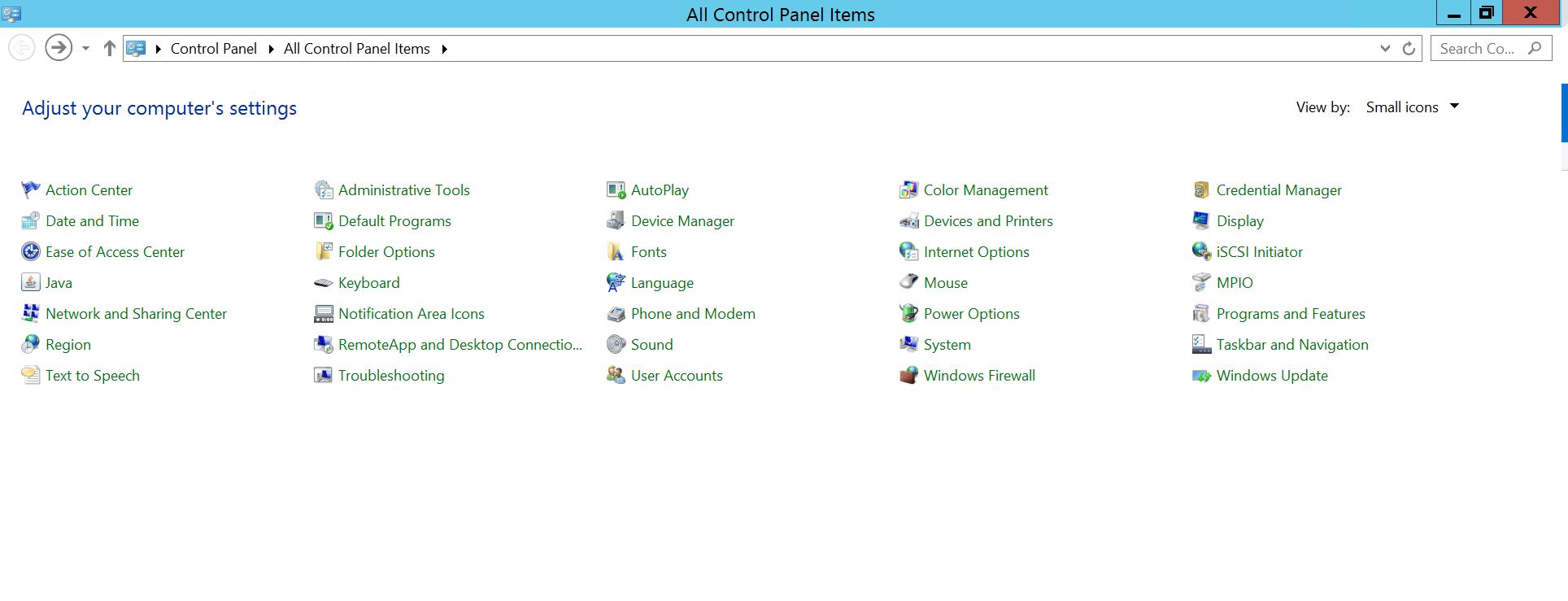
Vyberte Program a funkce
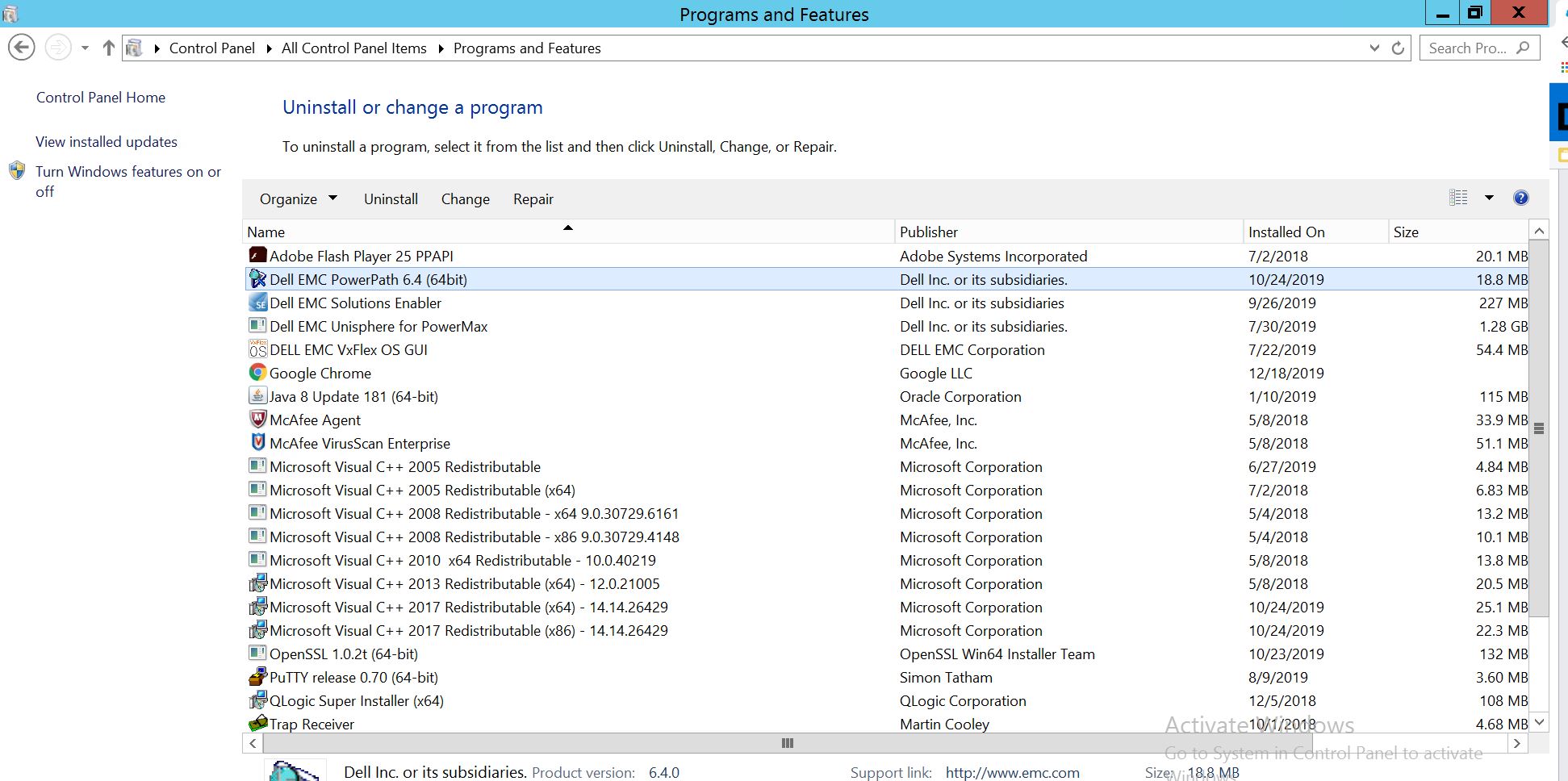
Vyberte PowerPath a zvolte upravit/Změnit, čímž se otevře výzva instalačního programu:
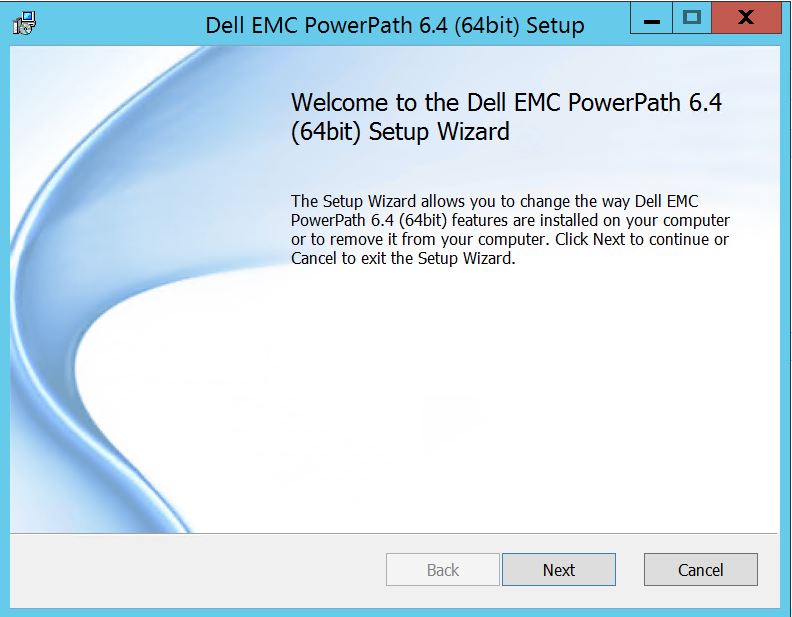
Klikněte na tlačítko Další a postupujte podle volby Change :
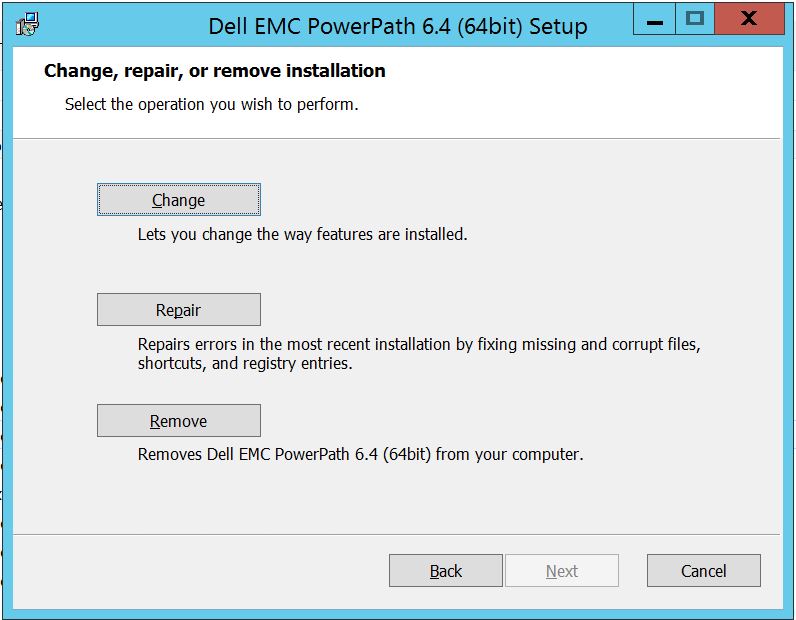
Which will you to Custom Setup :
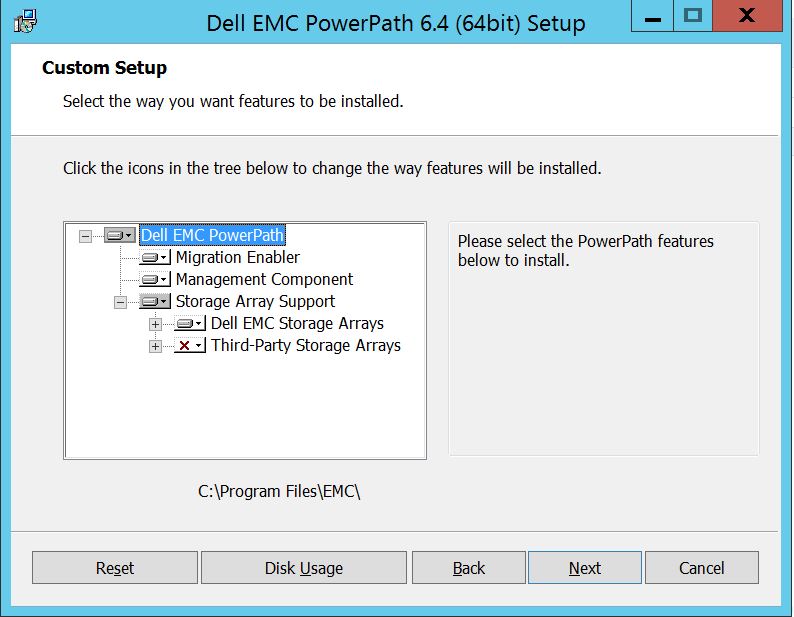
Nyní můžete rozšířit podporu diskových polí, pokud ji ještě nemáte, a také rozbalit pole úložišť Dell EMC, kde se zobrazí všechna pole úložišť podporovaná v softwaru PowerPath:
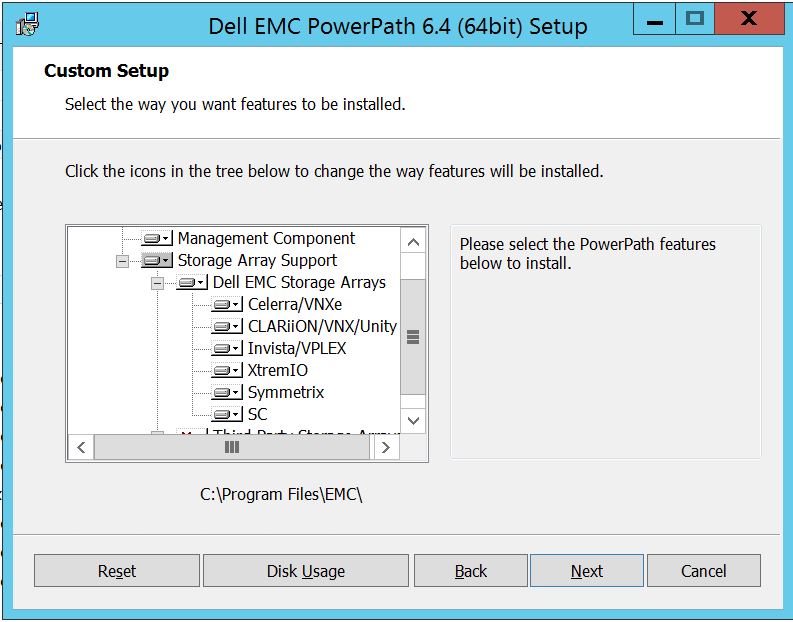
Poté můžete dále použít malý klíč dolů poblíž libovolného úložiště. Vezměme si například Symmetrix. Dále se zobrazí 2 možnosti:
1. Nainstaluje se na místní pevný disk
2. Celá funkce se nainstaluje na místní pevný disk.
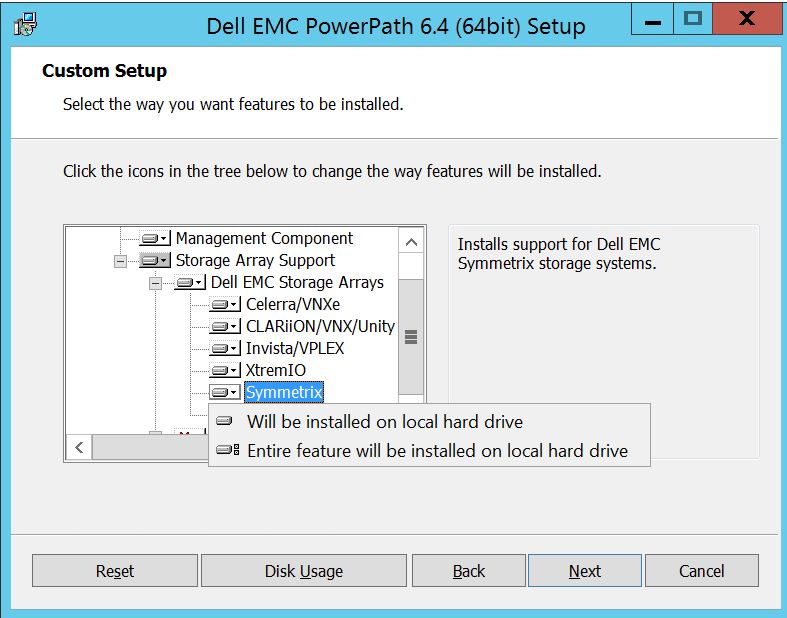
Chcete-li spravovat všechna pole úložišť Dell EMC (což je v podstatě výchozí nastavení),
můžete totéž provést také v rozevíracím seznamu diskových polí Dell EMC: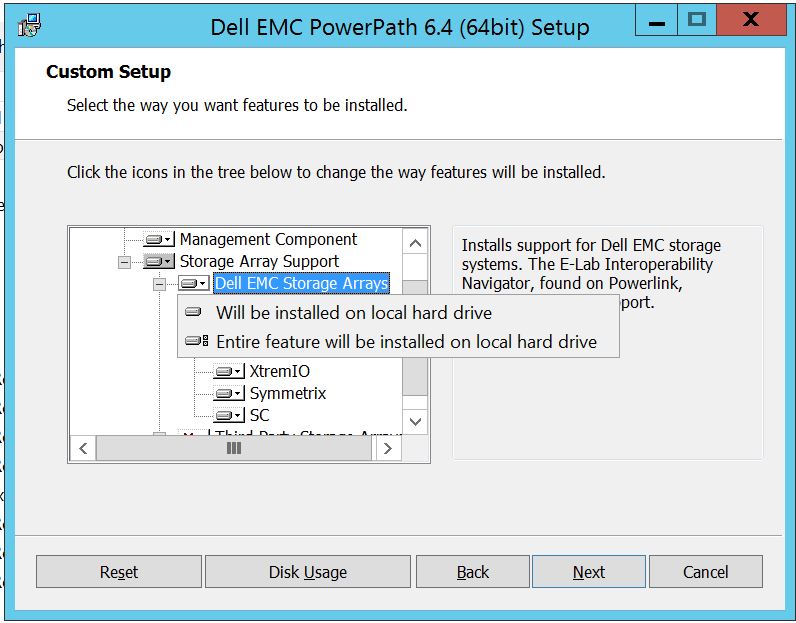
Po dokončení Vyberte další
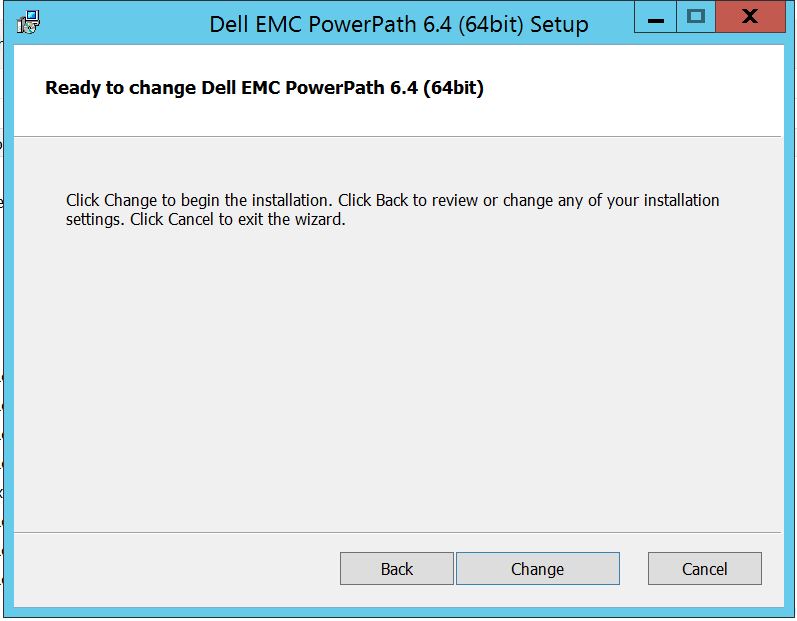
kliknutím na tlačítko Změnit, čímž dokončíte potřebné změny:
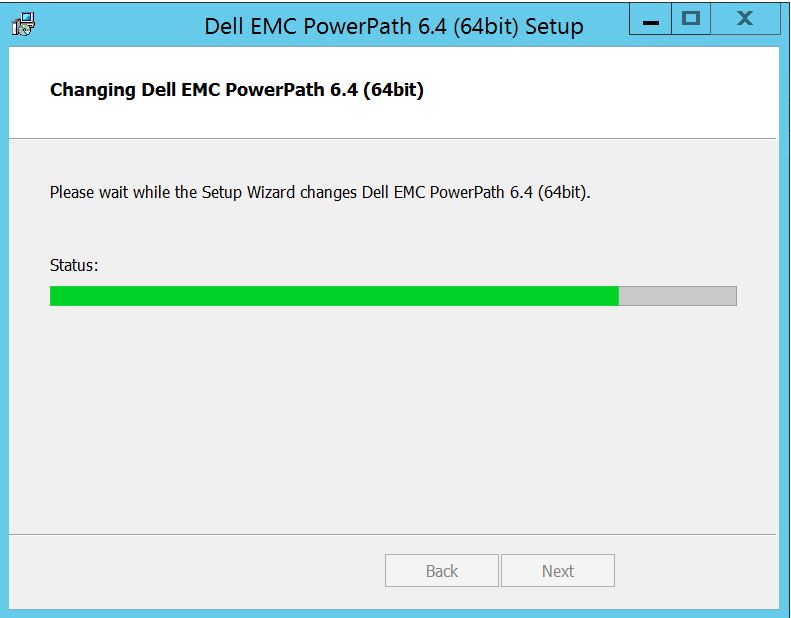
Příspěvek, který byste měli vidět zde, kde můžete vybrat "Dokončit" Po
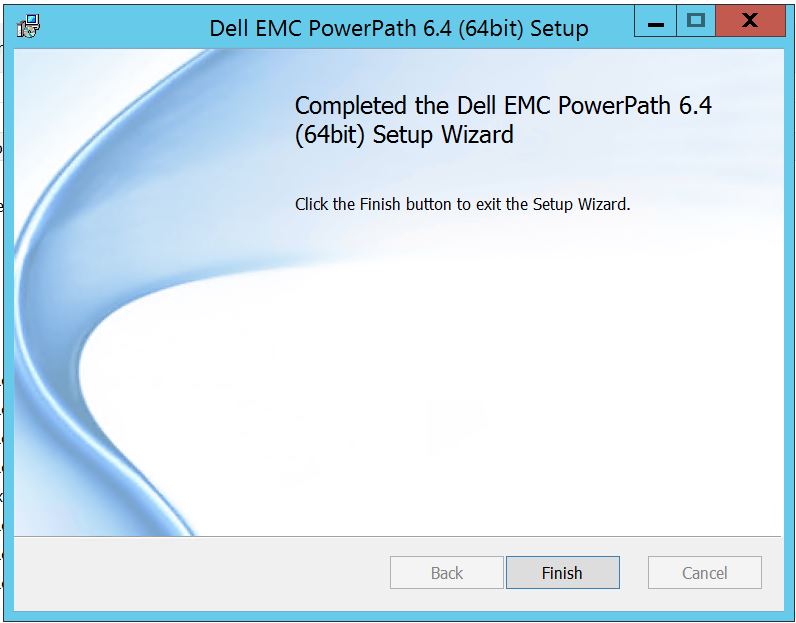 dokončení se zobrazí vyskakovací okno s výzvou k restartování, Vyberte restartování serveru, protože změny je nutné implementovat na úrovni serveru, což pak zviditelní disky pole úložišť v PowerPath.
Po restartu, když spustíte možnosti zobrazení powermt, bude výstup vypadat takto:
** MOŽNOSTI DISPLEJE POWERMT **
Zobrazit názvy jednotek LUN CLARiiON:
true Path Latency Monitor: Vypnuto
a informace o trvalé cestě: Monitor
výkonu: zakázáno
Automatický pohotovostní režim: IOPS per Failure (iopf): Povoleno
období stárnutí IOPF: 1 d
IOPF limit: 6000
Storage
System Class Attributes
------------ ----------
Symmetrix periodic autorestore = on
reactive autorestore = on
status = managed
proximity based autostandby = off
auto host registration = enabled
app finger printing = enabled
device to array performance report = enabled
device in use to array report = enabled
CLARiiON periodic autorestore = on
reactive autorestore = on
status = managed
proximity based autostandby = N/A
auto host registration = disabled
app finger printing = N/A
device to array performance report = N/A
device in use to array report = N/A
Invista periodic autorestore = on
reactive autorestore = on
status = managed
proximity based autostandby = N/A
auto host registration = N/A
app finger printing = N/A
device to array performance report = N/A
device in use to array report = N/A
Hitachi periodic autorestore = on
reactive autorestore = on
status = unmanaged
proximity based autostandby = N/A
auto host registration = N/A
app finger printing = N/A
device to array performance report = N/A
device in use to array report = N/A
HP xp periodic autorestore = on
reactive autorestore = on
status = unmanaged
proximity based autostandby = N/A
auto host registration = N/A
app finger printing = N/A
device to array performance report = N/A
device in use to array report = N/A
Ess periodic autorestore = on
reactive autorestore = on
status = unmanaged
proximity based autostandby = N/A
auto host registration = N/A
app finger printing = N/A
device to array performance report = N/A
device in use to array report = N/A
Generic periodic autorestore = on
reactive autorestore = on
status = managed
proximity based autostandby = N/A
auto host registration = N/A
app finger printing = N/A
device to array performance report = N/A
device in use to array report = N/A
VPLEX periodic autorestore = on
reactive autorestore = on
status = managed
proximity based autostandby = on
proximity based autostandby threshold = default
auto host registration = N/A
app finger printing = N/A
device to array performance report = N/A
device in use to array report = N/A
VNX periodic autorestore = on
reactive autorestore = on
status = managed
proximity based autostandby = N/A
auto host registration = disabled
app finger printing = N/A
device to array performance report = N/A
device in use to array report = N/A
NetApp periodic autorestore = on
reactive autorestore = on
status = unmanaged
proximity based autostandby = N/A
auto host registration = N/A
app finger printing = N/A
device to array performance report = N/A
device in use to array report = N/A
XtremIO periodic autorestore = on
reactive autorestore = on
status = managed
proximity based autostandby = N/A
auto host registration = N/A
app finger printing = N/A
device to array performance report = N/A
device in use to array report = N/A
Unity periodic autorestore = on
reactive autorestore = on
status = managed
proximity based autostandby = N/A
auto host registration = disabled
app finger printing = N/A
device to array performance report = N/A
device in use to array report = N/A
SC periodic autorestore = on
reactive autorestore = on
status = managed
proximity based autostandby = N/A
auto host registration = N/A
app finger printing = N/A
device to array performance report = N/A
device in use to array report = N/A
Zde je scénář, kdy zákazník prezentuje disky z diskového pole Symmetrix a hlásí, že po upgradu není schopen v softwaru PowerPath najít žádné disky.
Výstup " powermt display options " zobrazuje:
** MOŽNOSTI DISPLEJE POWERMT **
Zobrazit názvy jednotek LUN CLARiiON:
true Path Latency Monitor: Vypnuto
a informace o trvalé cestě: Monitor
výkonu: zakázáno
Automatický pohotovostní režim: IOPS per Failure (iopf): Povoleno
období stárnutí IOPF: 1 d
IOPF limit: 6000
Auto Host Registration: disabled
Storage
System Class Attributes
------------ ----------
Symmetrix periodic autorestore = on
reactive autorestore = on
status = unmanaged
proximity based autostandby = on
proximity based autostandby threshold = default
CLARiiON periodic autorestore = on
reactive autorestore = on
status = unmanaged
proximity based autostandby = N/A
Invista periodic autorestore = on
reactive autorestore = on
status = managed
proximity based autostandby = N/A
Hitachi periodic autorestore = on
reactive autorestore = on
status = unmanaged
proximity based autostandby = N/A
HP xp periodic autorestore = on
reactive autorestore = on
status = unmanaged
proximity based autostandby = N/A
Ess periodic autorestore = on
reactive autorestore = on
status = unmanaged
proximity based autostandby = N/A
Generic periodic autorestore = on
reactive autorestore = on
status = managed
proximity based autostandby = N/A
VPLEX periodic autorestore = on
reactive autorestore = on
status = managed
proximity based autostandby = on
proximity based autostandby threshold = default
VNX periodic autorestore = on
reactive autorestore = on
status = unmanaged
proximity based autostandby = N/A
NetApp periodic autorestore = on
reactive autorestore = on
status = unmanaged
proximity based autostandby = N/A
XtremIO periodic autorestore = on
reactive autorestore = on
status = managed
proximity based autostandby = N/A
Unity periodic autorestore = on
reactive autorestore = on
status = unmanaged
proximity based autostandby = N/A
SC periodic autorestore = on
reactive autorestore = on
status = managed
proximity based autostandby = off
Notice how some of the storage array and especially Symmetrix here is "unmanaged"
Here are the steps along with the screenshot from our lab server , how to make it "Managed"
Open Control Panel :
Vyberte Program a funkce
Vyberte PowerPath a zvolte upravit/Změnit, čímž se otevře výzva instalačního programu:
Klikněte na tlačítko Další a postupujte podle volby Change :
Which will you to Custom Setup :
Nyní můžete rozšířit podporu diskových polí, pokud ji ještě nemáte, a také rozbalit pole úložišť Dell EMC, kde se zobrazí všechna pole úložišť podporovaná v softwaru PowerPath:
Poté můžete dále použít malý klíč dolů poblíž libovolného úložiště. Vezměme si například Symmetrix. Dále se zobrazí 2 možnosti:
1. Nainstaluje se na místní pevný disk
2. Celá funkce se nainstaluje na místní pevný disk.
Chcete-li spravovat všechna pole úložišť Dell EMC (což je v podstatě výchozí nastavení),
můžete totéž provést také v rozevíracím seznamu diskových polí Dell EMC:
Po dokončení Vyberte další
kliknutím na tlačítko Změnit, čímž dokončíte potřebné změny:
Příspěvek, který byste měli vidět zde, kde můžete vybrat "Dokončit" Po
dokončení se zobrazí vyskakovací okno s výzvou k restartování, Vyberte restartování serveru, protože změny je nutné implementovat na úrovni serveru, což pak zviditelní disky pole úložišť v PowerPath.
Po restartu, když spustíte možnosti zobrazení powermt, bude výstup vypadat takto:
** MOŽNOSTI DISPLEJE POWERMT **
Zobrazit názvy jednotek LUN CLARiiON:
true Path Latency Monitor: Vypnuto
a informace o trvalé cestě: Monitor
výkonu: zakázáno
Automatický pohotovostní režim: IOPS per Failure (iopf): Povoleno
období stárnutí IOPF: 1 d
IOPF limit: 6000
Storage
System Class Attributes
------------ ----------
Symmetrix periodic autorestore = on
reactive autorestore = on
status = managed
proximity based autostandby = off
auto host registration = enabled
app finger printing = enabled
device to array performance report = enabled
device in use to array report = enabled
CLARiiON periodic autorestore = on
reactive autorestore = on
status = managed
proximity based autostandby = N/A
auto host registration = disabled
app finger printing = N/A
device to array performance report = N/A
device in use to array report = N/A
Invista periodic autorestore = on
reactive autorestore = on
status = managed
proximity based autostandby = N/A
auto host registration = N/A
app finger printing = N/A
device to array performance report = N/A
device in use to array report = N/A
Hitachi periodic autorestore = on
reactive autorestore = on
status = unmanaged
proximity based autostandby = N/A
auto host registration = N/A
app finger printing = N/A
device to array performance report = N/A
device in use to array report = N/A
HP xp periodic autorestore = on
reactive autorestore = on
status = unmanaged
proximity based autostandby = N/A
auto host registration = N/A
app finger printing = N/A
device to array performance report = N/A
device in use to array report = N/A
Ess periodic autorestore = on
reactive autorestore = on
status = unmanaged
proximity based autostandby = N/A
auto host registration = N/A
app finger printing = N/A
device to array performance report = N/A
device in use to array report = N/A
Generic periodic autorestore = on
reactive autorestore = on
status = managed
proximity based autostandby = N/A
auto host registration = N/A
app finger printing = N/A
device to array performance report = N/A
device in use to array report = N/A
VPLEX periodic autorestore = on
reactive autorestore = on
status = managed
proximity based autostandby = on
proximity based autostandby threshold = default
auto host registration = N/A
app finger printing = N/A
device to array performance report = N/A
device in use to array report = N/A
VNX periodic autorestore = on
reactive autorestore = on
status = managed
proximity based autostandby = N/A
auto host registration = disabled
app finger printing = N/A
device to array performance report = N/A
device in use to array report = N/A
NetApp periodic autorestore = on
reactive autorestore = on
status = unmanaged
proximity based autostandby = N/A
auto host registration = N/A
app finger printing = N/A
device to array performance report = N/A
device in use to array report = N/A
XtremIO periodic autorestore = on
reactive autorestore = on
status = managed
proximity based autostandby = N/A
auto host registration = N/A
app finger printing = N/A
device to array performance report = N/A
device in use to array report = N/A
Unity periodic autorestore = on
reactive autorestore = on
status = managed
proximity based autostandby = N/A
auto host registration = disabled
app finger printing = N/A
device to array performance report = N/A
device in use to array report = N/A
SC periodic autorestore = on
reactive autorestore = on
status = managed
proximity based autostandby = N/A
auto host registration = N/A
app finger printing = N/A
device to array performance report = N/A
device in use to array report = N/A
Affected Products
PowerPath for WindowsProducts
PowerPath for WindowsArticle Properties
Article Number: 000158477
Article Type: How To
Last Modified: 17 Oct 2025
Version: 4
Find answers to your questions from other Dell users
Support Services
Check if your device is covered by Support Services.