So managen Sie Storage in PowerPath for Windows
Summary: Wenn der Kunde meldet, dass Festplatten nicht sichtbar sind und in Powermt-Anzeigeoptionen festgestellt wird, dass das Storage-Array als nicht verwaltet angezeigt wird, So wird es verwaltet ...
This article applies to
This article does not apply to
This article is not tied to any specific product.
Not all product versions are identified in this article.
Instructions
Wenn in bestimmten Szenarien KundInnen berichten, dass sie keine vom Storage-Array in PowerPath bereitgestellten Festplatten bemerken können. Wenn Sie powermt display options ausführen und Sie feststellen, dass das Storage-Array als "Unmanaged" angezeigt wird, dann In einer Windows-Umgebung mit PowerPath. Befolgen Sie den empfohlenen Aktionsplan in diesem Wissensdatenbank-Artikel, um dasselbe wie "Gemanagt" zu erhalten.
Hier ist ein Szenario, in dem der Kunde Festplatten vom Symmetrix Storage-Array präsentiert und gemeldet hat, dass er nach dem Upgrade keine Festplatten in PowerPath erkennen kann.
Die Ausgabe der " powermt display options " zeigt an:
** POWERMT-ANZEIGEOPTIONEN **
Anzeigen von CLARiiON-LUN-Namen: true
Path Latency Monitor: Informationen zu "Off
Persist Path": Auf
Performance Monitor: Autostandby deaktiviert
:
IOs per Failure (IOPF): IOPF-Alterungszeitraum aktiviert
: 1 D
IOPF-Grenzwert : 6000
Auto Host Registration: disabled
Storage
System Class Attributes
------------ ----------
Symmetrix periodic autorestore = on
reactive autorestore = on
status = unmanaged
proximity based autostandby = on
proximity based autostandby threshold = default
CLARiiON periodic autorestore = on
reactive autorestore = on
status = unmanaged
proximity based autostandby = N/A
Invista periodic autorestore = on
reactive autorestore = on
status = managed
proximity based autostandby = N/A
Hitachi periodic autorestore = on
reactive autorestore = on
status = unmanaged
proximity based autostandby = N/A
HP xp periodic autorestore = on
reactive autorestore = on
status = unmanaged
proximity based autostandby = N/A
Ess periodic autorestore = on
reactive autorestore = on
status = unmanaged
proximity based autostandby = N/A
Generic periodic autorestore = on
reactive autorestore = on
status = managed
proximity based autostandby = N/A
VPLEX periodic autorestore = on
reactive autorestore = on
status = managed
proximity based autostandby = on
proximity based autostandby threshold = default
VNX periodic autorestore = on
reactive autorestore = on
status = unmanaged
proximity based autostandby = N/A
NetApp periodic autorestore = on
reactive autorestore = on
status = unmanaged
proximity based autostandby = N/A
XtremIO periodic autorestore = on
reactive autorestore = on
status = managed
proximity based autostandby = N/A
Unity periodic autorestore = on
reactive autorestore = on
status = unmanaged
proximity based autostandby = N/A
SC periodic autorestore = on
reactive autorestore = on
status = managed
proximity based autostandby = off
Notice how some of the storage array and especially Symmetrix here is "unmanaged"
Here are the steps along with the screenshot from our lab server , how to make it "Managed"
Open Control Panel :
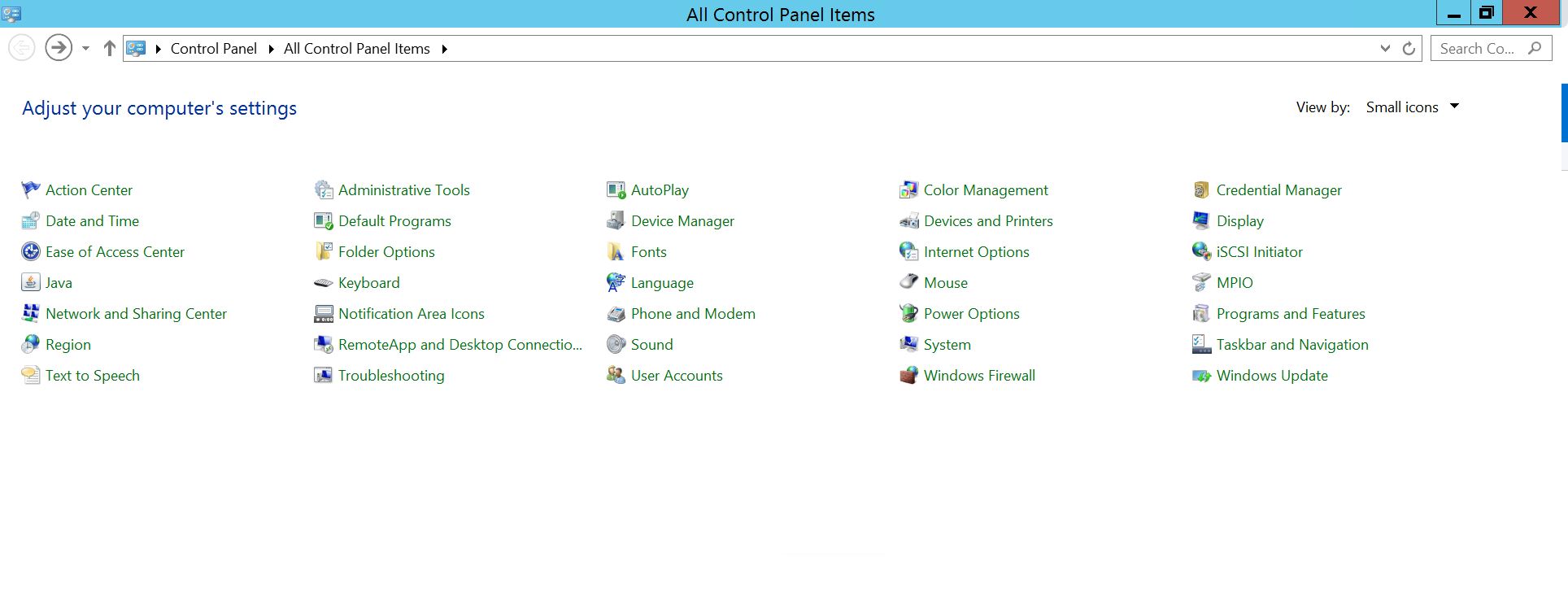
Wählen Sie Programm und Funktionen
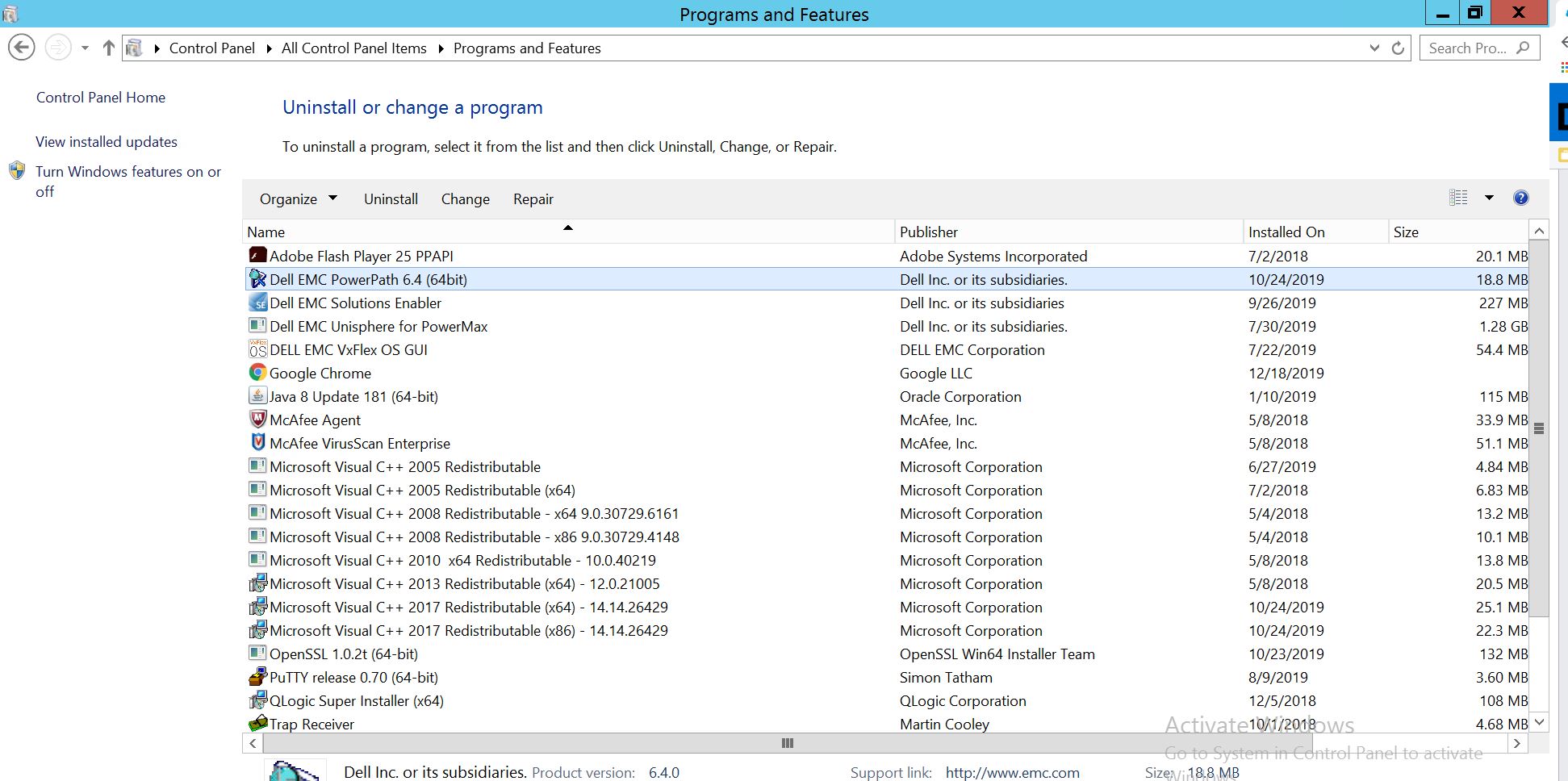 PowerPath aus und wählen Sie "Modify/Change" aus, um die Eingabeaufforderung des Installationsprogramms zu öffnen:
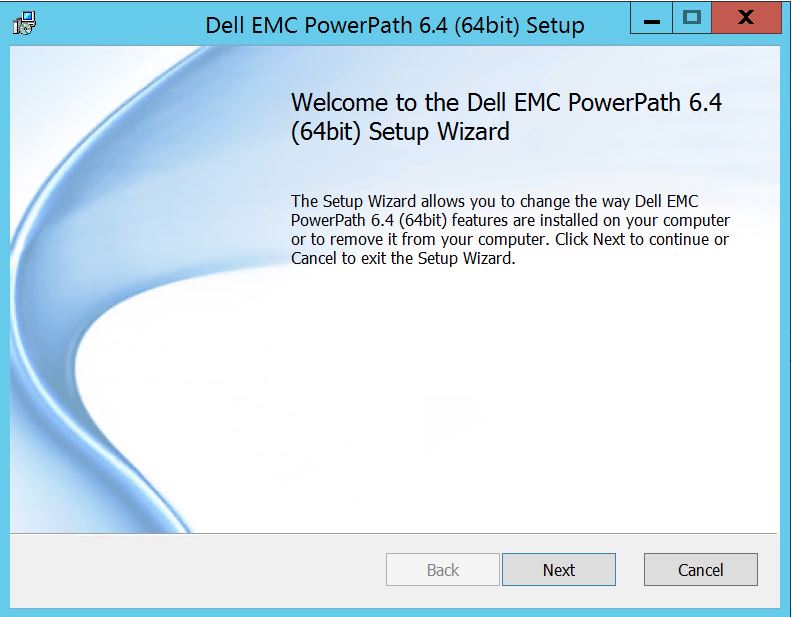
Klicken Sie auf Weiter und folgen Sie der Auswahl der Änderung,
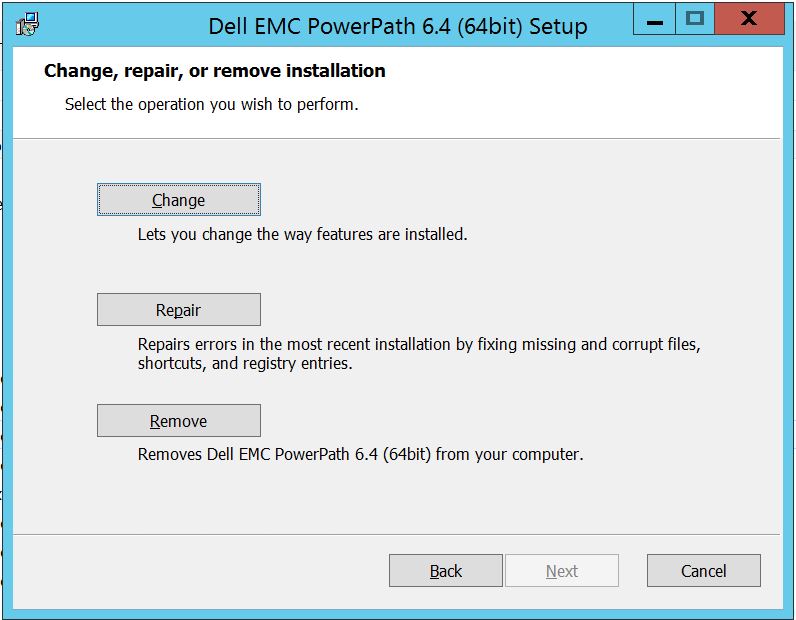
die Sie zum benutzerdefinierten Setup führt:
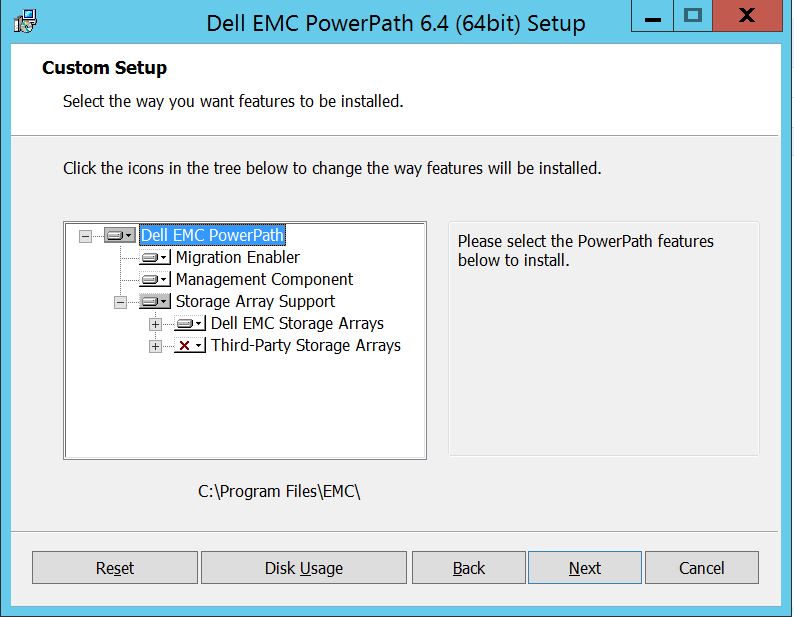
Sie können jetzt die Unterstützung für Storage-Arrays erweitern, falls noch nicht geschehen, und Dell EMC Storage-Arrays erweitern, um alle Storage-Arrays anzuzeigen, die von PowerPath unterstützt werden:
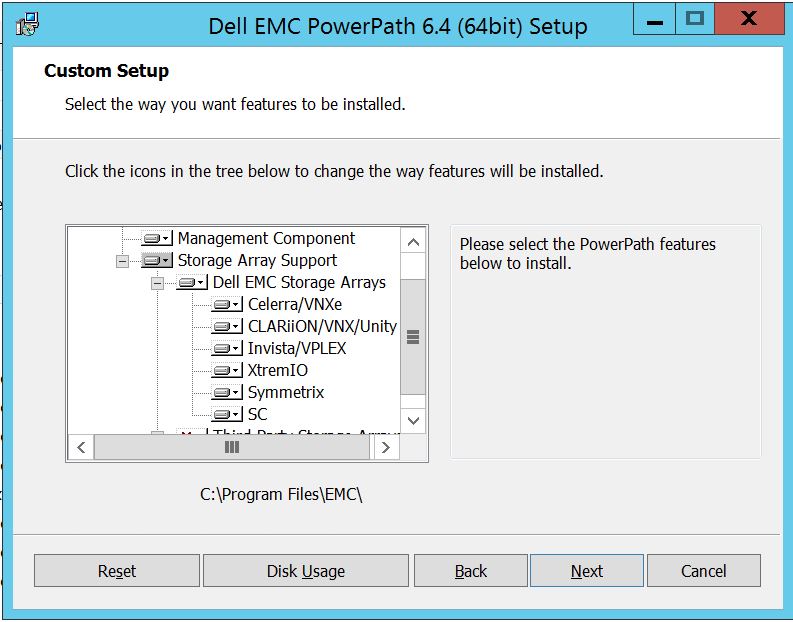
Dann können Sie weiter den kleinen Downkey neben jedem Storage verwenden. Nehmen wir hier zum Beispiel Symmetrix. Es werden weiterhin 2 Optionen angezeigt:
1. Wird auf der lokalen Festplatte
2 installiert. Die gesamte Funktion wird auf der lokalen Festplatte
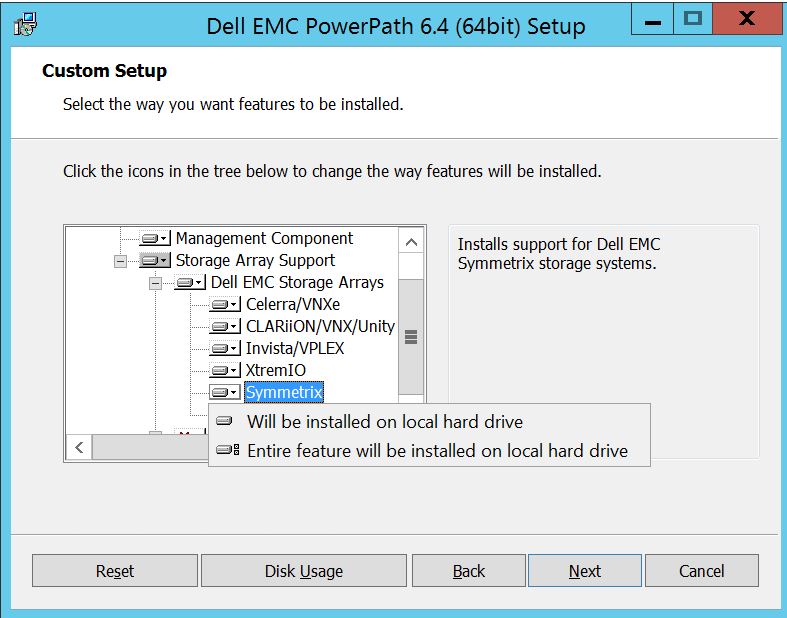
installiertWenn Sie möchten, dass alle Dell EMC Speicherarrays verwaltet werden ( was im Wesentlichen die Standardeinstellung ist ),
können Sie dies auch in der Dropdown-Liste Dell EMC Speicherarray tun:
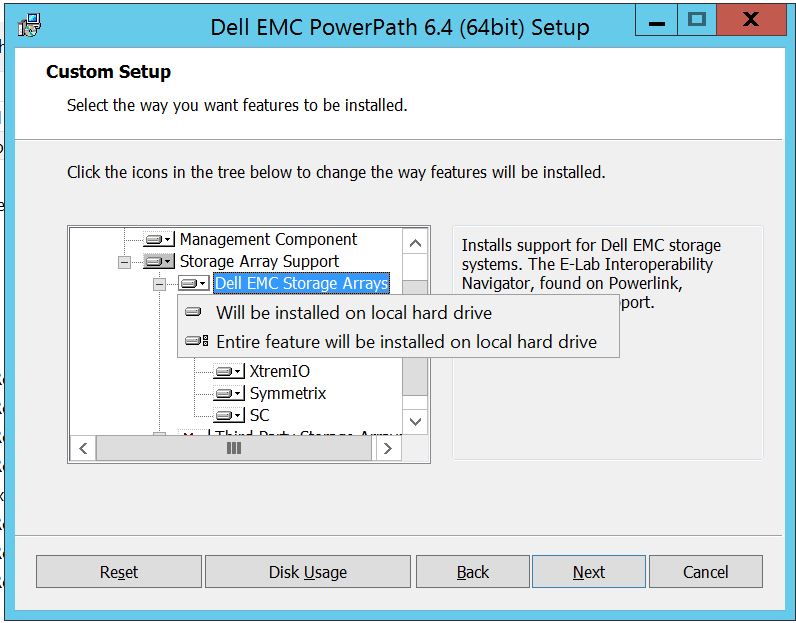 Sobald der Vorgang abgeschlossen ist, wählen Sie die Option "Weiter"
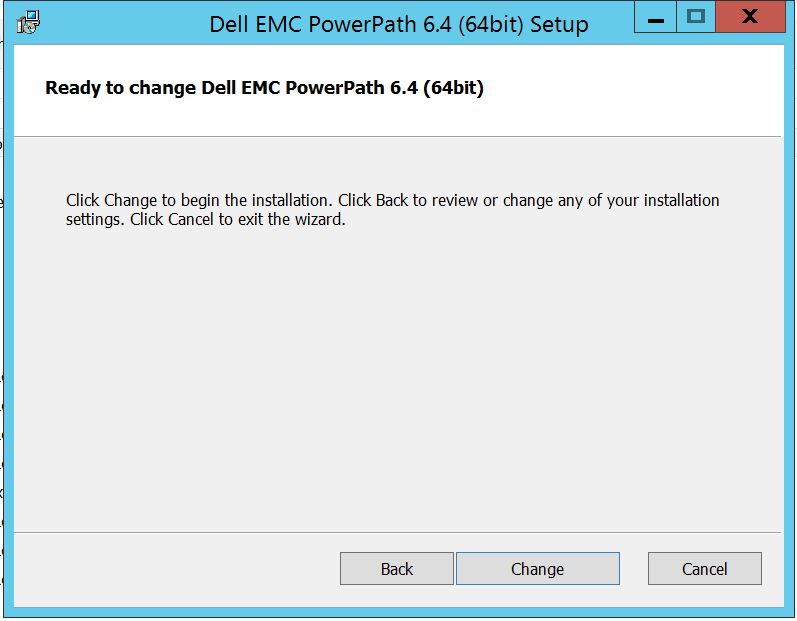
Klicken Sie auf Ändern, um die erforderlichen Änderungen abzuschließen:
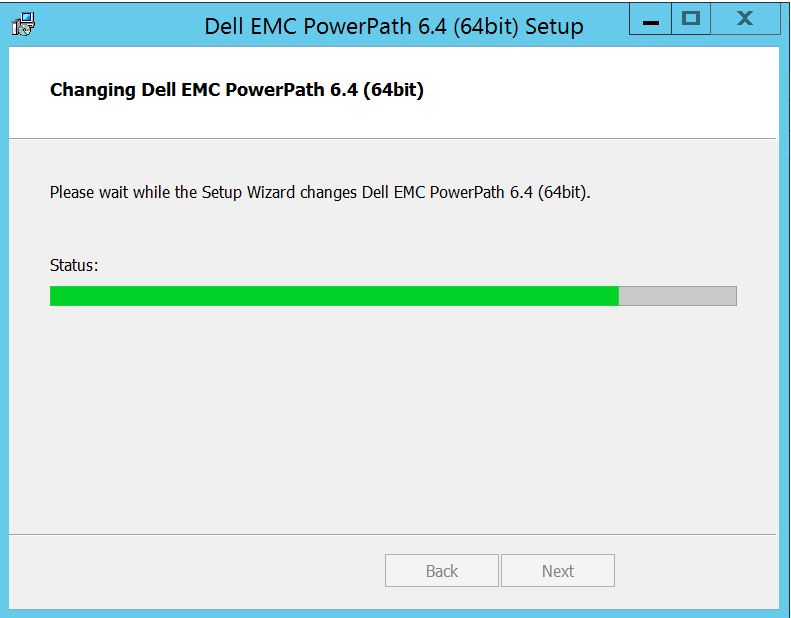
Nach dem Vorgang sollten Sie diese Option sehen, in der Sie "Fertigstellen
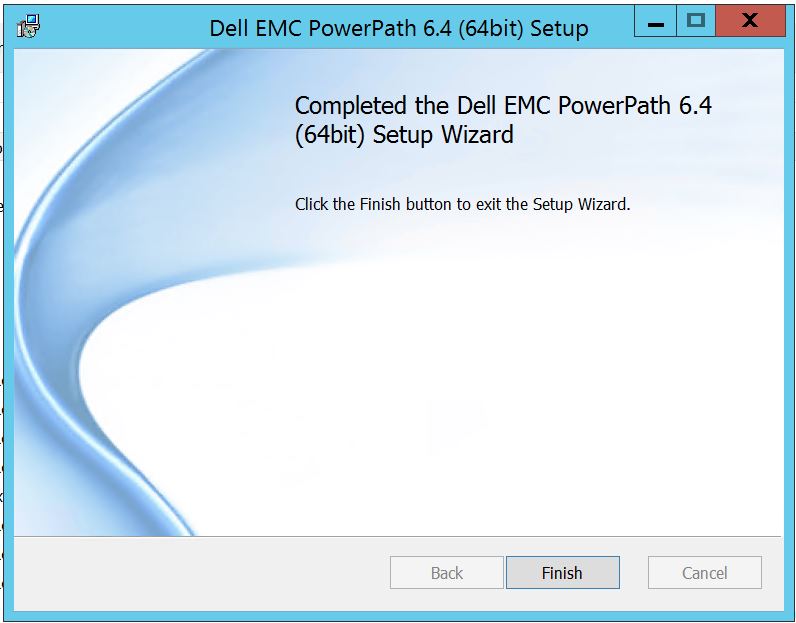 " auswählen können. Nach dem Abschluss wird ein Pop-up-Fenster angezeigt, in dem Sie aufgefordert werden, den Server neu zu starten. Bitte wählen Sie aus, um den Server neu zu starten, da die Änderungen auf Serverebene implementiert werden müssen, wodurch die Storage-Array-Festplatten in PowerPath sichtbar werden.
Nach dem Neustart, wenn Sie powermt display options ausführen, sieht die Ausgabe wie folgt aus:
** POWERMT-ANZEIGEOPTIONEN **
Anzeigen von CLARiiON-LUN-Namen: true
Path Latency Monitor: Informationen zu "Off
Persist Path": Auf
Performance Monitor: Autostandby deaktiviert
:
IOs per Failure (IOPF): IOPF-Alterungszeitraum aktiviert
: 1 D
IOPF-Grenzwert : 6000
Storage
System Class Attributes
------------ ----------
Symmetrix periodic autorestore = on
reactive autorestore = on
status = managed
proximity based autostandby = off
auto host registration = enabled
app finger printing = enabled
device to array performance report = enabled
device in use to array report = enabled
CLARiiON periodic autorestore = on
reactive autorestore = on
status = managed
proximity based autostandby = N/A
auto host registration = disabled
app finger printing = N/A
device to array performance report = N/A
device in use to array report = N/A
Invista periodic autorestore = on
reactive autorestore = on
status = managed
proximity based autostandby = N/A
auto host registration = N/A
app finger printing = N/A
device to array performance report = N/A
device in use to array report = N/A
Hitachi periodic autorestore = on
reactive autorestore = on
status = unmanaged
proximity based autostandby = N/A
auto host registration = N/A
app finger printing = N/A
device to array performance report = N/A
device in use to array report = N/A
HP xp periodic autorestore = on
reactive autorestore = on
status = unmanaged
proximity based autostandby = N/A
auto host registration = N/A
app finger printing = N/A
device to array performance report = N/A
device in use to array report = N/A
Ess periodic autorestore = on
reactive autorestore = on
status = unmanaged
proximity based autostandby = N/A
auto host registration = N/A
app finger printing = N/A
device to array performance report = N/A
device in use to array report = N/A
Generic periodic autorestore = on
reactive autorestore = on
status = managed
proximity based autostandby = N/A
auto host registration = N/A
app finger printing = N/A
device to array performance report = N/A
device in use to array report = N/A
VPLEX periodic autorestore = on
reactive autorestore = on
status = managed
proximity based autostandby = on
proximity based autostandby threshold = default
auto host registration = N/A
app finger printing = N/A
device to array performance report = N/A
device in use to array report = N/A
VNX periodic autorestore = on
reactive autorestore = on
status = managed
proximity based autostandby = N/A
auto host registration = disabled
app finger printing = N/A
device to array performance report = N/A
device in use to array report = N/A
NetApp periodic autorestore = on
reactive autorestore = on
status = unmanaged
proximity based autostandby = N/A
auto host registration = N/A
app finger printing = N/A
device to array performance report = N/A
device in use to array report = N/A
XtremIO periodic autorestore = on
reactive autorestore = on
status = managed
proximity based autostandby = N/A
auto host registration = N/A
app finger printing = N/A
device to array performance report = N/A
device in use to array report = N/A
Unity periodic autorestore = on
reactive autorestore = on
status = managed
proximity based autostandby = N/A
auto host registration = disabled
app finger printing = N/A
device to array performance report = N/A
device in use to array report = N/A
SC periodic autorestore = on
reactive autorestore = on
status = managed
proximity based autostandby = N/A
auto host registration = N/A
app finger printing = N/A
device to array performance report = N/A
device in use to array report = N/A
Hier ist ein Szenario, in dem der Kunde Festplatten vom Symmetrix Storage-Array präsentiert und gemeldet hat, dass er nach dem Upgrade keine Festplatten in PowerPath erkennen kann.
Die Ausgabe der " powermt display options " zeigt an:
** POWERMT-ANZEIGEOPTIONEN **
Anzeigen von CLARiiON-LUN-Namen: true
Path Latency Monitor: Informationen zu "Off
Persist Path": Auf
Performance Monitor: Autostandby deaktiviert
:
IOs per Failure (IOPF): IOPF-Alterungszeitraum aktiviert
: 1 D
IOPF-Grenzwert : 6000
Auto Host Registration: disabled
Storage
System Class Attributes
------------ ----------
Symmetrix periodic autorestore = on
reactive autorestore = on
status = unmanaged
proximity based autostandby = on
proximity based autostandby threshold = default
CLARiiON periodic autorestore = on
reactive autorestore = on
status = unmanaged
proximity based autostandby = N/A
Invista periodic autorestore = on
reactive autorestore = on
status = managed
proximity based autostandby = N/A
Hitachi periodic autorestore = on
reactive autorestore = on
status = unmanaged
proximity based autostandby = N/A
HP xp periodic autorestore = on
reactive autorestore = on
status = unmanaged
proximity based autostandby = N/A
Ess periodic autorestore = on
reactive autorestore = on
status = unmanaged
proximity based autostandby = N/A
Generic periodic autorestore = on
reactive autorestore = on
status = managed
proximity based autostandby = N/A
VPLEX periodic autorestore = on
reactive autorestore = on
status = managed
proximity based autostandby = on
proximity based autostandby threshold = default
VNX periodic autorestore = on
reactive autorestore = on
status = unmanaged
proximity based autostandby = N/A
NetApp periodic autorestore = on
reactive autorestore = on
status = unmanaged
proximity based autostandby = N/A
XtremIO periodic autorestore = on
reactive autorestore = on
status = managed
proximity based autostandby = N/A
Unity periodic autorestore = on
reactive autorestore = on
status = unmanaged
proximity based autostandby = N/A
SC periodic autorestore = on
reactive autorestore = on
status = managed
proximity based autostandby = off
Notice how some of the storage array and especially Symmetrix here is "unmanaged"
Here are the steps along with the screenshot from our lab server , how to make it "Managed"
Open Control Panel :
Wählen Sie Programm und Funktionen
PowerPath aus und wählen Sie "Modify/Change" aus, um die Eingabeaufforderung des Installationsprogramms zu öffnen:
Klicken Sie auf Weiter und folgen Sie der Auswahl der Änderung,
die Sie zum benutzerdefinierten Setup führt:
Sie können jetzt die Unterstützung für Storage-Arrays erweitern, falls noch nicht geschehen, und Dell EMC Storage-Arrays erweitern, um alle Storage-Arrays anzuzeigen, die von PowerPath unterstützt werden:
Dann können Sie weiter den kleinen Downkey neben jedem Storage verwenden. Nehmen wir hier zum Beispiel Symmetrix. Es werden weiterhin 2 Optionen angezeigt:
1. Wird auf der lokalen Festplatte
2 installiert. Die gesamte Funktion wird auf der lokalen Festplatte
installiertWenn Sie möchten, dass alle Dell EMC Speicherarrays verwaltet werden ( was im Wesentlichen die Standardeinstellung ist ),
können Sie dies auch in der Dropdown-Liste Dell EMC Speicherarray tun:
Sobald der Vorgang abgeschlossen ist, wählen Sie die Option "Weiter"
Klicken Sie auf Ändern, um die erforderlichen Änderungen abzuschließen:
Nach dem Vorgang sollten Sie diese Option sehen, in der Sie "Fertigstellen
" auswählen können. Nach dem Abschluss wird ein Pop-up-Fenster angezeigt, in dem Sie aufgefordert werden, den Server neu zu starten. Bitte wählen Sie aus, um den Server neu zu starten, da die Änderungen auf Serverebene implementiert werden müssen, wodurch die Storage-Array-Festplatten in PowerPath sichtbar werden.
Nach dem Neustart, wenn Sie powermt display options ausführen, sieht die Ausgabe wie folgt aus:
** POWERMT-ANZEIGEOPTIONEN **
Anzeigen von CLARiiON-LUN-Namen: true
Path Latency Monitor: Informationen zu "Off
Persist Path": Auf
Performance Monitor: Autostandby deaktiviert
:
IOs per Failure (IOPF): IOPF-Alterungszeitraum aktiviert
: 1 D
IOPF-Grenzwert : 6000
Storage
System Class Attributes
------------ ----------
Symmetrix periodic autorestore = on
reactive autorestore = on
status = managed
proximity based autostandby = off
auto host registration = enabled
app finger printing = enabled
device to array performance report = enabled
device in use to array report = enabled
CLARiiON periodic autorestore = on
reactive autorestore = on
status = managed
proximity based autostandby = N/A
auto host registration = disabled
app finger printing = N/A
device to array performance report = N/A
device in use to array report = N/A
Invista periodic autorestore = on
reactive autorestore = on
status = managed
proximity based autostandby = N/A
auto host registration = N/A
app finger printing = N/A
device to array performance report = N/A
device in use to array report = N/A
Hitachi periodic autorestore = on
reactive autorestore = on
status = unmanaged
proximity based autostandby = N/A
auto host registration = N/A
app finger printing = N/A
device to array performance report = N/A
device in use to array report = N/A
HP xp periodic autorestore = on
reactive autorestore = on
status = unmanaged
proximity based autostandby = N/A
auto host registration = N/A
app finger printing = N/A
device to array performance report = N/A
device in use to array report = N/A
Ess periodic autorestore = on
reactive autorestore = on
status = unmanaged
proximity based autostandby = N/A
auto host registration = N/A
app finger printing = N/A
device to array performance report = N/A
device in use to array report = N/A
Generic periodic autorestore = on
reactive autorestore = on
status = managed
proximity based autostandby = N/A
auto host registration = N/A
app finger printing = N/A
device to array performance report = N/A
device in use to array report = N/A
VPLEX periodic autorestore = on
reactive autorestore = on
status = managed
proximity based autostandby = on
proximity based autostandby threshold = default
auto host registration = N/A
app finger printing = N/A
device to array performance report = N/A
device in use to array report = N/A
VNX periodic autorestore = on
reactive autorestore = on
status = managed
proximity based autostandby = N/A
auto host registration = disabled
app finger printing = N/A
device to array performance report = N/A
device in use to array report = N/A
NetApp periodic autorestore = on
reactive autorestore = on
status = unmanaged
proximity based autostandby = N/A
auto host registration = N/A
app finger printing = N/A
device to array performance report = N/A
device in use to array report = N/A
XtremIO periodic autorestore = on
reactive autorestore = on
status = managed
proximity based autostandby = N/A
auto host registration = N/A
app finger printing = N/A
device to array performance report = N/A
device in use to array report = N/A
Unity periodic autorestore = on
reactive autorestore = on
status = managed
proximity based autostandby = N/A
auto host registration = disabled
app finger printing = N/A
device to array performance report = N/A
device in use to array report = N/A
SC periodic autorestore = on
reactive autorestore = on
status = managed
proximity based autostandby = N/A
auto host registration = N/A
app finger printing = N/A
device to array performance report = N/A
device in use to array report = N/A
Affected Products
PowerPath for WindowsProducts
PowerPath for WindowsArticle Properties
Article Number: 000158477
Article Type: How To
Last Modified: 17 Oct 2025
Version: 4
Find answers to your questions from other Dell users
Support Services
Check if your device is covered by Support Services.