Windows için PowerPath'te depolamayı yönetilen hale getirme
Summary: Müşteri, disklerin görünür olmadığını ve Powermt ekran seçeneklerinde olduğunu bildirirse depolama dizisini yönetilmeyen olarak fark ederseniz bunu nasıl yönetebilirsiniz?
This article applies to
This article does not apply to
This article is not tied to any specific product.
Not all product versions are identified in this article.
Instructions
Belirli senaryolarda, bir müşteri PowerPath'teki depolama dizisinde sağlanan herhangi bir diski fark edemediğini bildirdiğinde. Powermt display options'ı çalıştırdığınızda, depolama dizisini "Yönetilmeyen" olarak fark ederseniz, PowerPath'e sahip bir Windows Ortamında. Managed" ile aynı işlemi yapmak için lütfen bu KB'de önerilen eylem planını izleyin.
Müşterinin Symmetrix Depolama dizisindeki diskleri sunduğu ve yükseltme sonrasında PowerPath'te herhangi bir disk bulamadığını bildirdiği bir Senaryo aşağıda verilmiştir.
" Powermt ekran seçenekleri " çıktısı şunları gösterir:
** POWERMT GÖRÜNTÜLEME SEÇENEKLERİ **
CLARiiON LUN adlarını göster: true
Path Gecikme Süresi İzleyicisi: Off
Persist Path Information: Performans İzleyicisi'nde
: devre dışı
Otomatik bekleme: Hata Başına IO (iopf): Etkin
iopf yaşlandırma dönemi: 1 D
IOPF Limiti : 6000
Auto Host Registration: disabled
Storage
System Class Attributes
------------ ----------
Symmetrix periodic autorestore = on
reactive autorestore = on
status = unmanaged
proximity based autostandby = on
proximity based autostandby threshold = default
CLARiiON periodic autorestore = on
reactive autorestore = on
status = unmanaged
proximity based autostandby = N/A
Invista periodic autorestore = on
reactive autorestore = on
status = managed
proximity based autostandby = N/A
Hitachi periodic autorestore = on
reactive autorestore = on
status = unmanaged
proximity based autostandby = N/A
HP xp periodic autorestore = on
reactive autorestore = on
status = unmanaged
proximity based autostandby = N/A
Ess periodic autorestore = on
reactive autorestore = on
status = unmanaged
proximity based autostandby = N/A
Generic periodic autorestore = on
reactive autorestore = on
status = managed
proximity based autostandby = N/A
VPLEX periodic autorestore = on
reactive autorestore = on
status = managed
proximity based autostandby = on
proximity based autostandby threshold = default
VNX periodic autorestore = on
reactive autorestore = on
status = unmanaged
proximity based autostandby = N/A
NetApp periodic autorestore = on
reactive autorestore = on
status = unmanaged
proximity based autostandby = N/A
XtremIO periodic autorestore = on
reactive autorestore = on
status = managed
proximity based autostandby = N/A
Unity periodic autorestore = on
reactive autorestore = on
status = unmanaged
proximity based autostandby = N/A
SC periodic autorestore = on
reactive autorestore = on
status = managed
proximity based autostandby = off
Notice how some of the storage array and especially Symmetrix here is "unmanaged"
Here are the steps along with the screenshot from our lab server , how to make it "Managed"
Open Control Panel :
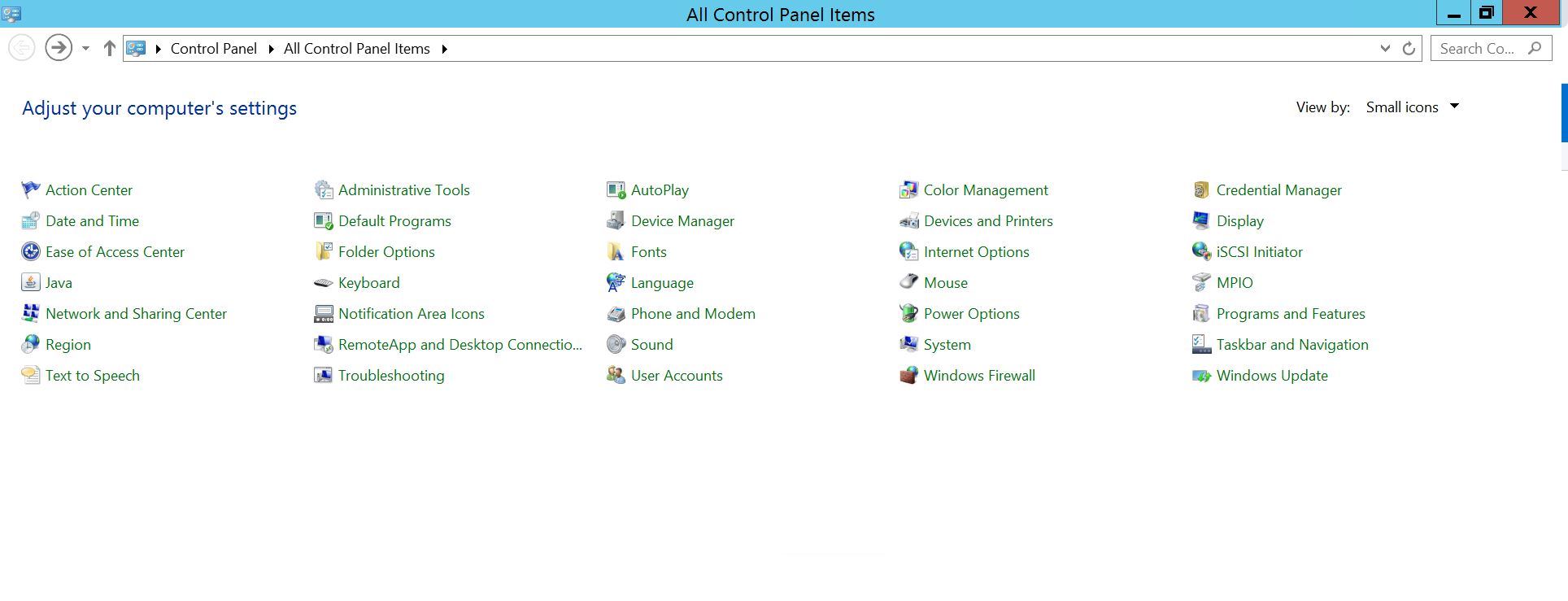
Program ve Özellikler'i
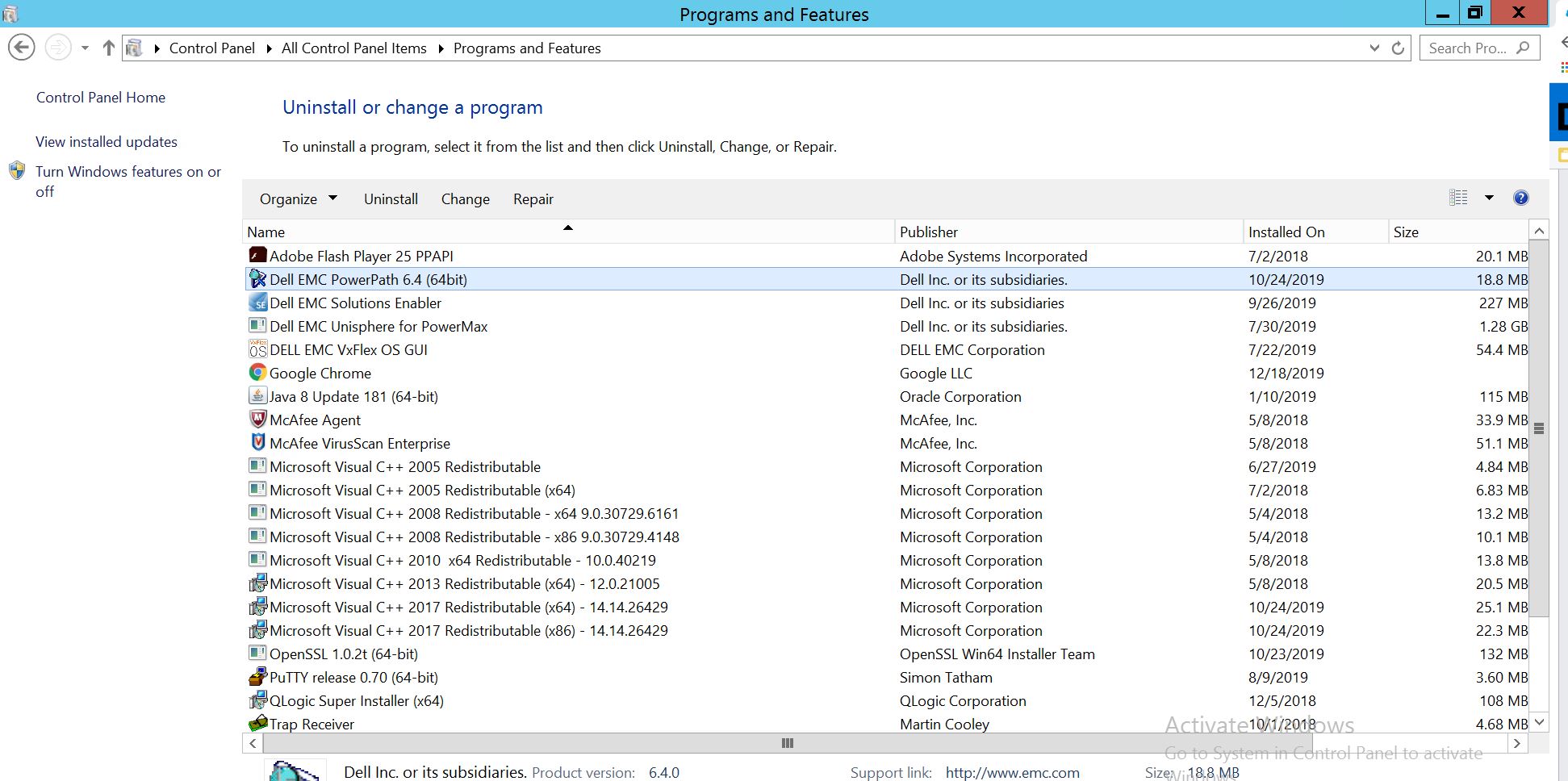
seçin PowerPath'i seçin ve yükleyici istemini açacak olan Değiştir/Değiştir'i seçin:
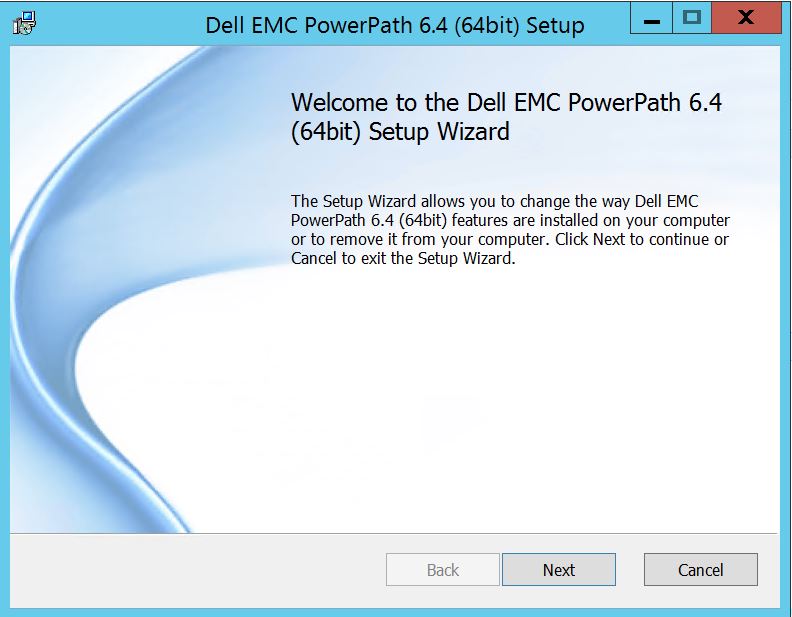
İleri'ye tıklayın ve değişikliği seçin:
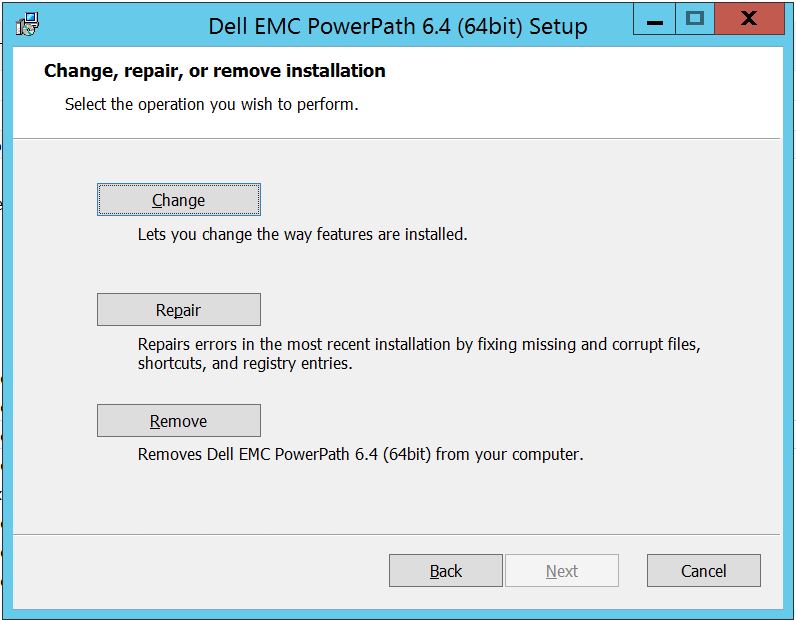
Bu da sizi Özel Kurulum'a götürecektir:
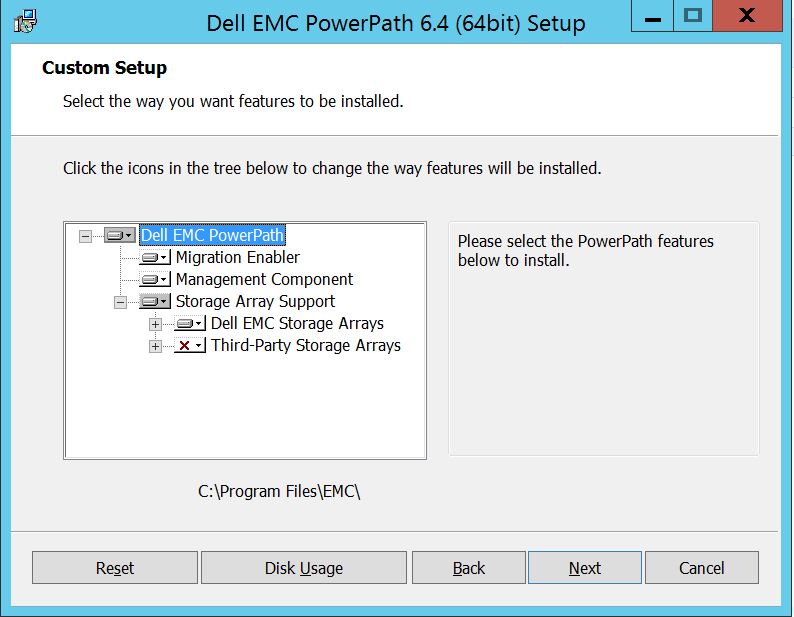
Henüz yapmadıysanız artık Depolama Dizisi desteğini genişletebilir ve ayrıca PowerPath altında desteklenen tüm depolama dizilerini görüntüleyecek olan Dell EMC Depolama Dizilerini genişletebilirsiniz:
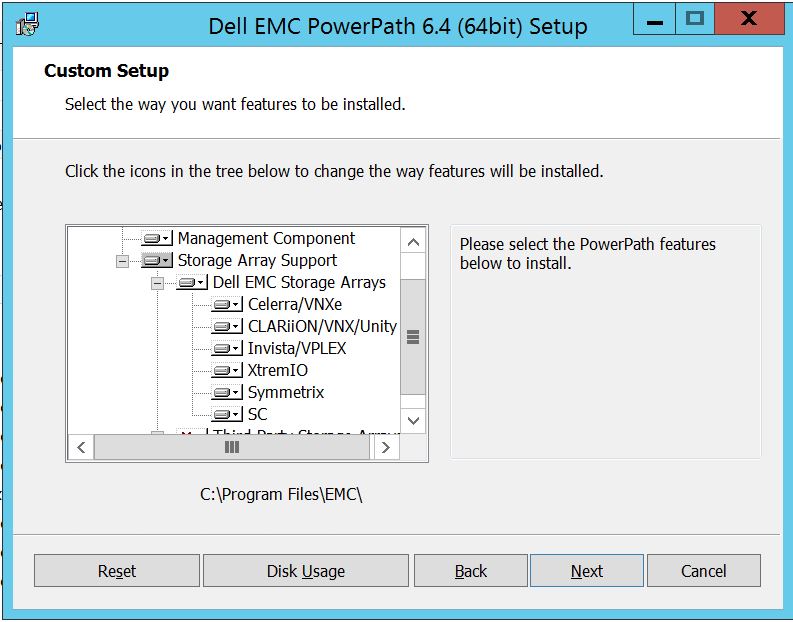
Ardından, herhangi bir depolamanın yakınındaki küçük aşağı anahtarı daha fazla kullanabilirsiniz. Örneğin, burada Symmetrix'i ele alalım. Ayrıca 2 seçenek gösterecektir:
1. Yerel sabit sürücü
2'ye yüklenecektir. Özelliğin tamamı yerel sabit sürücüye
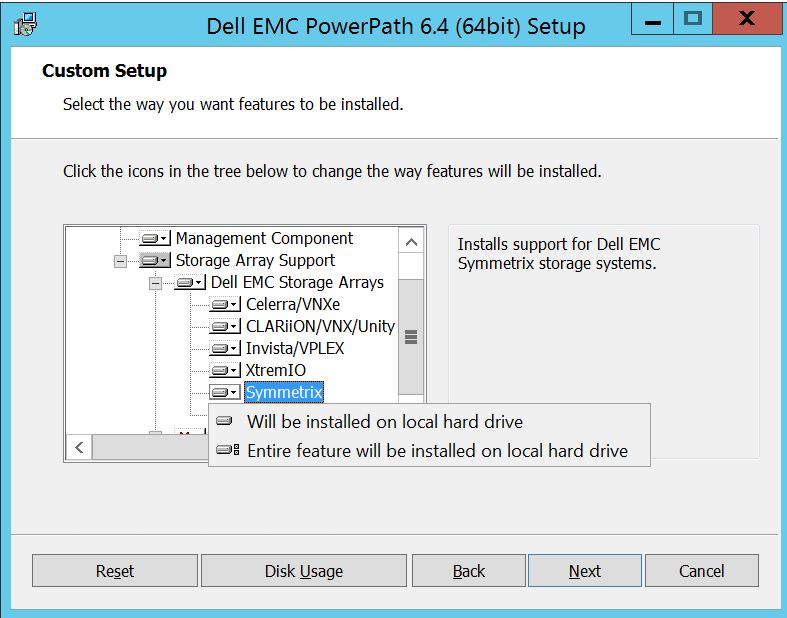
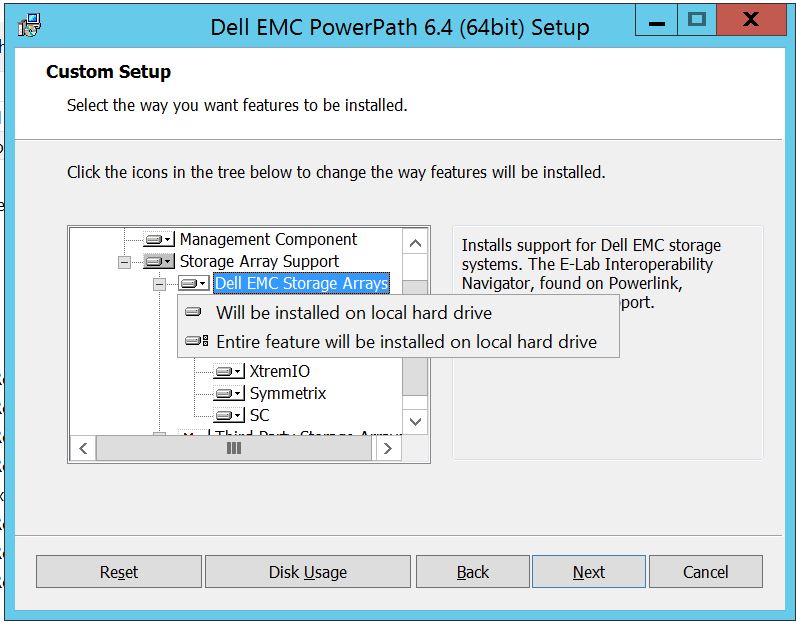
yüklenecektirTüm Dell EMC Depolama dizisinin yönetilmesini istiyorsanız ( Bu aslında varsayılandır)
Aynı işlemi Dell EMC Depolama Dizisi açılır menüsünden de yapabilirsiniz:
Tamamlandığında İleri
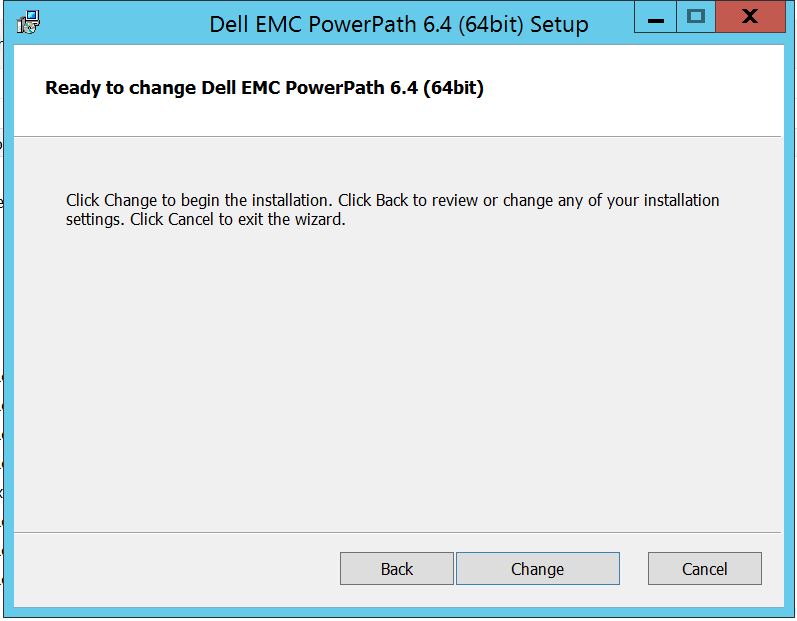
öğesini seçin Gerekli değişiklikleri tamamlayacak olan Değiştir'e tıklayın:
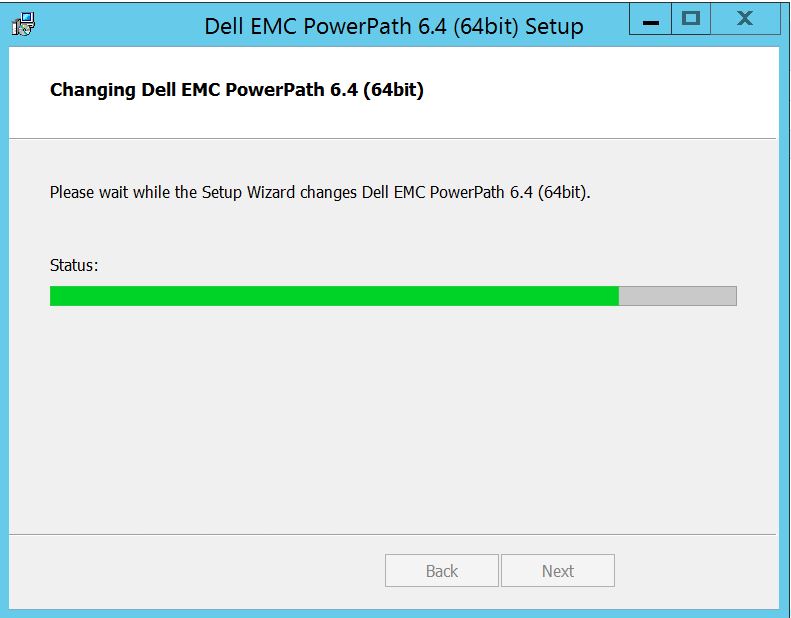
Bunu görmeniz gereken gönderi, burada "Bitir"i seçebilirsiniz Bitirdikten
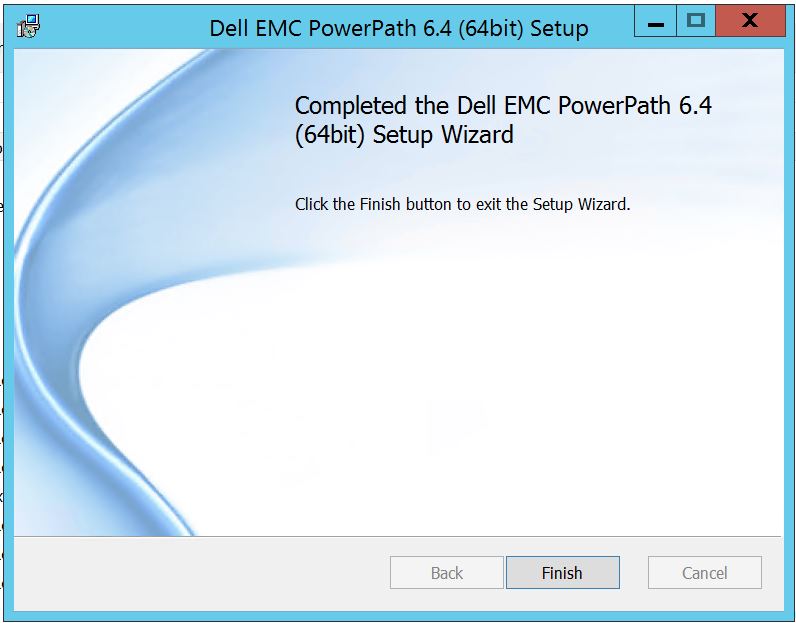 sonra Yeniden Başlatma isteyen bir açılır pencere alacaksınız, Lütfen Sunucuyu yeniden başlatmayı seçin Değişikliklerin Sunucu düzeyinde uygulanması gerektiğinden, bu da Depolama dizisi disklerini PowerPath'te görünür hale getirecektir.
Powermt ekran seçeneklerini çalıştırdığınızda yeniden başlatma sonrası, çıktı şu şekilde görünecektir:
** POWERMT GÖRÜNTÜLEME SEÇENEKLERİ **
CLARiiON LUN adlarını göster: true
Path Gecikme Süresi İzleyicisi: Off
Persist Path Information: Performans İzleyicisi'nde
: devre dışı
Otomatik bekleme: Hata Başına IO (iopf): Etkin
iopf yaşlandırma dönemi: 1 D
IOPF Limiti : 6000
Storage
System Class Attributes
------------ ----------
Symmetrix periodic autorestore = on
reactive autorestore = on
status = managed
proximity based autostandby = off
auto host registration = enabled
app finger printing = enabled
device to array performance report = enabled
device in use to array report = enabled
CLARiiON periodic autorestore = on
reactive autorestore = on
status = managed
proximity based autostandby = N/A
auto host registration = disabled
app finger printing = N/A
device to array performance report = N/A
device in use to array report = N/A
Invista periodic autorestore = on
reactive autorestore = on
status = managed
proximity based autostandby = N/A
auto host registration = N/A
app finger printing = N/A
device to array performance report = N/A
device in use to array report = N/A
Hitachi periodic autorestore = on
reactive autorestore = on
status = unmanaged
proximity based autostandby = N/A
auto host registration = N/A
app finger printing = N/A
device to array performance report = N/A
device in use to array report = N/A
HP xp periodic autorestore = on
reactive autorestore = on
status = unmanaged
proximity based autostandby = N/A
auto host registration = N/A
app finger printing = N/A
device to array performance report = N/A
device in use to array report = N/A
Ess periodic autorestore = on
reactive autorestore = on
status = unmanaged
proximity based autostandby = N/A
auto host registration = N/A
app finger printing = N/A
device to array performance report = N/A
device in use to array report = N/A
Generic periodic autorestore = on
reactive autorestore = on
status = managed
proximity based autostandby = N/A
auto host registration = N/A
app finger printing = N/A
device to array performance report = N/A
device in use to array report = N/A
VPLEX periodic autorestore = on
reactive autorestore = on
status = managed
proximity based autostandby = on
proximity based autostandby threshold = default
auto host registration = N/A
app finger printing = N/A
device to array performance report = N/A
device in use to array report = N/A
VNX periodic autorestore = on
reactive autorestore = on
status = managed
proximity based autostandby = N/A
auto host registration = disabled
app finger printing = N/A
device to array performance report = N/A
device in use to array report = N/A
NetApp periodic autorestore = on
reactive autorestore = on
status = unmanaged
proximity based autostandby = N/A
auto host registration = N/A
app finger printing = N/A
device to array performance report = N/A
device in use to array report = N/A
XtremIO periodic autorestore = on
reactive autorestore = on
status = managed
proximity based autostandby = N/A
auto host registration = N/A
app finger printing = N/A
device to array performance report = N/A
device in use to array report = N/A
Unity periodic autorestore = on
reactive autorestore = on
status = managed
proximity based autostandby = N/A
auto host registration = disabled
app finger printing = N/A
device to array performance report = N/A
device in use to array report = N/A
SC periodic autorestore = on
reactive autorestore = on
status = managed
proximity based autostandby = N/A
auto host registration = N/A
app finger printing = N/A
device to array performance report = N/A
device in use to array report = N/A
Müşterinin Symmetrix Depolama dizisindeki diskleri sunduğu ve yükseltme sonrasında PowerPath'te herhangi bir disk bulamadığını bildirdiği bir Senaryo aşağıda verilmiştir.
" Powermt ekran seçenekleri " çıktısı şunları gösterir:
** POWERMT GÖRÜNTÜLEME SEÇENEKLERİ **
CLARiiON LUN adlarını göster: true
Path Gecikme Süresi İzleyicisi: Off
Persist Path Information: Performans İzleyicisi'nde
: devre dışı
Otomatik bekleme: Hata Başına IO (iopf): Etkin
iopf yaşlandırma dönemi: 1 D
IOPF Limiti : 6000
Auto Host Registration: disabled
Storage
System Class Attributes
------------ ----------
Symmetrix periodic autorestore = on
reactive autorestore = on
status = unmanaged
proximity based autostandby = on
proximity based autostandby threshold = default
CLARiiON periodic autorestore = on
reactive autorestore = on
status = unmanaged
proximity based autostandby = N/A
Invista periodic autorestore = on
reactive autorestore = on
status = managed
proximity based autostandby = N/A
Hitachi periodic autorestore = on
reactive autorestore = on
status = unmanaged
proximity based autostandby = N/A
HP xp periodic autorestore = on
reactive autorestore = on
status = unmanaged
proximity based autostandby = N/A
Ess periodic autorestore = on
reactive autorestore = on
status = unmanaged
proximity based autostandby = N/A
Generic periodic autorestore = on
reactive autorestore = on
status = managed
proximity based autostandby = N/A
VPLEX periodic autorestore = on
reactive autorestore = on
status = managed
proximity based autostandby = on
proximity based autostandby threshold = default
VNX periodic autorestore = on
reactive autorestore = on
status = unmanaged
proximity based autostandby = N/A
NetApp periodic autorestore = on
reactive autorestore = on
status = unmanaged
proximity based autostandby = N/A
XtremIO periodic autorestore = on
reactive autorestore = on
status = managed
proximity based autostandby = N/A
Unity periodic autorestore = on
reactive autorestore = on
status = unmanaged
proximity based autostandby = N/A
SC periodic autorestore = on
reactive autorestore = on
status = managed
proximity based autostandby = off
Notice how some of the storage array and especially Symmetrix here is "unmanaged"
Here are the steps along with the screenshot from our lab server , how to make it "Managed"
Open Control Panel :
Program ve Özellikler'i
seçin PowerPath'i seçin ve yükleyici istemini açacak olan Değiştir/Değiştir'i seçin:
İleri'ye tıklayın ve değişikliği seçin:
Bu da sizi Özel Kurulum'a götürecektir:
Henüz yapmadıysanız artık Depolama Dizisi desteğini genişletebilir ve ayrıca PowerPath altında desteklenen tüm depolama dizilerini görüntüleyecek olan Dell EMC Depolama Dizilerini genişletebilirsiniz:
Ardından, herhangi bir depolamanın yakınındaki küçük aşağı anahtarı daha fazla kullanabilirsiniz. Örneğin, burada Symmetrix'i ele alalım. Ayrıca 2 seçenek gösterecektir:
1. Yerel sabit sürücü
2'ye yüklenecektir. Özelliğin tamamı yerel sabit sürücüye
yüklenecektirTüm Dell EMC Depolama dizisinin yönetilmesini istiyorsanız ( Bu aslında varsayılandır)
Aynı işlemi Dell EMC Depolama Dizisi açılır menüsünden de yapabilirsiniz:
Tamamlandığında İleri
öğesini seçin Gerekli değişiklikleri tamamlayacak olan Değiştir'e tıklayın:
Bunu görmeniz gereken gönderi, burada "Bitir"i seçebilirsiniz Bitirdikten
sonra Yeniden Başlatma isteyen bir açılır pencere alacaksınız, Lütfen Sunucuyu yeniden başlatmayı seçin Değişikliklerin Sunucu düzeyinde uygulanması gerektiğinden, bu da Depolama dizisi disklerini PowerPath'te görünür hale getirecektir.
Powermt ekran seçeneklerini çalıştırdığınızda yeniden başlatma sonrası, çıktı şu şekilde görünecektir:
** POWERMT GÖRÜNTÜLEME SEÇENEKLERİ **
CLARiiON LUN adlarını göster: true
Path Gecikme Süresi İzleyicisi: Off
Persist Path Information: Performans İzleyicisi'nde
: devre dışı
Otomatik bekleme: Hata Başına IO (iopf): Etkin
iopf yaşlandırma dönemi: 1 D
IOPF Limiti : 6000
Storage
System Class Attributes
------------ ----------
Symmetrix periodic autorestore = on
reactive autorestore = on
status = managed
proximity based autostandby = off
auto host registration = enabled
app finger printing = enabled
device to array performance report = enabled
device in use to array report = enabled
CLARiiON periodic autorestore = on
reactive autorestore = on
status = managed
proximity based autostandby = N/A
auto host registration = disabled
app finger printing = N/A
device to array performance report = N/A
device in use to array report = N/A
Invista periodic autorestore = on
reactive autorestore = on
status = managed
proximity based autostandby = N/A
auto host registration = N/A
app finger printing = N/A
device to array performance report = N/A
device in use to array report = N/A
Hitachi periodic autorestore = on
reactive autorestore = on
status = unmanaged
proximity based autostandby = N/A
auto host registration = N/A
app finger printing = N/A
device to array performance report = N/A
device in use to array report = N/A
HP xp periodic autorestore = on
reactive autorestore = on
status = unmanaged
proximity based autostandby = N/A
auto host registration = N/A
app finger printing = N/A
device to array performance report = N/A
device in use to array report = N/A
Ess periodic autorestore = on
reactive autorestore = on
status = unmanaged
proximity based autostandby = N/A
auto host registration = N/A
app finger printing = N/A
device to array performance report = N/A
device in use to array report = N/A
Generic periodic autorestore = on
reactive autorestore = on
status = managed
proximity based autostandby = N/A
auto host registration = N/A
app finger printing = N/A
device to array performance report = N/A
device in use to array report = N/A
VPLEX periodic autorestore = on
reactive autorestore = on
status = managed
proximity based autostandby = on
proximity based autostandby threshold = default
auto host registration = N/A
app finger printing = N/A
device to array performance report = N/A
device in use to array report = N/A
VNX periodic autorestore = on
reactive autorestore = on
status = managed
proximity based autostandby = N/A
auto host registration = disabled
app finger printing = N/A
device to array performance report = N/A
device in use to array report = N/A
NetApp periodic autorestore = on
reactive autorestore = on
status = unmanaged
proximity based autostandby = N/A
auto host registration = N/A
app finger printing = N/A
device to array performance report = N/A
device in use to array report = N/A
XtremIO periodic autorestore = on
reactive autorestore = on
status = managed
proximity based autostandby = N/A
auto host registration = N/A
app finger printing = N/A
device to array performance report = N/A
device in use to array report = N/A
Unity periodic autorestore = on
reactive autorestore = on
status = managed
proximity based autostandby = N/A
auto host registration = disabled
app finger printing = N/A
device to array performance report = N/A
device in use to array report = N/A
SC periodic autorestore = on
reactive autorestore = on
status = managed
proximity based autostandby = N/A
auto host registration = N/A
app finger printing = N/A
device to array performance report = N/A
device in use to array report = N/A
Affected Products
PowerPath for WindowsProducts
PowerPath for WindowsArticle Properties
Article Number: 000158477
Article Type: How To
Last Modified: 17 Oct 2025
Version: 4
Find answers to your questions from other Dell users
Support Services
Check if your device is covered by Support Services.