如何在 Windows 的 PowerPath 中管理儲存裝置
Summary: 如果客戶回報看不到磁碟,並且在 Powermt 顯示選項中,如果您注意到儲存陣列未受管理,如何使其受管理
This article applies to
This article does not apply to
This article is not tied to any specific product.
Not all product versions are identified in this article.
Instructions
在某些情況下,當客戶回報無法注意到 PowerPath 中的儲存陣列提供的任何磁碟時。當您執行 powermt 顯示選項時,如果您注意到儲存陣列為「未受管理」,則在使用 PowerPath 的 Windows 環境中。請依照本知識文章中的建議行動計畫,執行與「受管理」相同的動作。
在這種情況下,客戶已經提供來自 Symmetrix 儲存陣列的磁碟,並回報升級後無法在 PowerPath 中探索到任何磁碟。
「 powermt display options 」的輸出顯示:
** POWERMT 顯示選項 **
顯示 CLARiiON LUN 名稱: True
路徑延遲監控器:關閉
保留路徑資訊:在
效能監視器上:已停用
自動待機: 每次故障 IO 數 (iopf):啟用
iopf 老化期間:1 D
IOPF 限制: 6000
Auto Host Registration: disabled
Storage
System Class Attributes
------------ ----------
Symmetrix periodic autorestore = on
reactive autorestore = on
status = unmanaged
proximity based autostandby = on
proximity based autostandby threshold = default
CLARiiON periodic autorestore = on
reactive autorestore = on
status = unmanaged
proximity based autostandby = N/A
Invista periodic autorestore = on
reactive autorestore = on
status = managed
proximity based autostandby = N/A
Hitachi periodic autorestore = on
reactive autorestore = on
status = unmanaged
proximity based autostandby = N/A
HP xp periodic autorestore = on
reactive autorestore = on
status = unmanaged
proximity based autostandby = N/A
Ess periodic autorestore = on
reactive autorestore = on
status = unmanaged
proximity based autostandby = N/A
Generic periodic autorestore = on
reactive autorestore = on
status = managed
proximity based autostandby = N/A
VPLEX periodic autorestore = on
reactive autorestore = on
status = managed
proximity based autostandby = on
proximity based autostandby threshold = default
VNX periodic autorestore = on
reactive autorestore = on
status = unmanaged
proximity based autostandby = N/A
NetApp periodic autorestore = on
reactive autorestore = on
status = unmanaged
proximity based autostandby = N/A
XtremIO periodic autorestore = on
reactive autorestore = on
status = managed
proximity based autostandby = N/A
Unity periodic autorestore = on
reactive autorestore = on
status = unmanaged
proximity based autostandby = N/A
SC periodic autorestore = on
reactive autorestore = on
status = managed
proximity based autostandby = off
Notice how some of the storage array and especially Symmetrix here is "unmanaged"
Here are the steps along with the screenshot from our lab server , how to make it "Managed"
Open Control Panel :
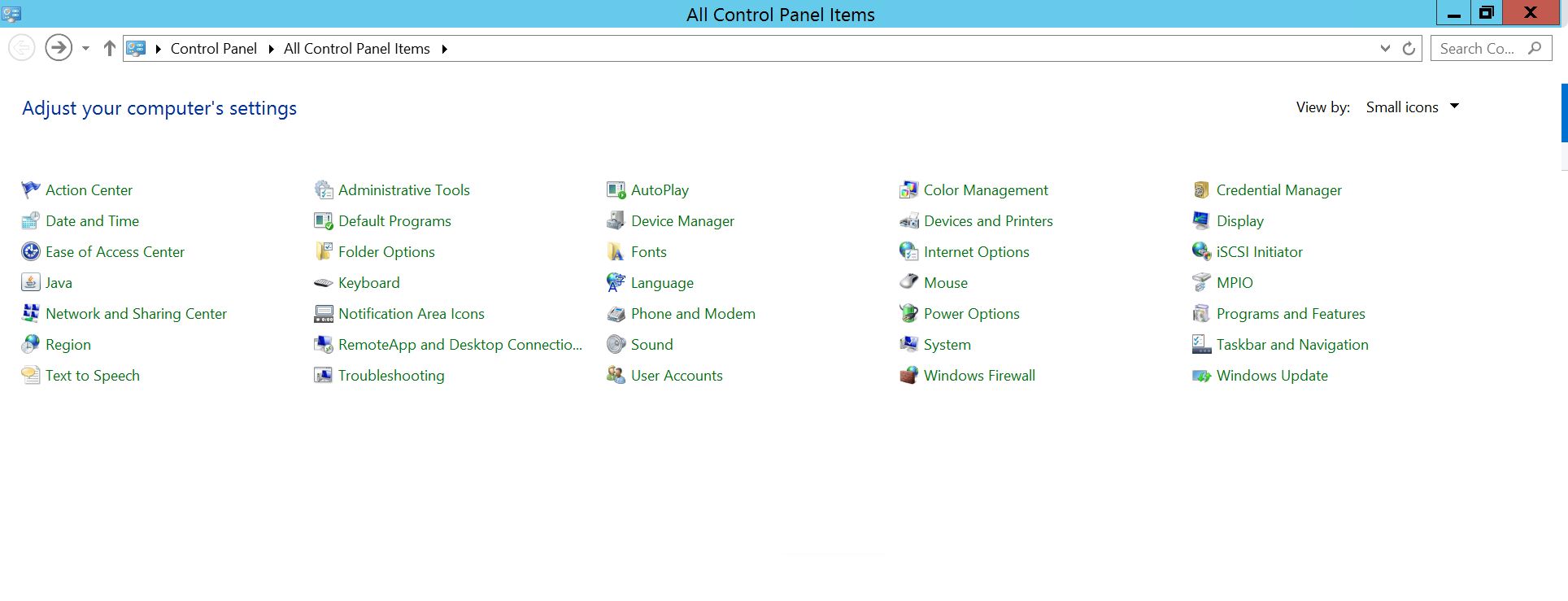
選取程式與功能
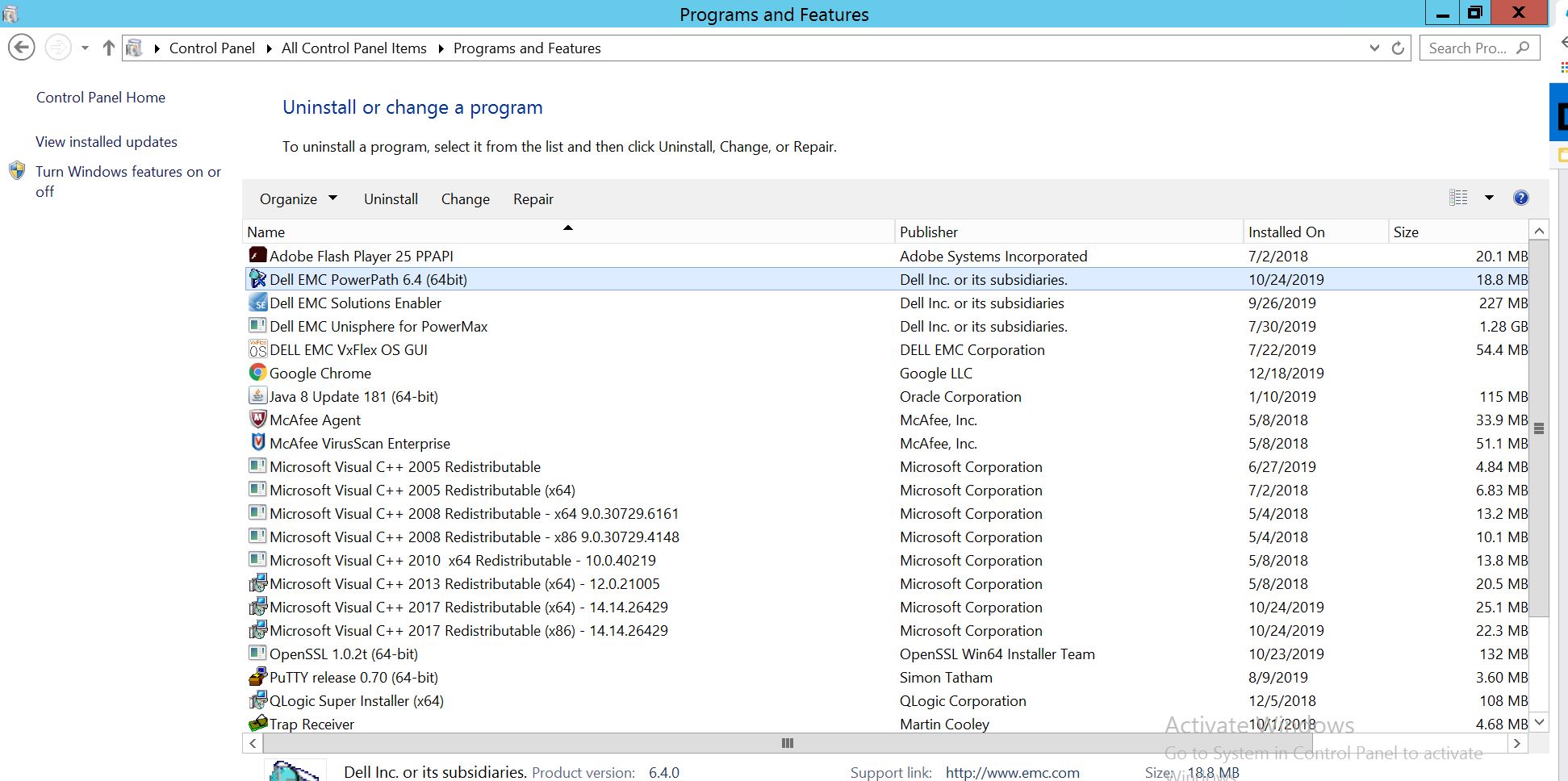
選取 PowerPath,然後選擇修改/變更,這會開啟安裝程式提示:
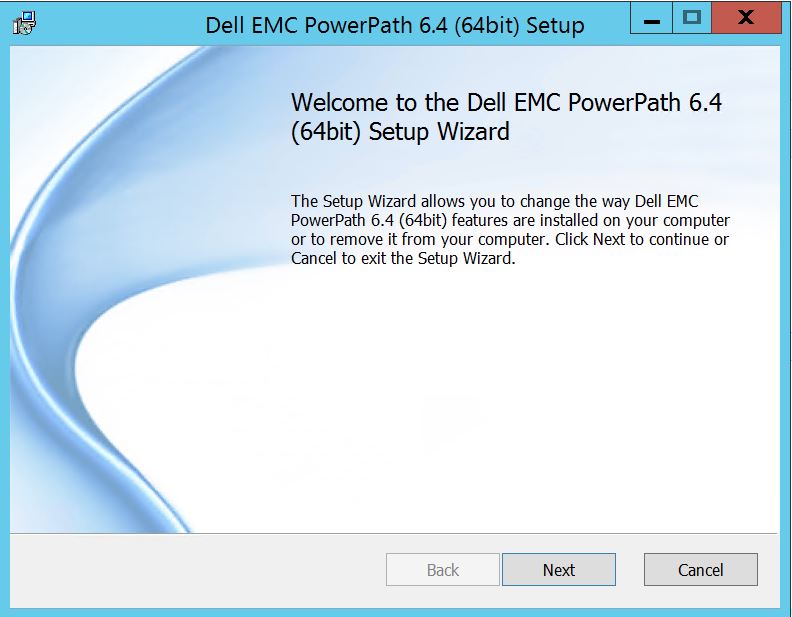
單擊“下一步”,然後按照選擇更改進行操作:
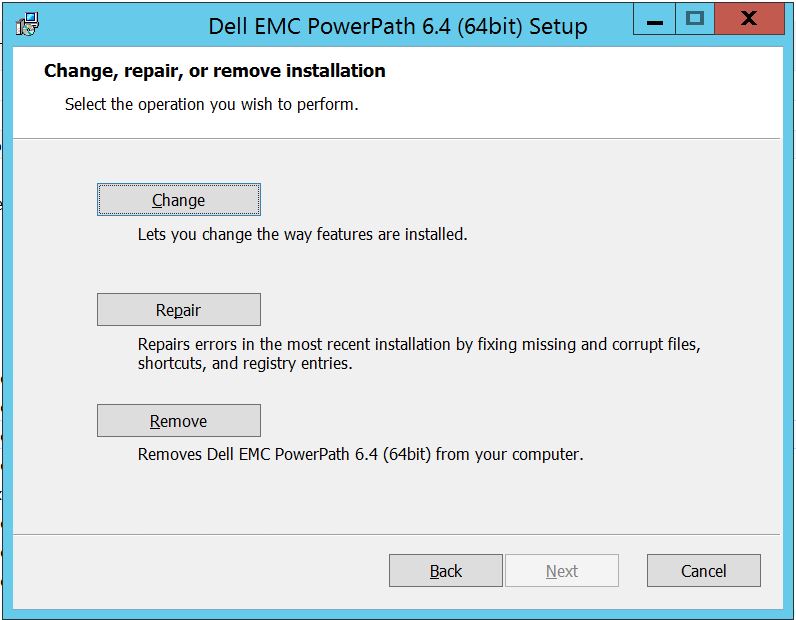
這將帶您進入“自定義設置”:
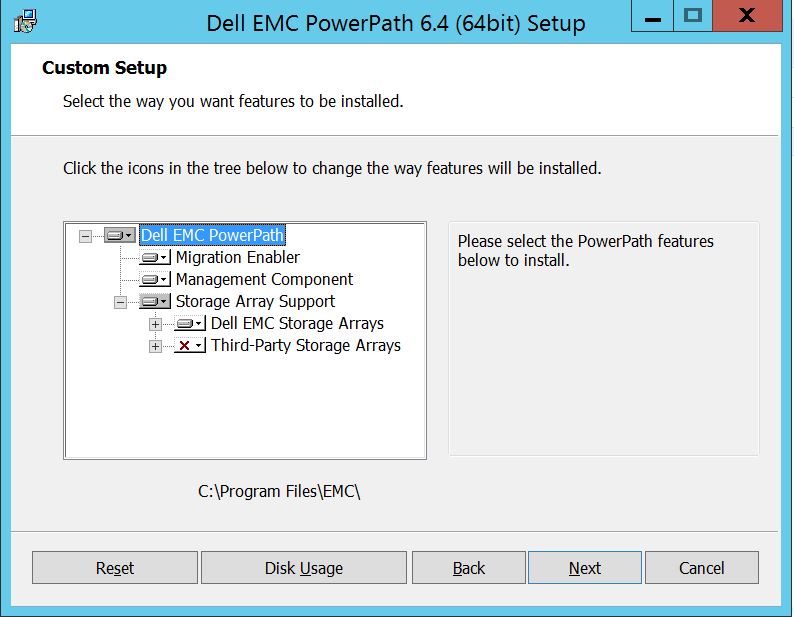
若尚未支援,您現在可以擴展儲存陣列支援,同時展開 Dell EMC 儲存陣列,這會顯示 PowerPath 支援的所有儲存陣列:
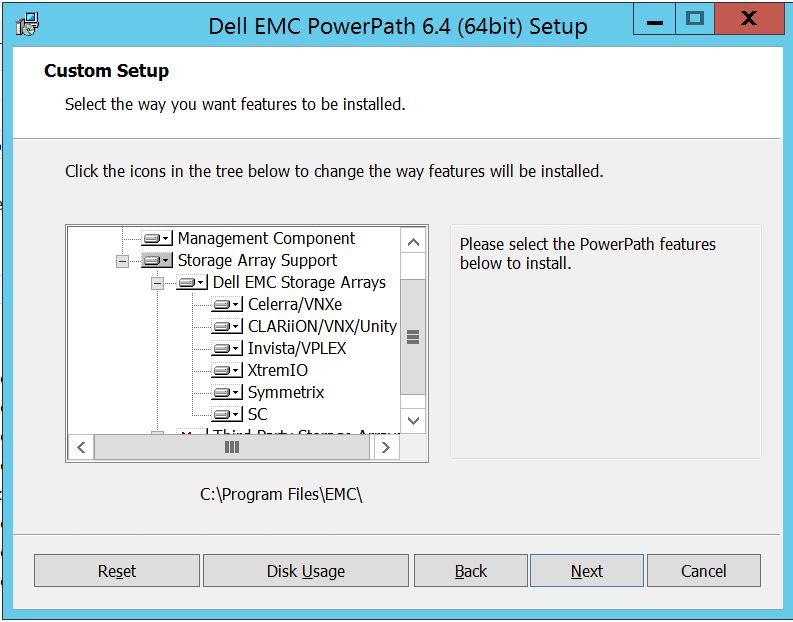
接著,您可以使用任何儲存裝置附近的小下鍵。這裡以 Symmetrix 為例。它將進一步顯示 2 個選項:
1.將會安裝於本機硬碟
2。整個功能將安裝在本地硬碟驅動器
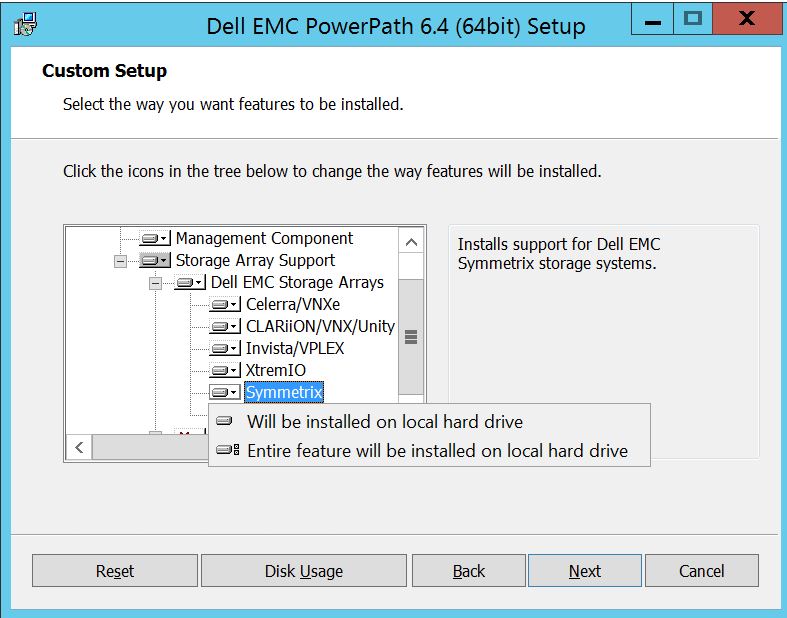
上如果您想要管理所有的 Dell EMC 儲存陣列 (基本上為預設陣列),
您也可以在 Dell EMC 儲存陣列下拉式清單中執行相同動作: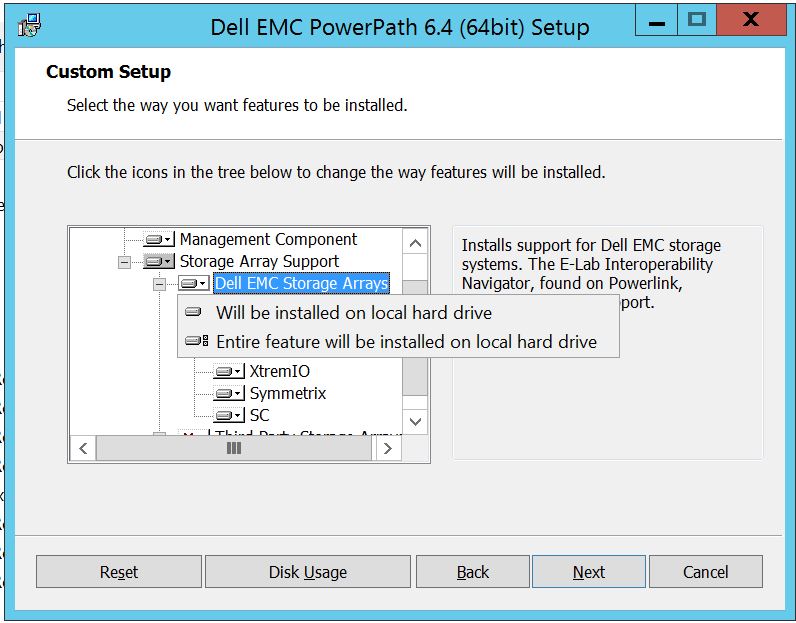
完成後選取下一步
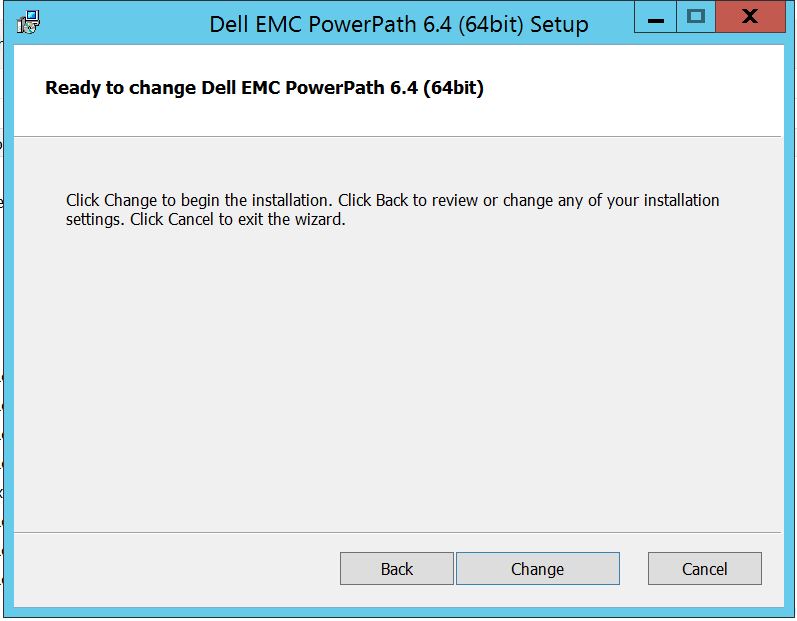
按一下變更,這將完成必要的變更:
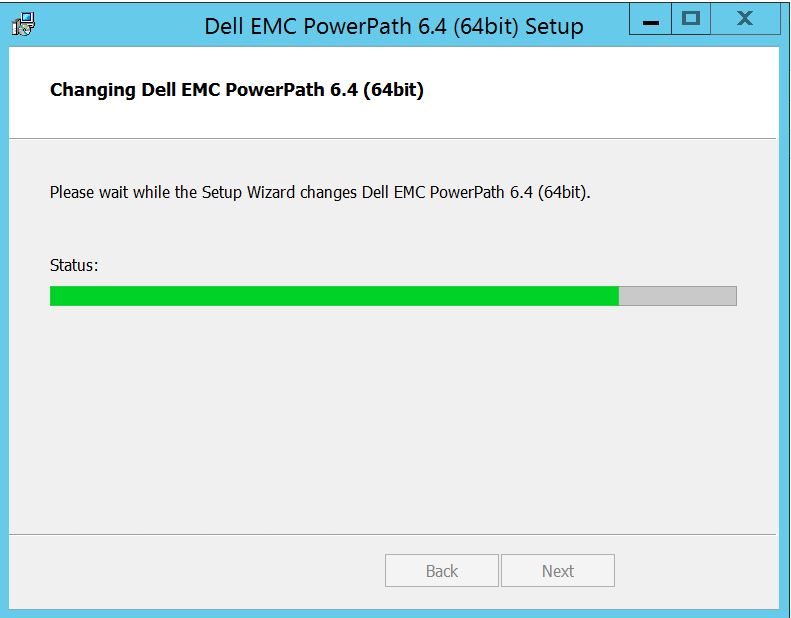
您應該會看到以下內容,您可以在其中選取「完成」
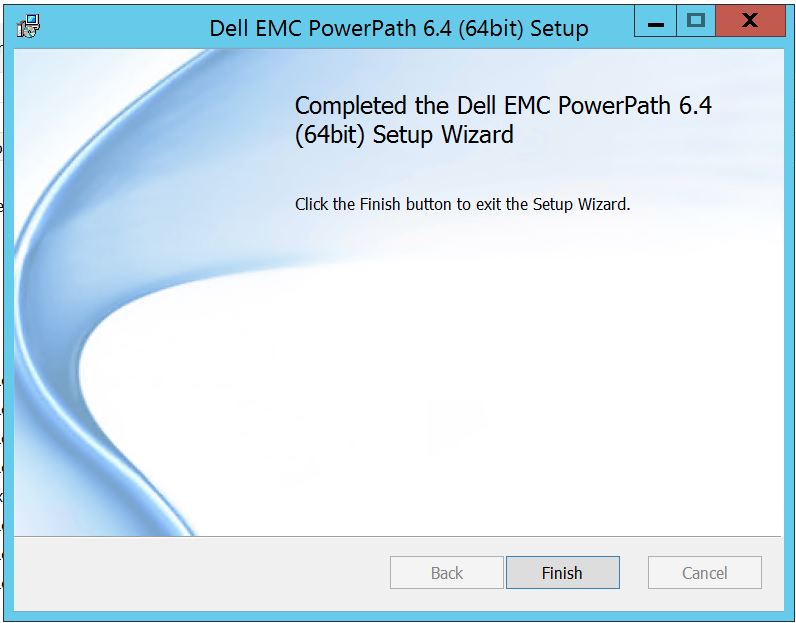 完成後,您會看到要求重新開機的快顯,請選擇將伺服器重新開機,因為變更必須在伺服器層級實作,如此便會在 PowerPath 中顯示儲存陣列磁碟。
重新開機後,當您執行 powermt 顯示選項時,輸出會是這樣:
** POWERMT 顯示選項 **
顯示 CLARiiON LUN 名稱: True
路徑延遲監控器:關閉
保留路徑資訊:在
效能監視器上:已停用
自動待機: 每次故障 IO 數 (iopf):啟用
iopf 老化期間:1 D
IOPF 限制: 6000
Storage
System Class Attributes
------------ ----------
Symmetrix periodic autorestore = on
reactive autorestore = on
status = managed
proximity based autostandby = off
auto host registration = enabled
app finger printing = enabled
device to array performance report = enabled
device in use to array report = enabled
CLARiiON periodic autorestore = on
reactive autorestore = on
status = managed
proximity based autostandby = N/A
auto host registration = disabled
app finger printing = N/A
device to array performance report = N/A
device in use to array report = N/A
Invista periodic autorestore = on
reactive autorestore = on
status = managed
proximity based autostandby = N/A
auto host registration = N/A
app finger printing = N/A
device to array performance report = N/A
device in use to array report = N/A
Hitachi periodic autorestore = on
reactive autorestore = on
status = unmanaged
proximity based autostandby = N/A
auto host registration = N/A
app finger printing = N/A
device to array performance report = N/A
device in use to array report = N/A
HP xp periodic autorestore = on
reactive autorestore = on
status = unmanaged
proximity based autostandby = N/A
auto host registration = N/A
app finger printing = N/A
device to array performance report = N/A
device in use to array report = N/A
Ess periodic autorestore = on
reactive autorestore = on
status = unmanaged
proximity based autostandby = N/A
auto host registration = N/A
app finger printing = N/A
device to array performance report = N/A
device in use to array report = N/A
Generic periodic autorestore = on
reactive autorestore = on
status = managed
proximity based autostandby = N/A
auto host registration = N/A
app finger printing = N/A
device to array performance report = N/A
device in use to array report = N/A
VPLEX periodic autorestore = on
reactive autorestore = on
status = managed
proximity based autostandby = on
proximity based autostandby threshold = default
auto host registration = N/A
app finger printing = N/A
device to array performance report = N/A
device in use to array report = N/A
VNX periodic autorestore = on
reactive autorestore = on
status = managed
proximity based autostandby = N/A
auto host registration = disabled
app finger printing = N/A
device to array performance report = N/A
device in use to array report = N/A
NetApp periodic autorestore = on
reactive autorestore = on
status = unmanaged
proximity based autostandby = N/A
auto host registration = N/A
app finger printing = N/A
device to array performance report = N/A
device in use to array report = N/A
XtremIO periodic autorestore = on
reactive autorestore = on
status = managed
proximity based autostandby = N/A
auto host registration = N/A
app finger printing = N/A
device to array performance report = N/A
device in use to array report = N/A
Unity periodic autorestore = on
reactive autorestore = on
status = managed
proximity based autostandby = N/A
auto host registration = disabled
app finger printing = N/A
device to array performance report = N/A
device in use to array report = N/A
SC periodic autorestore = on
reactive autorestore = on
status = managed
proximity based autostandby = N/A
auto host registration = N/A
app finger printing = N/A
device to array performance report = N/A
device in use to array report = N/A
在這種情況下,客戶已經提供來自 Symmetrix 儲存陣列的磁碟,並回報升級後無法在 PowerPath 中探索到任何磁碟。
「 powermt display options 」的輸出顯示:
** POWERMT 顯示選項 **
顯示 CLARiiON LUN 名稱: True
路徑延遲監控器:關閉
保留路徑資訊:在
效能監視器上:已停用
自動待機: 每次故障 IO 數 (iopf):啟用
iopf 老化期間:1 D
IOPF 限制: 6000
Auto Host Registration: disabled
Storage
System Class Attributes
------------ ----------
Symmetrix periodic autorestore = on
reactive autorestore = on
status = unmanaged
proximity based autostandby = on
proximity based autostandby threshold = default
CLARiiON periodic autorestore = on
reactive autorestore = on
status = unmanaged
proximity based autostandby = N/A
Invista periodic autorestore = on
reactive autorestore = on
status = managed
proximity based autostandby = N/A
Hitachi periodic autorestore = on
reactive autorestore = on
status = unmanaged
proximity based autostandby = N/A
HP xp periodic autorestore = on
reactive autorestore = on
status = unmanaged
proximity based autostandby = N/A
Ess periodic autorestore = on
reactive autorestore = on
status = unmanaged
proximity based autostandby = N/A
Generic periodic autorestore = on
reactive autorestore = on
status = managed
proximity based autostandby = N/A
VPLEX periodic autorestore = on
reactive autorestore = on
status = managed
proximity based autostandby = on
proximity based autostandby threshold = default
VNX periodic autorestore = on
reactive autorestore = on
status = unmanaged
proximity based autostandby = N/A
NetApp periodic autorestore = on
reactive autorestore = on
status = unmanaged
proximity based autostandby = N/A
XtremIO periodic autorestore = on
reactive autorestore = on
status = managed
proximity based autostandby = N/A
Unity periodic autorestore = on
reactive autorestore = on
status = unmanaged
proximity based autostandby = N/A
SC periodic autorestore = on
reactive autorestore = on
status = managed
proximity based autostandby = off
Notice how some of the storage array and especially Symmetrix here is "unmanaged"
Here are the steps along with the screenshot from our lab server , how to make it "Managed"
Open Control Panel :
選取程式與功能
選取 PowerPath,然後選擇修改/變更,這會開啟安裝程式提示:
單擊“下一步”,然後按照選擇更改進行操作:
這將帶您進入“自定義設置”:
若尚未支援,您現在可以擴展儲存陣列支援,同時展開 Dell EMC 儲存陣列,這會顯示 PowerPath 支援的所有儲存陣列:
接著,您可以使用任何儲存裝置附近的小下鍵。這裡以 Symmetrix 為例。它將進一步顯示 2 個選項:
1.將會安裝於本機硬碟
2。整個功能將安裝在本地硬碟驅動器
上如果您想要管理所有的 Dell EMC 儲存陣列 (基本上為預設陣列),
您也可以在 Dell EMC 儲存陣列下拉式清單中執行相同動作:
完成後選取下一步
按一下變更,這將完成必要的變更:
您應該會看到以下內容,您可以在其中選取「完成」
完成後,您會看到要求重新開機的快顯,請選擇將伺服器重新開機,因為變更必須在伺服器層級實作,如此便會在 PowerPath 中顯示儲存陣列磁碟。
重新開機後,當您執行 powermt 顯示選項時,輸出會是這樣:
** POWERMT 顯示選項 **
顯示 CLARiiON LUN 名稱: True
路徑延遲監控器:關閉
保留路徑資訊:在
效能監視器上:已停用
自動待機: 每次故障 IO 數 (iopf):啟用
iopf 老化期間:1 D
IOPF 限制: 6000
Storage
System Class Attributes
------------ ----------
Symmetrix periodic autorestore = on
reactive autorestore = on
status = managed
proximity based autostandby = off
auto host registration = enabled
app finger printing = enabled
device to array performance report = enabled
device in use to array report = enabled
CLARiiON periodic autorestore = on
reactive autorestore = on
status = managed
proximity based autostandby = N/A
auto host registration = disabled
app finger printing = N/A
device to array performance report = N/A
device in use to array report = N/A
Invista periodic autorestore = on
reactive autorestore = on
status = managed
proximity based autostandby = N/A
auto host registration = N/A
app finger printing = N/A
device to array performance report = N/A
device in use to array report = N/A
Hitachi periodic autorestore = on
reactive autorestore = on
status = unmanaged
proximity based autostandby = N/A
auto host registration = N/A
app finger printing = N/A
device to array performance report = N/A
device in use to array report = N/A
HP xp periodic autorestore = on
reactive autorestore = on
status = unmanaged
proximity based autostandby = N/A
auto host registration = N/A
app finger printing = N/A
device to array performance report = N/A
device in use to array report = N/A
Ess periodic autorestore = on
reactive autorestore = on
status = unmanaged
proximity based autostandby = N/A
auto host registration = N/A
app finger printing = N/A
device to array performance report = N/A
device in use to array report = N/A
Generic periodic autorestore = on
reactive autorestore = on
status = managed
proximity based autostandby = N/A
auto host registration = N/A
app finger printing = N/A
device to array performance report = N/A
device in use to array report = N/A
VPLEX periodic autorestore = on
reactive autorestore = on
status = managed
proximity based autostandby = on
proximity based autostandby threshold = default
auto host registration = N/A
app finger printing = N/A
device to array performance report = N/A
device in use to array report = N/A
VNX periodic autorestore = on
reactive autorestore = on
status = managed
proximity based autostandby = N/A
auto host registration = disabled
app finger printing = N/A
device to array performance report = N/A
device in use to array report = N/A
NetApp periodic autorestore = on
reactive autorestore = on
status = unmanaged
proximity based autostandby = N/A
auto host registration = N/A
app finger printing = N/A
device to array performance report = N/A
device in use to array report = N/A
XtremIO periodic autorestore = on
reactive autorestore = on
status = managed
proximity based autostandby = N/A
auto host registration = N/A
app finger printing = N/A
device to array performance report = N/A
device in use to array report = N/A
Unity periodic autorestore = on
reactive autorestore = on
status = managed
proximity based autostandby = N/A
auto host registration = disabled
app finger printing = N/A
device to array performance report = N/A
device in use to array report = N/A
SC periodic autorestore = on
reactive autorestore = on
status = managed
proximity based autostandby = N/A
auto host registration = N/A
app finger printing = N/A
device to array performance report = N/A
device in use to array report = N/A
Affected Products
PowerPath for WindowsProducts
PowerPath for WindowsArticle Properties
Article Number: 000158477
Article Type: How To
Last Modified: 17 Oct 2025
Version: 4
Find answers to your questions from other Dell users
Support Services
Check if your device is covered by Support Services.