在視窗更新感應器驅動程式後看到未知裝置
Summary: 下列文章提供裝置管理員顯示未知裝置 (UBLOXVCP\PNP0501) 問題的相關資訊。透過 Windows Update 更新感應器驅動程式後,就會發生這種情況。本文可協助您故障診斷此問題。
This article applies to
This article does not apply to
This article is not tied to any specific product.
Not all product versions are identified in this article.
Symptoms
感應器驅動程式更新後,裝置管理員回報未知裝置
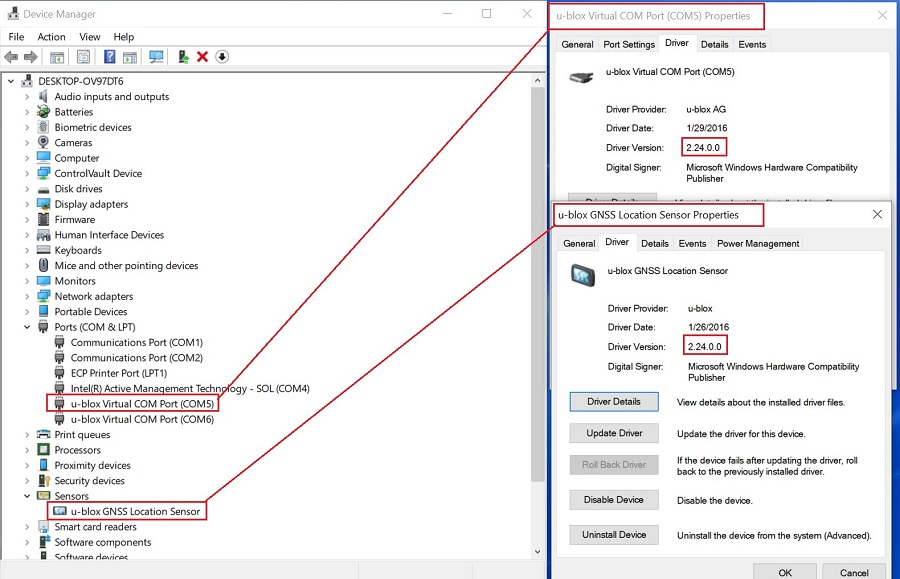
裝置管理員可能會顯示未知裝置 (UBLOXVCP\PNP0501) 執行 Windows 更新之後。當作業系統自動更新 u-blox 感應器驅動程式 和 虛擬通訊 (COM) 連接埠 (VCP) 驅動程式時,就會發生這種情況。
如果您使用以下平臺和作業系統,這將影響您:
- Latitude 7214 Rugged Extreme 筆記型電腦
- Windows 10 (組建 19044.1202)
Cause
這意味著您不能在全球定位系統 (GPS) 定位期間使用 COM 埠傳輸美國國家海洋電子協會 (NMEA) 數據。
Microsoft 已不再支援此更新,並已透過 Windows 更新從其作業系統移除 VCP 驅動程式版本 2.24 認證。
Resolution
注意:您必須擁有筆記型電腦的系統管理員權限,才能變更作業系統或更新任何軟體。
- 將數據機或通訊驅動程式更新至
u-blox GPS Communication Driver,版本2.24.0.0, A00或更新版本。使用下列連結中的指示下載並安裝u-blox-GPS-Communication-Driver_TX5Y1_WIN64_2.24.0.0_A00_02.exe安裝檔案:- Dell 知識文章:如何下載和安裝 Dell 驅動程式
- 裝置管理員中現在會顯示正確的 驅動程式版本。
Affected Products
Latitude 7214 Rugged ExtremeArticle Properties
Article Number: 000193379
Article Type: Solution
Last Modified: 06 May 2025
Version: 6
Find answers to your questions from other Dell users
Support Services
Check if your device is covered by Support Services.