窗口更新传感器驱动程序后看到未知设备
Summary: 以下文章提供有关设备管理器显示未知设备 (UBLOXVCP\PNP0501) 的问题的信息。通过 Windows Update 更新传感器驱动程序后,会发生这种情况。本文可帮助您对问题进行故障处理。
This article applies to
This article does not apply to
This article is not tied to any specific product.
Not all product versions are identified in this article.
Symptoms
传感器驱动程序更新后,设备管理器报告未知设备
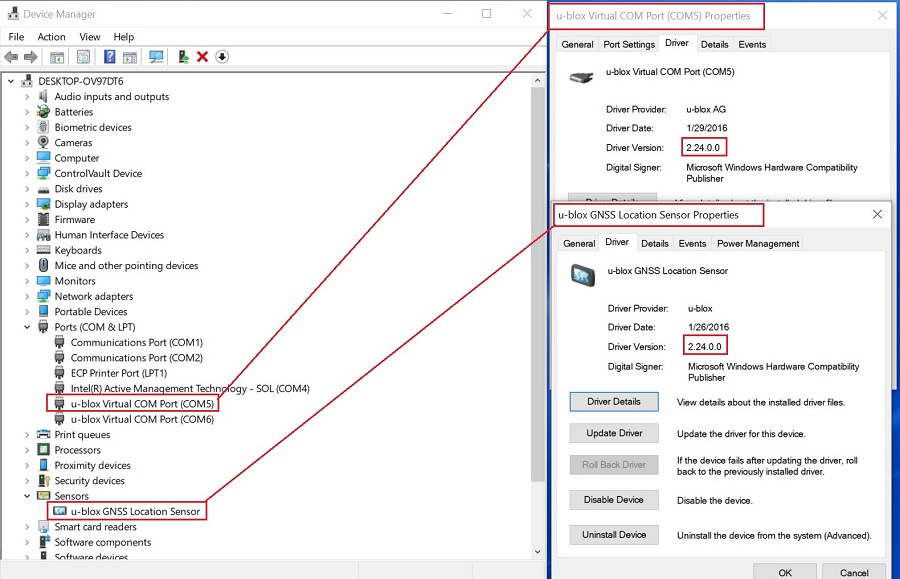
设备管理器可能会显示未知设备 (UBLOXVCP\PNP0501) Windows 更新运行后。当作系统自动更新 u-blox 传感器驱动程序 和 虚拟通信 (COM) 端口 (VCP) 驱动程序时,会发生这种情况。
如果您使用的是以下平台和作系统,这会影响您:
- Latitude 7214 Rugged Extreme 笔记本电脑
- Windows 10(内部版本 19044.1202)
Cause
这意味着您不能在全球定位系统 (GPS) 定位期间使用 COM 端口传输国家海洋电子协会 (NMEA) 数据。
Microsoft 不再支持此更新,并已通过 Windows 更新从其作系统中删除了 VCP 驱动程序版本 2.24 认证。
Resolution
提醒:您必须在笔记本电脑上拥有管理员权限才能进行任何操作系统更改或更新任何软件。
- 将调制解调器或通信驱动程序更新为
u-blox GPS Communication Driver,版本2.24.0.0, A00或更高版本。使用以下链接中的说明下载并安装u-blox-GPS-Communication-Driver_TX5Y1_WIN64_2.24.0.0_A00_02.exe安装文件:- 戴尔知识库文章:如何下载和安装戴尔驱动程序
- 正确的 驱动程序版本现在显示在设备管理器中。
Affected Products
Latitude 7214 Rugged ExtremeArticle Properties
Article Number: 000193379
Article Type: Solution
Last Modified: 06 May 2025
Version: 6
Find answers to your questions from other Dell users
Support Services
Check if your device is covered by Support Services.