Cannot Bind LDAPs in Dell Security Management Server Virtual 11.0 or Later
Summary: This article discusses a situation where Dell Security Management Server Virtual v11.0 and later receive the error "unable to connect to the server" when binding LDAPs in Remote Management Console. ...
Symptoms
Affected Products:
- Dell Security Management Server Virtual
Affected Versions:
- v11.0 and Later
Affected Operating Systems:
- Linux
Typically seen after upgrading to Dell Security Management Server Virtual v11.0 or later from an older version and attempting to use the same LDAPs settings that worked fine before the update now show a bad status for the domain and errors are encountered when attempting to save LDAPs settings.
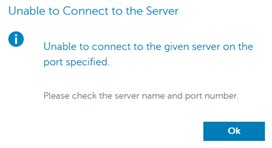
Error unable to connect to the server appears when attempting to bind LDAPs in the remote management console. Logs show SSL handshake errors:
org.springframework.ldap.CommunicationException: simple bind failed: ADSERVER.DOMAIN.COM:636; nested exception is javax.naming.CommunicationException: simple bind failed: ADSERVER.DOMAIN.COM:636 [Root exception is javax.net.ssl.SSLHandshakeException: No subject alternative DNS name matching ADSERVER.DOMAIN.COM found.]
Cause
Self-singed certificates and the Java updates in v11.0. Endpoint identification algorithms have been enabled by default, to improve the robustness of LDAPS (secure LDAP over TLS) connections. From the changelog: https://www.oracle.com/technetwork/java/javase/8u181-relnotes-4479407.html

Resolution
Disable endpoint identification by modifying wrapper.conf by following the instructions below.
- Stop services reference How to Stop and Start Services in Dell Security Management Server Virtual.
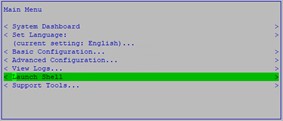
- From the main menu, select Launch Shell:
- Type
su dellsupportand press enter:

- Type the password for the
dellsupportaccount and press enter:

- Type
sudo nano /opt/dell/server/security-server/conf/wrapper.conf.

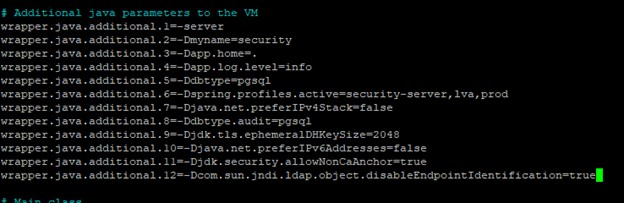
- Under # Additional java parameters to the VM, add the line
wrapper.java.additional.XX=-Dcom.sun.jndi.ldap.object.disableEndpointIdentification=truewhere XX is incremental to the list (mine is 12 in this example):
- Press CTRL + O to save changes.
- Press CTRL + X to exit.
- Type
exitand then press Enter to log out ofdellsupport.

- Type
exitand then press Enter to log out of the shell to the Main Menu.

- Start services reference How to Stop and Start Services in Dell Security Management Server Virtual.
Now you can bind the domain using LDAPs port.