Data Domain : Système de fichiers DDVE arrêté/impossible d’activer le système de fichiers DDVE
Summary: Impossible d’activer le système de fichiers DDVE.
Symptoms
Système de fichiers DDVE arrêté.
Le disque du niveau actif n’est pas disponible.
Le niveau actif affiche les éléments suivants :
sysadmin@DD1# filesys show space
Active Tier :
Resource Size GiB Used GiB Avail GiB Use % Cleanable GiB*
---------------- -------- -------- --------- ---- --------------
/data : pre-comp - - - - -
/data : post-comp - - - - - -
/ddvar 49,2 10,0 36,7 21 % -
/ddvar/cœur 158,5 7,0 143,5 5 % -
---------------- -------- -------- --------- ---- --------------
Le système de fichiers n’est pas disponible pour le moment.
Cause
Environnement système dans lequel DDVE est configuré sur ESX connecté à un périphérique de stockage externe.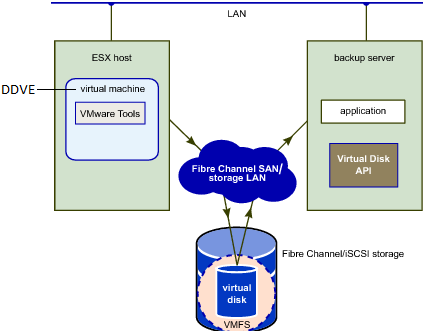
Le problème mentionné ci-dessus se produit lorsque le périphérique de stockage externe perd la connectivité avec l’hôte ESXi.
L’erreur suivante a été signalée dans le journal vmkernel du serveur ESX
Log Location #cd /var/log/vmkernel.log
cpu4:2098003)ScsiDeviceIO : 3032: Cmd(0x45a2c0b7ca80) 0x2a, CmdSN 0x3bf from world 2305853 to dev « naa.6006016001f049003b705c5cde10cdfc » (vmhba5 :C0 :T5 :L1) failed H :0x8 D :0x0 P :0x0
cpu8:2098003)ScsiDeviceIO : 3032: Cmd(0x459ac13b9340) 0x28, CmdSN 0x2e7 from world 2305853 to dev « naa.6006016001f0490045705c5c730bd671 » (vmhba5 :C0 :T5 :L7) failed H :0x8 D :0x0 P :0x0
cpu7:2098003)ScsiDeviceIO : 3032: Cmd(0x45a2c0a2a380) 0x88, CmdSN 0x368 from world 2305853 to dev « naa.6006016001f049003d705c5ccf627f86 » (vmhba5 :C0 :T5 :L3) failed H :0x8 D :0x0 P :0x0
cpu8:2098003)ScsiDeviceIO : 3032: Cmd(0x45a319d16c00) 0x8a, CmdSN 0x33e from world 2305853 to dev « naa.6006016001f049003f705c5c47140d37 » (vmhba5 :C0 :T5 :L5) failed H :0x8 D :0x0 P :0x0
cpu5:2098003)ScsiDeviceIO : 3047: Cmd(0x45a31708cb00) 0x2a, CmdSN 0x39a from world 2305853 to dev « naa.6006016007f04900c272965b8bff4a05 » (vmhba5 :C0 :T5 :L11) failed H :0x8 D :0x0 P :0x0 Invalid sense data :
0x0 0x0 0x0 cpu0:66299)ScsiDeviceIO : 2954: Cmd(0x4397ba4ea9c0) 0x4d, CmdSN 0x88555a de world 613487900 à dev « naa.500003981809326d » failed H :0x0D :0x2 P :0x0 Valid sense data : 0x5 0x24 0x0.
CPU10:615767554)<6>USB USB2 : reprise
CPU20:615767554)<6>USB 2-1 : reprise
CPU1:66060)<6>USB 2-1 : suspended
CPU3:66074)<6>USB USB2 : suspended
CPU10:613606886 opID=9b42f169)World : 12235: VC opID esxcli-4e-1f1a mappages to vmkernel opID 9b42f169
cpu10:613606886 opID=9b42f169)vmw_ahci[00000011] : scsiDiscover :channel=0, target=0, lun=0, action=0
cpu10:613606886 opID=9b42f169)vmw_ahci[00000011] : scsiDiscover :No media
cpu10:613606886 opID=9b42f169)vmw_ahci[00000011] : scsiDiscover :channel=0, target=1, lun=0, action=0
cpu10:613606886 opID=9b42f169)vmw_ahci[00000011] : scsiDiscover :No media
cpu10:613606886 opID=9b42f169)vmw_ahci[0000001f] : scsiDiscover :channel=0, target=0, lun=0, action=0
cpu10:613606886 opID=9b42f169)vmw_ahci[0000001f] : scsiDiscover :port initialization not complete
cpu10:613606886 opID=9b42f169)vmw_ahci[0000001f] : scsiDiscover :channel=0, target=1, lun=0, action=0
Dans les journaux, vous pouvez voir que les périphériques suivants ont échoué :
naa.6006016001f049003b705c5cde10cdfc
naa.6006016001f0490045705c5c730bd671 naa.6006016001f049003d705c5ccf627f86
naa.6006016001f049003f705c5c47140d37
naa.6006016007f04900c272965b8bff4a05
naa.500003981809326d
En plus de ce qui précède, les alertes suivantes seront publiées :
cpu13:2097909)ALERT : PowerPath :Path vmhba5 :C0 :T5 :L3 vers APM00183214618 est mort.
cpu13:2097909)ALERT : PowerPath :Path vmhba5 :C0 :T5 :L0 to APM00183214618 is dead.
cpu13:2097909)ALERT : PowerPath :Path vmhba5 :C0 :T5 :L7 vers APM00183214618 est mort.
cpu13:2097909)ALERT : PowerPath :Path vmhba5 :C0 :T5 :L5 vers APM00183214618 est mort.
cpu13:2097909)ALERT : PowerPath :Path vmhba5 :C0 :T5 :L9 vers APM00183214618 est mort.
cpu13:2097909)ALERT : PowerPath :Path vmhba5 :C0 :T5 :L11 vers APM00183214618 est mort.
cpu13:2097909)ALERT : PowerPath :Path vmhba5 :C0 :T5 :L6 vers APM00183214618 est mort.
cpu13:2097909)ALERT : PowerPath :Path vmhba5 :C0 :T5 :L4 vers APM00183214618 est inactif.
cpu13:2097909)ALERT : PowerPath :Path vmhba5 :C0 :T5 :L2 vers APM00183214618 est mort.
cpu13:2097909)ALERT : PowerPath :Path vmhba5 :C0 :T5 :L8 vers APM00183214618 est mort.
cpu13:2097909)ALERT : PowerPath :Path vmhba5 :C0 :T5 :L10 vers APM00183214618 est mort.
cpu13:2097909)ALERT : PowerPath :Path vmhba5 :C0 :T5 :L1 vers APM00183214618 est mort.
En outre, il y aura des événements de perte de trame sur vmhbaX notés :
VMHBA5 : L’événement FRAME DROP observé suggère un problème avec la liaison/le commutateur Fibre Channel !
Resolution
- Vérifiez le chemin de connexion (vmhbaX :C0 :T5 :LX) et rétablissez la connexion entre le commutateur et le périphérique de stockage externe.
- Une fois la connexion établie, assurez-vous qu’aucun autre appareil en échec n’est signalé dans « vmkernel.log ».
- Redémarrez DDVE.
Si le problème persiste une fois les tâches mentionnées ci-dessus terminées, collectez les informations suivantes et contactez le support DELL EMC DD :
- Bundle de support de DDVE.
- Générez le bundle à partir du serveur ESXi.
- Consigne de connexion du commutateur.