SRDF SRA Error durante l'aggiunta di una coppia di array: Il comando SRA "discoverArrays" non è riuscito. Impossibile connettersi all host di gestione dell'array
Summary: Il comando discoverArrays di SRDF Replication Adapter (SRA) non è riuscito. Impossibile connettersi all host di gestione dell'array. Controllare i registri di EmcSrdfSra per ulteriori informazioni sull'errore. ...
Symptoms
Viene visualizzato il seguente errore durante l'aggiunta di una coppia di array utilizzando Symmetrix Remote Data Facility (SRDF) Replication Adapter (SRA):
SRA command ‘discoverArrays’ failed. Failed to connect to the array management host. Please check EmcSrdfSra logs for more information on the error.

Ulteriori informazioni sulla configurazione in cui si è verificato questo problema:
- Versione vCenter: 6.7
- Versione SRM: 8.1
- Versione SRA: 9.2.0
- Versione SE: Client 9.2.1 installato su SRM
- Server SYMAPI: Array gestito integrato con SE 9.2.1
Cause
Impossibile inizializzare la sessione SYMAPI dal client SRM al server SYMAPI a causa dell'errore:The maximum number of network connections has been reached on the server.
Ciò significa che il client SRM potrebbe effettuare più di 100 connessioni (per impostazione predefinita e al massimo) al server SYMAPI (storsrvd).
Errore riscontrato nel EmcSrdfSra.log:
[07/21 06:13:53.779  5264   155 SymapiSession::Init             ] [ERROR]: Failed to perform SymInit().

[ERROR]: [SYMAPI_C_SRVR_CONNECTS_EXCEEDED : The maximum number of network connections has been reached on the server]
.
.
[07/21 06:13:53.779  5264   366 MessageFormatter::setMarker     ] _______Backtrace end_______
[07/21 06:13:53.779  5264    33 SymapiSession::SymapiSession    ] [ERROR]: Failed to initialize Symapi session
[07/21 06:13:53.779  5264   366 MessageFormatter::setMarker     ] _______Backtrace begin_______
[07/21 06:13:53.779  5264   264 SymapiSession::Init             ] Exit
[07/21 06:13:53.779  5264   366 MessageFormatter::setMarker     ] _______Backtrace end_______
[07/21 06:13:53.779  5264   590 SymmUtil::DisplaySEVersion      ] [ERROR]: Failed to fetch SE version information
[07/21 06:13:53.779  5264   366 MessageFormatter::setMarker     ] _______Backtrace begin_______
[07/21 06:13:53.779  5264   664 SymmUtil::GetSEVersion          ] Exit
Errore rilevato nel server SYMAPI storsrvd.log:
<Error> [26815 SESS 0001] Jul-27 15:46:17.992 : ANR0018E Rejecting session 1 for dell_user@dellemc123.abc.def.com (::ffff:111.222.333.444): The maximum number of network connections has been reached on the server
Osservando la voce di errore nel storsrvd.log nel server SYMAPI, è stato rilevato che la prima sessione (sessione 1) dal client SRM dellemc123.abc.def.com utilizzando dell_user utente è stata rifiutata dal daemon storsrvd sul server SYMAPI.
Quando l'icona daemon_options è stato controllato sul server SYMAPI, è stato rilevato che il storsrvd:max_sessions parametro è stato impostato su 0.
Questo è il motivo per cui il primo cliente è stato rifiutato.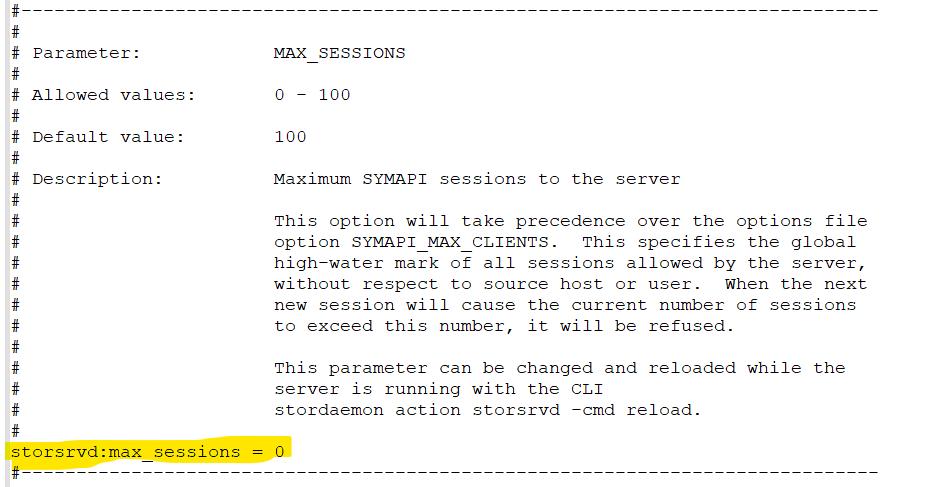
Resolution
- Modificare il campo
daemon_optionsparametrostorsrvd:max_sessionsal valore predefinito (100) mettendo un # davanti al parametro o modificando il parametro instorsrvd:max_sessions = 100.

o
2. Una volta apportate le modifiche, riavviare il daemon storsrvd .
stordaemon shutdown storsrvd -immediate
stordaemon start storsrvd
3. Eseguire le operazioni Add Array Pair nell'interfaccia utente (UI) di SRM.