アレイ ペアの追加中にSRDF SRAエラーが発生しました: SRAコマンド'discoverArrays'が失敗しました。アレイ管理ホストに接続できませんでした
Summary: SRDFレプリケーション アダプター(SRA)のdiscoverArraysコマンドが失敗しました。アレイ管理ホストへの接続に失敗しました。エラーの詳細については、EmcSrdfSraログを確認してください。
Symptoms
Symmetrix Remote Data Facility (SRDF) Replication Adapter (SRA)を使用してアレイ ペアを追加すると、次のエラーが表示されます。
SRA command ‘discoverArrays’ failed. Failed to connect to the array management host. Please check EmcSrdfSra logs for more information on the error.

この問題が発生した構成に関する追加情報:
- vCenterバージョン: 6.7
- SRMバージョン: 8.1の使用方法
- SRAバージョン: 9.2.0
- SEバージョン: SRMにインストールされた9.2.1クライアント
- SYMAPI Server: SE 9.2.1を使用した組み込みマネージド アレイ
Cause
次のエラーのため、SRMクライアントからSYMAPIサーバーへのSYMAPIセッションを初期化できませんでした。The maximum number of network connections has been reached on the server.
つまり、SRMクライアントは、SYMAPIサーバー(storsrvd)に対して100を超える接続(デフォルトおよび最大)を行っている可能性があります
EmcSrdfSra.logでエラーが見つかりました:
[07/21 06:13:53.779  5264   155 SymapiSession::Init             ] [ERROR]: Failed to perform SymInit().

[ERROR]: [SYMAPI_C_SRVR_CONNECTS_EXCEEDED : The maximum number of network connections has been reached on the server]
.
.
[07/21 06:13:53.779  5264   366 MessageFormatter::setMarker     ] _______Backtrace end_______
[07/21 06:13:53.779  5264    33 SymapiSession::SymapiSession    ] [ERROR]: Failed to initialize Symapi session
[07/21 06:13:53.779  5264   366 MessageFormatter::setMarker     ] _______Backtrace begin_______
[07/21 06:13:53.779  5264   264 SymapiSession::Init             ] Exit
[07/21 06:13:53.779  5264   366 MessageFormatter::setMarker     ] _______Backtrace end_______
[07/21 06:13:53.779  5264   590 SymmUtil::DisplaySEVersion      ] [ERROR]: Failed to fetch SE version information
[07/21 06:13:53.779  5264   366 MessageFormatter::setMarker     ] _______Backtrace begin_______
[07/21 06:13:53.779  5264   664 SymmUtil::GetSEVersion          ] Exit
SYMAPIサーバー storsrvd.logでエラーが見つかりました:
<Error> [26815 SESS 0001] Jul-27 15:46:17.992 : ANR0018E Rejecting session 1 for dell_user@dellemc123.abc.def.com (::ffff:111.222.333.444): The maximum number of network connections has been reached on the server
SYMAPIサーバーへの storsrvd.log のエラー エントリーを確認すると、ユーザー dell_userを使用するSRMクライアント dellemc123.abc.def.com からの最初のセッション(セッション1)が、SYMAPIサーバー上のstorsrvdデーモンによって拒否されていることがわかりました
このとき、 daemon_options ファイルがSYMAPIサーバーでチェックされたところ、 storsrvd:max_sessions パラメーターは 0.
に設定されましたこれが、最初のクライアントが拒否された理由です。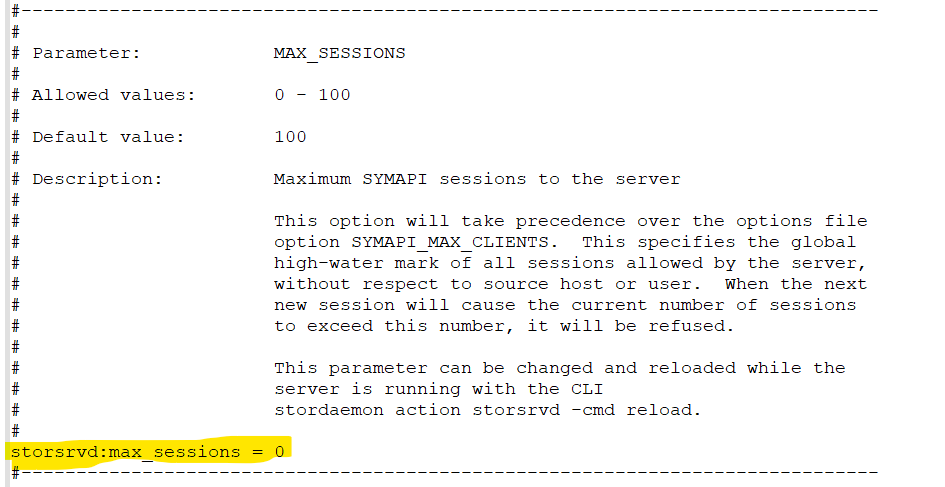
Resolution
- [Details]を
daemon_optionsパラメーターstorsrvd:max_sessionsデフォルト (100) に設定するには、パラメーターの前に # を付けるか、パラメーターをstorsrvd:max_sessions = 100の詳細を確認してください。

または
2.変更が行われたら、 storsrvd デーモンを再起動します。
stordaemon shutdown storsrvd -immediate
stordaemon start storsrvd
3.実行 Add Array Pair SRMユーザー インターフェイス(UI)での操作。