어레이 페어를 추가하는 동안 SRDF SRA 오류가 발생했습니다. SRA 명령 'discoverArrays'에 실패했습니다. 어레이 관리 호스트에 연결하지 못했습니다.
Summary: SRA(SRDF Replication Adapter) discoverArrays 명령이 실패했습니다. 어레이 관리 호스트에 연결하지 못했습니다. 오류에 대한 자세한 내용은 EmcSrdfSra 로그를 확인하십시오.
This article applies to
This article does not apply to
This article is not tied to any specific product.
Not all product versions are identified in this article.
Symptoms
SRDF(Symmetrix Remote Data Facility) SRA(Replication Adapter)를 사용하여 어레이 페어를 추가하는 동안 다음 오류가 표시됩니다.
SRA command ‘discoverArrays’ failed. Failed to connect to the array management host. Please check EmcSrdfSra logs for more information on the error.

이 문제가 발생한 구성에 대한 추가 정보:
- vCenter 버전: 6.7
- SRM 버전: 8.1
- SRA 버전: 9.2.0
- SE 버전: SRM에 설치된 9.2.1 클라이언트
- SYMAPI 서버: SE 9.2.1의 내장형 매니지드 어레이
Cause
다음 오류로 인해 SRM 클라이언트에서 SYMAPI 서버로 SYMAPI 세션을 초기화할 수 없습니다.The maximum number of network connections has been reached on the server.
즉, SRM 클라이언트는 SYMAPI 서버(storsrvd)에 대해 100개를 초과하는 연결(기본값 및 최대)을 설정할 수 있습니다.
EmcSrdfSra.log에서 오류가 발견되었습니다.
[07/21 06:13:53.779  5264   155 SymapiSession::Init             ] [ERROR]: Failed to perform SymInit().

[ERROR]: [SYMAPI_C_SRVR_CONNECTS_EXCEEDED : The maximum number of network connections has been reached on the server]
.
.
[07/21 06:13:53.779  5264   366 MessageFormatter::setMarker     ] _______Backtrace end_______
[07/21 06:13:53.779  5264    33 SymapiSession::SymapiSession    ] [ERROR]: Failed to initialize Symapi session
[07/21 06:13:53.779  5264   366 MessageFormatter::setMarker     ] _______Backtrace begin_______
[07/21 06:13:53.779  5264   264 SymapiSession::Init             ] Exit
[07/21 06:13:53.779  5264   366 MessageFormatter::setMarker     ] _______Backtrace end_______
[07/21 06:13:53.779  5264   590 SymmUtil::DisplaySEVersion      ] [ERROR]: Failed to fetch SE version information
[07/21 06:13:53.779  5264   366 MessageFormatter::setMarker     ] _______Backtrace begin_______
[07/21 06:13:53.779  5264   664 SymmUtil::GetSEVersion          ] Exit
SYMAPI 서버 storsrvd.log에서 발견된 오류:
<Error> [26815 SESS 0001] Jul-27 15:46:17.992 : ANR0018E Rejecting session 1 for dell_user@dellemc123.abc.def.com (::ffff:111.222.333.444): The maximum number of network connections has been reached on the server
SYMAPI 서버에 대한 storsrvd.log 의 오류 항목을 확인한 결과, 사용자 dell_user 사용하는 SRM 클라이언트 dellemc123.abc.def.com 의 첫 번째 세션(세션 1)이 SYMAPI 서버의 storsrvd 데몬에 의해 거부되었습니다.
때 daemon_options SYMAPI 서버에서 파일을 확인한 결과, storsrvd:max_sessions 매개변수가 0으로 설정되었습니다.
이것이 첫 번째 클라이언트가 거부된 이유입니다.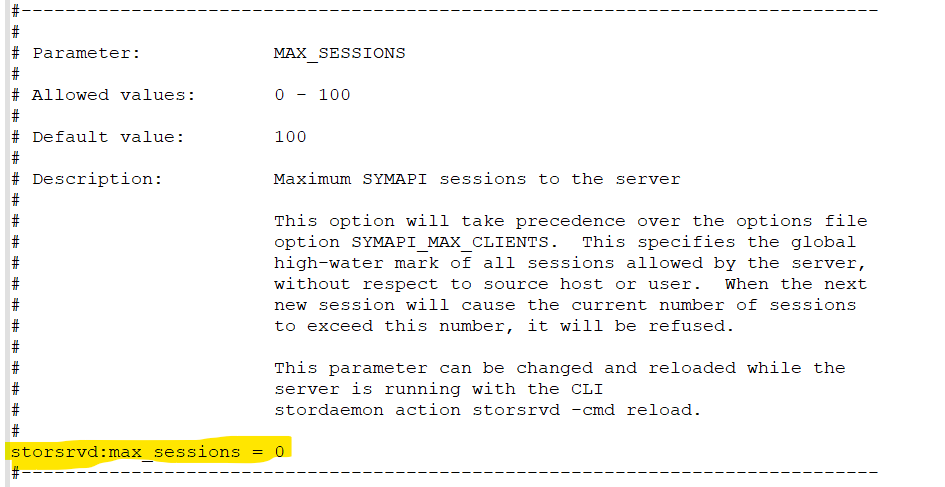
Resolution
- 수정
daemon_options매개 변수storsrvd:max_sessions매개 변수 앞에 #을 넣거나 매개 변수를 기본값(100)으로 변경합니다.storsrvd:max_sessions = 100에 관한 자세한 내용을 참조하십시오.

또는
2. 변경이 완료되면 storsrvd 데몬을 재시작합니다.
stordaemon shutdown storsrvd -immediate
stordaemon start storsrvd
3. 수행 Add Array Pair SRM UI(사용자 인터페이스)에서 작동합니다.
Affected Products
SRDF Adapter for VMware Site Recovery Manager, VMware vCenter Site Recovery ManagerArticle Properties
Article Number: 000190097
Article Type: Solution
Last Modified: 26 Aug 2025
Version: 3
Find answers to your questions from other Dell users
Support Services
Check if your device is covered by Support Services.