添加阵列对时出现 SRDF SRA 错误:SRA 命令“discoverArrays”失败。未能连接到阵列管理主机
Summary: SRDF 复制适配器 (SRA) discoverArrays 命令失败。未能连接到阵列管理主机。请检查 EmcSrdfSra 日志,了解有关错误的更多信息。
This article applies to
This article does not apply to
This article is not tied to any specific product.
Not all product versions are identified in this article.
Symptoms
使用 Symmetrix Remote Data Facility (SRDF) 复制适配器 (SRA) 添加阵列对时显示以下错误:
SRA command ‘discoverArrays’ failed. Failed to connect to the array management host. Please check EmcSrdfSra logs for more information on the error.

有关出现此问题的配置的其他信息:
- vCenter 版本:6.7
- SRM 版本:8.1
- SRA 版本:9.2.0
- SE 版本:9.2.1 SRM 上安装的客户端
- SYMAPI 服务器:采用 SE 9.2.1 的嵌入式托管阵列
Cause
由于以下错误,无法将 SYMAPI 会话从 SRM 客户端初始化至 SYMAPI 服务器:The maximum number of network connections has been reached on the server.
这意味着 SRM 客户端可以与 SYMAPI 服务器 (storsrvd) 建立超过 100 个连接(默认和最大)。
在 EmcSrdfSra.log中发现错误:
[07/21 06:13:53.779  5264   155 SymapiSession::Init             ] [ERROR]: Failed to perform SymInit().

[ERROR]: [SYMAPI_C_SRVR_CONNECTS_EXCEEDED : The maximum number of network connections has been reached on the server]
.
.
[07/21 06:13:53.779  5264   366 MessageFormatter::setMarker     ] _______Backtrace end_______
[07/21 06:13:53.779  5264    33 SymapiSession::SymapiSession    ] [ERROR]: Failed to initialize Symapi session
[07/21 06:13:53.779  5264   366 MessageFormatter::setMarker     ] _______Backtrace begin_______
[07/21 06:13:53.779  5264   264 SymapiSession::Init             ] Exit
[07/21 06:13:53.779  5264   366 MessageFormatter::setMarker     ] _______Backtrace end_______
[07/21 06:13:53.779  5264   590 SymmUtil::DisplaySEVersion      ] [ERROR]: Failed to fetch SE version information
[07/21 06:13:53.779  5264   366 MessageFormatter::setMarker     ] _______Backtrace begin_______
[07/21 06:13:53.779  5264   664 SymmUtil::GetSEVersion          ] Exit
在 SYMAPI 服务器 storsrvd.log中发现错误:
<Error> [26815 SESS 0001] Jul-27 15:46:17.992 : ANR0018E Rejecting session 1 for dell_user@dellemc123.abc.def.com (::ffff:111.222.333.444): The maximum number of network connections has been reached on the server
在进入 SYMAPI 服务器 的storsrvd.log 中查看错误条目时,发现 SYMAPI 服务器上的 storsrvd 守护程序拒绝了来自使用用户 dell_user 的 SRM 客户端 dellemc123.abc.def.com 的第一个会话(会话 1)。
当 daemon_options 在 SYMAPI 服务器上检查文件,发现 storsrvd:max_sessions 参数设置为 0。
这就是第一个客户端被拒绝的原因。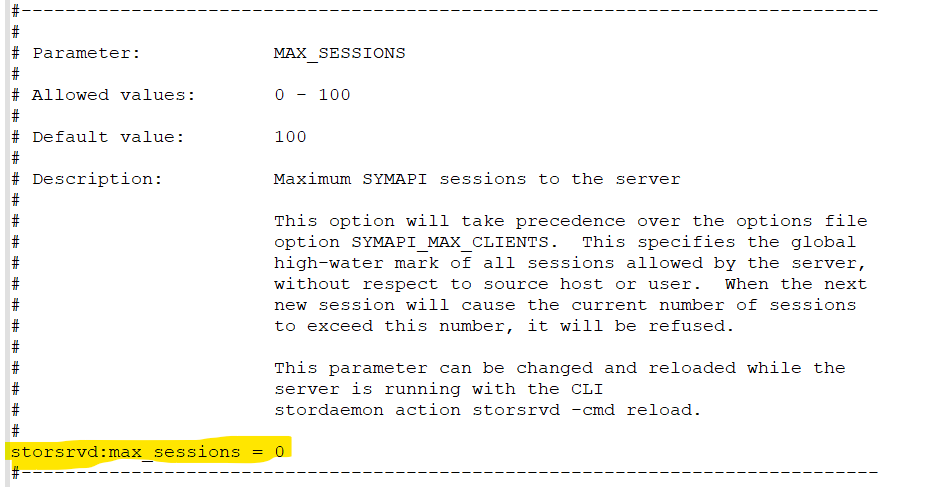
Resolution
- 修改
daemon_options参数storsrvd:max_sessions设置为默认值 (100),方法是在参数前面加上 # 或将参数更改为storsrvd:max_sessions = 100。

或
2.进行更改后,重新启动 storsrvd 守护程序。
stordaemon shutdown storsrvd -immediate
stordaemon start storsrvd
3.执行 Add Array Pair SRM 用户界面 (UI) 中的作。
Affected Products
SRDF Adapter for VMware Site Recovery Manager, VMware vCenter Site Recovery ManagerArticle Properties
Article Number: 000190097
Article Type: Solution
Last Modified: 26 Aug 2025
Version: 3
Find answers to your questions from other Dell users
Support Services
Check if your device is covered by Support Services.