In Dell Data Protection Enterprise Edition How to Troubleshoot Policy Proxy Log Error: Server said, " VFS error. Error putting device inventory file into VFS"
Summary: How to troubleshoot Policy Proxy log error: Server said, "VFS error. Error putting device inventory file into VFS" in Dell Data Protection | Enterprise Edition.
Symptoms
Affected Products:
- Dell Data Protection | Enterprise Edition
This error indicates that the server is having a catastrophic error. When it tries to put the inventory into the VFS table, it can stop the flow of all inventory.
Inventory does not flow to the server. This can affect one or more clients inventory data.
Cause
The Policy Proxy is failing in delivery of the Inventory with the following error:
DATE TIME [W] Bundle server upload error on [device.inventory; scid=XXXXXXXX; ucid= YYYYYYYY] Server unable to understand bundle. Server said, " VFS error. Error putting device inventory file into VFS"
Resolution
This means when the Server queries the shield ID XXXXXXXX (from user ID YYYYYYYY) it has bad data and the Inventory send failed. There is something catastrophic in the data that the shield is sending that is breaking the computer. This is a client issue, and we have to run wsdeactivate.exe on the client to try to repair it. If that does not work, uninstall then reinstall the client on this machine to attempt to repair it.
You can get the hostname from the Shield ID with the following SQL query against the CMG Database:
Select eu.UID as hostname, es.CID as SCID, AssociationDate as Date From DeviceShieldAssociationArchive
Join Entity as es on es.EID = ShieldEid
Join Entity as eu on eu.EID = DeviceEid
Where es.cid = 'XXXXXXXX'
Replace the XXXXXXXX with the DCID (SCID is another name for DCID in the server) and you can find the Host Name.
Alternatively, the hostname can be found using the SCID (DCID) in the Dell Data Security Console web interface.
- Log in to the Dell Data Security console.
- Select Endpoints.
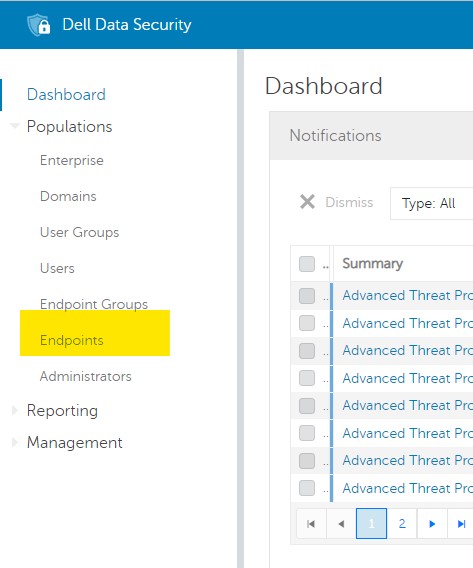
Figure 1: (English Only) Select Endpoints
- Enter the SCID into the Search box and click the magnifying glass icon:

Figure 2: (English Only) Search for SCID
To contact support, reference Dell Data Security International Support Phone Numbers.
Go to TechDirect to generate a technical support request online.
For additional insights and resources, join the Dell Security Community Forum.