Dell Encryption 설치 후 Microsoft Excel 피벗 테이블 문제
Summary: Dell Encryption을 사용 중일 때 Microsoft Excel 피벗 테이블 관련 문제
Symptoms
영향을 받는 제품:
- Dell Encryption
영향을 받는 운영 체제:
- Windows
Cause
피벗 테이블을 사용 중인 Microsoft Excel 파일을 저장하고 다시 연 후 데이터를 새로 고치려고 하면 Microsoft Excel에서 오류가 발생할 수 있습니다.
오류 예시:
We could not refresh the connection: XML parsing failed
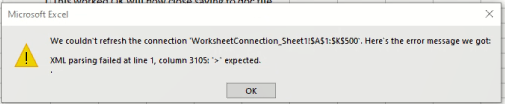
그림 1: (영어로만 제공) Microsoft Excel 오류
또는
데이터 모델의 문제로 인해 Microsoft Excel에서 이 통합 문서를 열 수 없습니다. Microsoft Excel을 다시 시작합니다.
Resolution
피벗 테이블을 사용하는 동안 임시 파일이 빠르게 생성되고 %Userprofile%\AppData\Local\Temp 디렉토리에 업데이트됩니다. 이 프로세스 중에 폴더에 있는 모든 파일의 적절한 암호화 상태를 반영하기 위해 메타데이터 파일을 동시에 동기화하고 업데이트해야 합니다. 이러한 빠른 파일 생성, 삭제 및 업데이트 작업 중에 DebugView 캡처를 통해 Dell Encryption이 각 파일에 대한 적절한 암호화 상태를 제공하기 위해 사용하는 임시 폴더의 메타데이터 업데이트 중 파일 손상이 발생하는 것을 확인했습니다.
현재의 해결 방법은 일반 암호화에서 다음 정책을 사용하는 영향을 받는 사용자를 위해 이 디렉토리를 제외합니다.
-^3%ENV:Userprofile%\appdata\local\Temp
지원 부서에 문의하려면 Dell Data Security 국제 지원 전화번호를 참조하십시오.
온라인으로 기술 지원 요청을 생성하려면 TechDirect로 이동하십시오.
추가 정보 및 리소스를 보려면 Dell 보안 커뮤니티 포럼에 참여하십시오.