OpenManage Server Administrator: How to add a custom SSL certificate
Summary: Systems Management How to Video that covers how to add a custom SSL certificate to OpenManage Server Administrator.
Instructions
This training video covers the process of adding a custom SSL certificate to OpenManage Server Administrator.
Link to the Dell Technologies YouTube channel video:
How to add a custom SSL certificate to OpenManage Server Administrator
This training video covers the process of adding a custom SSL certificate to OpenManage Server Administrator.
Certificate Basics
Scope
For the scope of this document, x509 web server certificates serve two purposes.
• Identity - Verify the endpoint and site 'entity' we are contacting is who we think it is.
• Privacy - Via Transport Layer Security (TLS) encryption
Encodings
Certificates are offered in two types of encodings.
• DER // Distinguished Encoding Representation is a Binary file.
• BASE64 // Base64 encoded text also known as Privacy-Enhanced Mail (PEM) is text file.
Certificate Containers/Format (X509, PKCS7, PKCS12)
• X.509 Defines a certificate in ASN.1 data structure format typical .cer/.crt/.pem
• PKCS7 Defines a container which can have nested X.509 certificates (client/ca) typical .p7b
• PKCS12 Defines a container to store private keys along with accompanying X.509 certificates typical .pfx
Certificate Request (CSR)
Install a Trusted Web Certificate for OMSA.
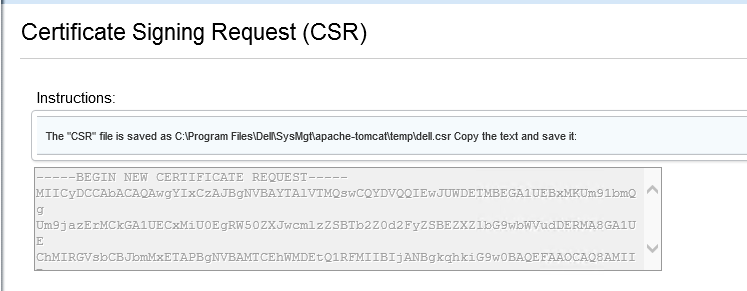
OMSA Web UI select Preferences -> General Settings -> X.509 Certificate and Certificate Maintenance "Generate CSR"
This provides us with a base64 encoded certificate request which we submit to the Certificate Authority (CA).
For Microsoft Certificate Services the Default-integrated Web Server Certificate template is used.
For the GoDaddy web server, the template is called IIS Server Certificate.
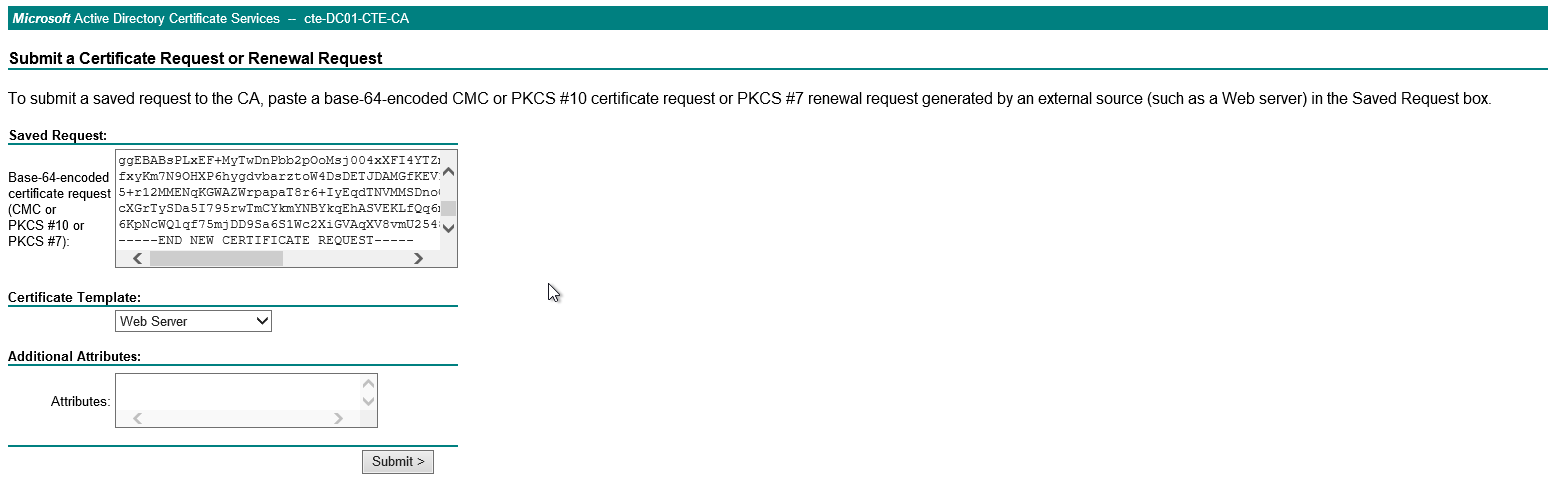
, the CSR is submitted the CA issues the new certificate, and you could download the certificate choosing the Encoding format.
Note: For all Dell Applications, use BASE64 format.
