Latitude Rugged PCでSATAモードを無効から有効に変更した直後にオペレーティング システムを起動できない
Summary: この記事では、M.2シリアルATアタッチメント(SATA)モードをオフからオンに変更した直後にオペレーティング システムを起動できないLatitude Ruggedコンピューターについて説明します。
This article applies to
This article does not apply to
This article is not tied to any specific product.
Not all product versions are identified in this article.
Symptoms
Latitude Rugged PCが無効になっている場合、オペレーティング システムを起動できず、デバイスを有効にすることができない場合があります。
対象製品:
- Latitude 5430 Rugged
- Latitude 7330 Rugged Extreme

Cause
原因に関する情報はありません。
Resolution
デバイスを再度有効にすると、起動順序が起動順序の最後に追加されます。
- PCを再起動し、F2キーを押してBIOS設定に移動します。
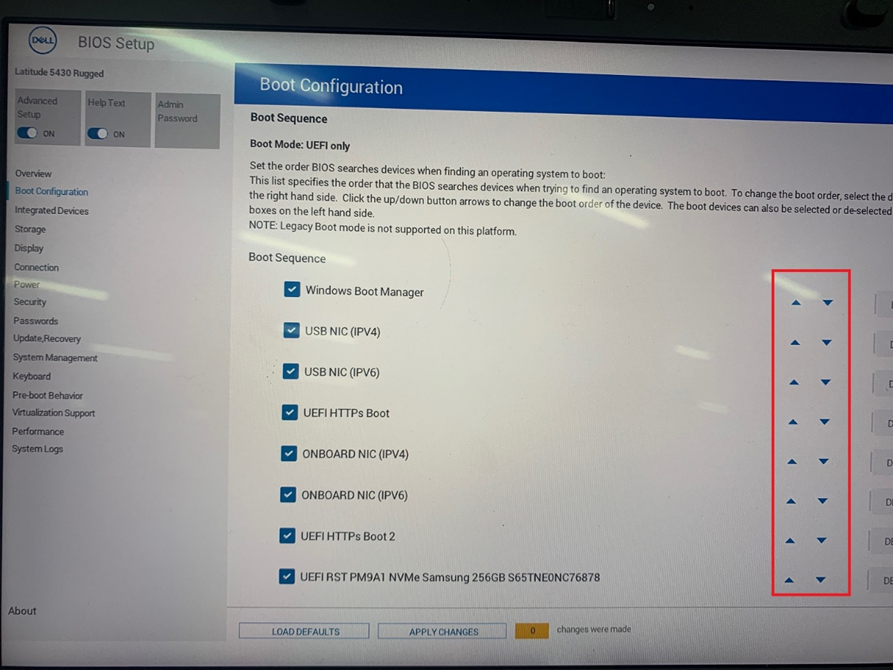
- [Boot Configuration]に移動し、次のようにブート シーケンスを調整します。
- Windowsブート マネージャー
- USB NIC(IPv4)
- USB NIC(IPv6)
- UEFI HTTPS起動
- オンボードNIC(IPV4)
- オンボードNIC(IPv6)
- UEFI HTTPS起動2
- コンピューターにインストールされているハード ドライブ ディスクの名前(次の例の画像では、「UEFI RST PM9A1 NVMe Samsung 256GB S65TNE0NC76878」が表示されています)
Affected Products
Latitude 7330 Rugged Extreme, Latitude 5430 RuggedArticle Properties
Article Number: 000193865
Article Type: Solution
Last Modified: 16 Apr 2025
Version: 4
Find answers to your questions from other Dell users
Support Services
Check if your device is covered by Support Services.