CloudBoost: Resolve the NetWorker CB error while Device creation
Summary: After the CloudProfile validation, initial configuration and enabling remotebackup password took place successfully on the CloudBoost appliance, unabled to create the CloudBoost device on NetWorker server and faced below error. ...
Symptoms
The below error appears while creating a new CloudBoost device in NetWorker: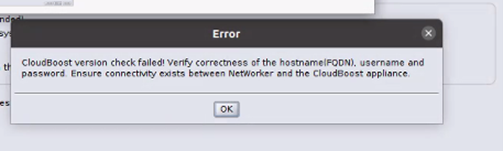
Cause
Some verifications take place during the CloudBoost device creation on the NetWorker server and may cause such error:
- The CloudBoost appliance, the Networker server, and the Storage Node versions compatibility.
- The CloudBoost appliance, the NetWorker server, and the Storage Node connectivity.
- The CloudBoost Fully Qualified Domain Name (FQDN) and short name.
remotebackupuser and password.
Resolution
- Verify the versions compatibility matrix and documentation: E-Lab Interoperability Navigator (Requires Dell Support Account sign-in)
- Verify the FQDN and hostname on the appliance and NetWorker Device Configuration wizard. Ensure that it resolves correctly: NetWorker: Name Resolution Troubleshooting Best Practices
- Verify the hosts file on the CloudBoost contains entries for the NetWorker server and remote NetWorker Storage Node (if used):
Hosts File location on CloudBoost:/etc/hosts/opt/maginatics/active/mgt_console/resources/templates/hosts.erb
FORMAT:
IP ADDRESS FQDN SHORTNAME
- Add the CloudBoost hostname and IP address to the NetWorker server, and remote storage node (if used):
Linux: /nsr/hosts
Windows: C:\Windows\System32\drivers\etc\hosts
FORMAT:
IP ADDRESS FQDN SHORTNAME
- Verify the connectivity between CloudBoost, NetWorker Server, and NetWorker Storage Nodes (if used):
From the NetWorker server and external storage nodes:nsrports -t CLOUDBOOST_HOSTNAME -p 443
From the CloudBoost command-line interface:#telenet NW_server 7937#telenet NW_server 7938#telenet NW_server 9443
- Verify the nsr services on the CloudBoost appliance, Storage Nodes, and NetWorker server.
#nsr status
From NetWorker hosts:
nsrrpcinfo -p localhost
- On the CloudBoost appliance, verify that the
remotebackupuser and password is enabled
#nsradmin -s <host_name> -p nsrexecnsradmin> delete type: nsr peer information; peer hostname: <client_name>
For more details regarding peer certificate cleanup, see: