Qualcomm 노트북에서 PXE 부팅 옵션 및 USB 디바이스를 찾을 수 없는 경우 F12 메뉴로 부팅
Summary: 이 문서에서는 Qualcomm 노트북에서 전원을 껐다가 다시 켠 후 PXE(Preboot Execution Environment) 부팅 옵션 및 USB 디바이스를 찾을 수 없는 문제에 대한 정보를 제공합니다.
This article applies to
This article does not apply to
This article is not tied to any specific product.
Not all product versions are identified in this article.
Symptoms
Qualcomm 노트북은 전원 주기에서 다시 시작하고 F12 메뉴로 부팅한 후 PXE 부팅 옵션 및 USB 디바이스를 찾지 못할 수 있습니다. 이 문제는 컴퓨터가 도크에 연결되어 있을 때 발생합니다WD22TB4.
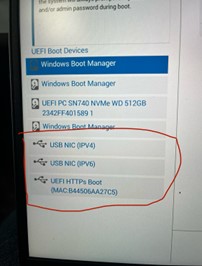
영향을 받는 Qualcomm 노트북:
- Inspiron 14 Plus 7441
- 래티튜드 7455
- XPS 13 9345
영향을 받는 도크:
- Dell Thunderbolt Dock - WD22TB4
Cause
이는 Qualcomm 플랫폼 설계 제한 때문입니다. 플랫폼이 전원 주기(콜드 부팅, 웜 부팅 또는 최대 절전 모드)에서 다시 시작될 때 하드 리셋을 전송하여 도크 Power Delivery가 잘못된 모드로 전환됩니다.
Resolution
컴퓨터에서 Dell Dock WD19/WD22TB4 펌웨어 업데이트 유틸리티 버전 01.00.44, 01.00.28 이상으로 업데이트하면 문제가 해결됩니다. 펌웨어를 다운로드하고 설치하려면 Dell 드라이버 다운로드 및 설치 방법을 참조하십시오.
Affected Products
Inspiron 14 Plus 7441, Latitude 7455, Dell Thunderbolt Dock – WD22TB4, XPS 13 9345Article Properties
Article Number: 000228393
Article Type: Solution
Last Modified: 16 Apr 2025
Version: 4
Find answers to your questions from other Dell users
Support Services
Check if your device is covered by Support Services.