Qualcomm 筆記型電腦找不到 PXE 開機選項和 USB 裝置,然後開機至 F12 功能表
Summary: 本文提供從電源週期恢復後,Qualcomm 筆記型電腦找不到開機前執行環境 (PXE) 開機選項及 USB 裝置的相關資訊。
This article applies to
This article does not apply to
This article is not tied to any specific product.
Not all product versions are identified in this article.
Symptoms
從電源週期恢復並開機至 F12 功能表後,Qualcomm 筆記型電腦可能找不到 PXE 開機選項和 USB 裝置。當電腦連接至擴充基座WD22TB4就會發生此問題。
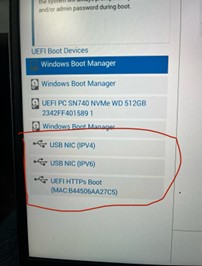
受影響的 Qualcomm 筆記型電腦:
- Inspiron 14 Plus 7441
- Latitude 7455
- XPS 13 9345
受影響的擴充基座:
- Dell Thunderbolt 擴充基座 - WD22TB4
Cause
這是由於 Qualcomm 平台的設計限制。當平台從電源週期恢復 (冷開機、暖開機或休眠) 時,會傳送強制重設,導致擴充基座的 Power Delivery 進入錯誤模式。
Resolution
將電腦更新至 Dell Dock WD19/WD22TB4 韌體更新公用程式 01.00.44、01.00.28 版或更新版本可解決問題。若要下載和安裝韌體,請參閱 如何下載和安裝 Dell 驅動程式。
Affected Products
Inspiron 14 Plus 7441, Latitude 7455, Dell Thunderbolt Dock – WD22TB4, XPS 13 9345Article Properties
Article Number: 000228393
Article Type: Solution
Last Modified: 16 Apr 2025
Version: 4
Find answers to your questions from other Dell users
Support Services
Check if your device is covered by Support Services.