Data Domain:DD3300「ウォッチドッグ タイマーの期限が切れました」
Summary: DD3300ウォッチドッグ タイマーの期限が切れました
This article applies to
This article does not apply to
This article is not tied to any specific product.
Not all product versions are identified in this article.
Instructions
問題の説明
ウォッチドッグ タイマーの有効期限が切れました。
現象
iDRAC UIで、システム イベント ログに「ウォッチドッグ タイマーの期限が切れました」と表示されます。
次のスクリーンショットのように、TSRログも収集して確認します。
該当製品:
DD3300
解決策
次の解決手順を実行します。
-
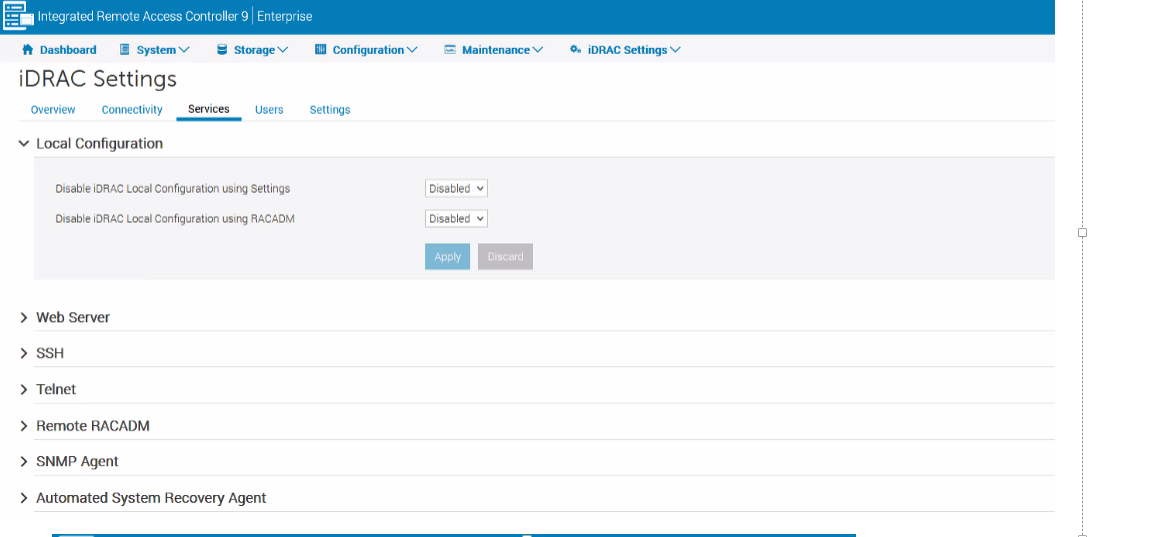
iDRACから、[iDRAC settings] >> [Services >> Local Configuration]に移動し >> 両方のオプションが有効になっていることを確認します。有効になっている場合は、次のスクリーンショットのように[disabled]に変更します。
-
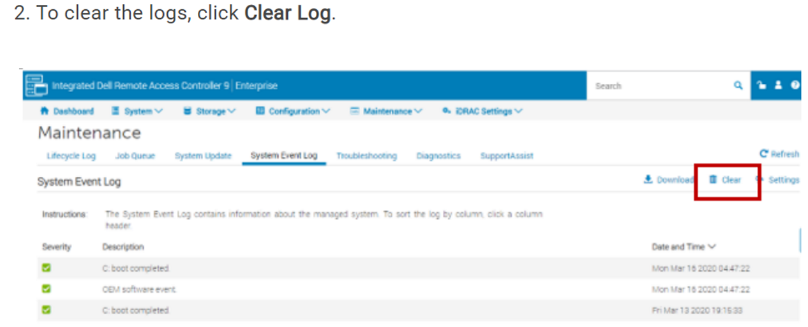
次のスクリーンショットに従って、システム イベント ログをクリアします。
-
アラートがまだトリガーされている場合は、以下のスクリーンショットにあるように、前述の手順をすべて適用した後で、iDRACからウォーム リブートを実行します。
Affected Products
DD3300 ApplianceProducts
Data DomainArticle Properties
Article Number: 000263097
Article Type: How To
Last Modified: 12 Dec 2025
Version: 3
Find answers to your questions from other Dell users
Support Services
Check if your device is covered by Support Services.