Data Domain:DD3300“监护程序计时器已过期”
Summary: DD3300 监护程序计时器已过期
This article applies to
This article does not apply to
This article is not tied to any specific product.
Not all product versions are identified in this article.
Instructions
问题描述
监护程序计时器已过期。
症状
iDRAC UI 显示在系统事件日志中 “监护程序计时器已过期。”
类似于下面的屏幕截图,并收集 TSR 日志进行确认。
适用于:
DD3300
解决方法
请执行以下解决步骤:
-
从 iDRAC 转至 iDRAC 设置 >> 服务 >> 本地配置 >> ,检查两个选项是否均已启用,如果是,则将其更改为“disabled”,类似于下面的屏幕截图。

-
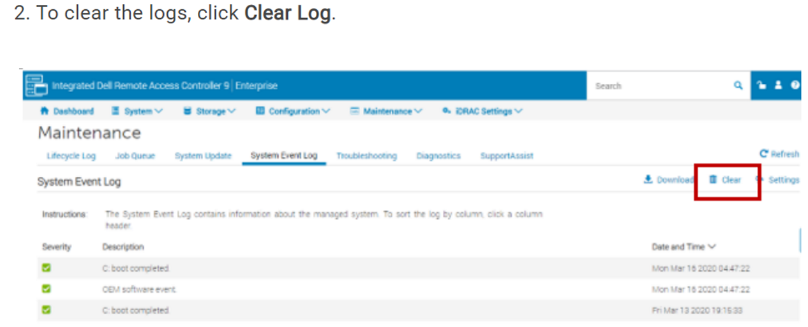
根据以下屏幕截图清除系统事件日志:
-
如果警报仍在触发,请根据下面提供的屏幕截图,在应用上述所有步骤后从 iDRAC 热重新启动:
Affected Products
DD3300 ApplianceProducts
Data DomainArticle Properties
Article Number: 000263097
Article Type: How To
Last Modified: 12 Dec 2025
Version: 3
Find answers to your questions from other Dell users
Support Services
Check if your device is covered by Support Services.