Dell EMC Unity:如何為 Unity 陣列新增 SMTP 伺服器設定
Summary: Dell EMC Unity:如何為 Unity 陣列新增 SMTP 伺服器設定
This article applies to
This article does not apply to
This article is not tied to any specific product.
Not all product versions are identified in this article.
Instructions
-->從右上角的“更新系統設置”中,選擇“警報”選項卡,然後選擇電子郵件和SMTP選項。
--> 添加希望接收系統警報的所需郵件清單。
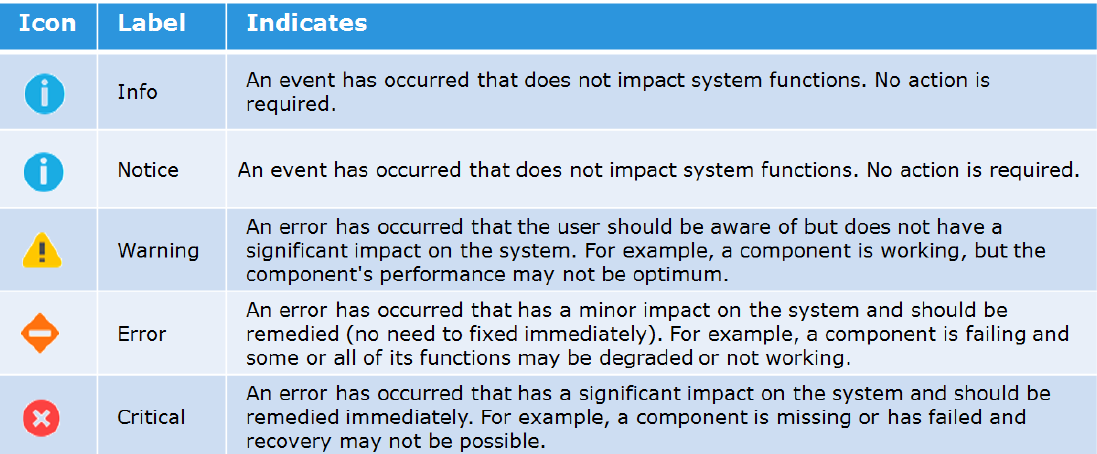
-->添加要發送的警報的嚴重性級別。
以下是不同嚴重性級別的圖示:
-->然後鍵入發送電子郵件所需的簡單郵件傳輸協定 (SMTP) 伺服器的IP位址或主機名。
請注意,比 Nighthawk (4.5.0) 更舊的 Unity OE 版本不支援變更 SMTP (25) 的預設連接埠。
從 Nighthawk 開始,Unity 開始支援自訂 SMTP 連接埠:
06:34:56 service@Peggy spa:~/user> uemcli /net/smtp -h
儲存系統位址:127.0.0.1
Storage system port: 443
HTTPS 連線
管理 SMTP 伺服器設定。使用 SMTP 將系統警報通過電子郵件發送到指定位址。
動作:
[顯示]
/net/smtp [ -id <值> ] show [ -output { nvp | csv | table [ -wrap ] } ] [ { -brief | -detail | -filter <value> } ]
[Set]
/net/smtp -id <value> set -addr <value>[ -port <value> ] [ -encryptLevel { none | startTLS | ssl } ] [ -authType { none | plain | login | cram_md5 | digest_md5 } ] [ -user <value> { -passwd <value> | -passwdSecure } ] [ -bypassProxy { yes | no } ]
--> 添加希望接收系統警報的所需郵件清單。
-->添加要發送的警報的嚴重性級別。
以下是不同嚴重性級別的圖示:
-->然後鍵入發送電子郵件所需的簡單郵件傳輸協定 (SMTP) 伺服器的IP位址或主機名。
請注意,比 Nighthawk (4.5.0) 更舊的 Unity OE 版本不支援變更 SMTP (25) 的預設連接埠。
從 Nighthawk 開始,Unity 開始支援自訂 SMTP 連接埠:
06:34:56 service@Peggy spa:~/user> uemcli /net/smtp -h
儲存系統位址:127.0.0.1
Storage system port: 443
HTTPS 連線
管理 SMTP 伺服器設定。使用 SMTP 將系統警報通過電子郵件發送到指定位址。
動作:
[顯示]
/net/smtp [ -id <值> ] show [ -output { nvp | csv | table [ -wrap ] } ] [ { -brief | -detail | -filter <value> } ]
[Set]
/net/smtp -id <value> set -addr <value>[ -port <value> ] [ -encryptLevel { none | startTLS | ssl } ] [ -authType { none | plain | login | cram_md5 | digest_md5 } ] [ -user <value> { -passwd <value> | -passwdSecure } ] [ -bypassProxy { yes | no } ]
Affected Products
Dell EMC Unity FamilyProducts
Dell EMC Unity FamilyArticle Properties
Article Number: 000022531
Article Type: How To
Last Modified: 22 Oct 2025
Version: 4
Find answers to your questions from other Dell users
Support Services
Check if your device is covered by Support Services.