Avamar: REST API를 사용하여 데이터 이동 앱 관리 정책을 재설정하는 방법
Summary: 이 문서에서는 DDOS 6.0이 설치된 Avamar에서 DDOS REST API를 사용하여 데이터 이동 "애플리케이션 관리" 정책을 재설정하는 방법에 대해 설명합니다.
This article applies to
This article does not apply to
This article is not tied to any specific product.
Not all product versions are identified in this article.
Instructions
REST API를 사용하여 DDOS 6.0을 사용하는 Avamar에서 데이터 이동 애플리케이션 관리 정책을 재설정하는 방법:
환경:
-
Avamar 7.4.1-58
-
Data Domain: 6.0
문제:
Avamar에서 Cloud Tier 기능이 활성화되었습니다. 문제가 발생한 후 해당 DD(Data Domain)의 Avamar UI에서 Cloud Tier 기능이 켜지지 않지만 DD 측에서 다음이 표시됩니다. mtree 앱 관리 정책이 있습니다.
예:
data-movement policy show
Mtree                             Target(Tier/Unit Name)   Policy          Value
-------------------------------   ----------------------   -------------   -------
/data/col1/avamar-1234567891      Cloud/cloudunit1        app-managed     enabled
이제 MCS(Management Console Server)에서 클라우드 계층을 활성화할 수 없습니다.
MCS에 표시되는 오류:
WARNING: com.avamar.asn.service.ServiceException: Failed with HTTP error code : 400 additional information : {"details": "**** Data Movement Policy exists for the mtree.", "code": 5437}
해결 방법:
재설정 기능은 DDOS 6.0에서 REST API를 통해서만 사용할 수 있으므로 DDOS REST API를 사용하여 데이터 이동 정책을 재설정해야 합니다.
DDOS REST API를 사용하여 기존 정책을 삭제한 다음 클라우드 계층을 다시 활성화할 수 있습니다.
DD REST API를 호출하기 위한 몇 가지 예가 아래에 나와 있습니다.
참고: Avamar에서 rest 호출을 실행하지 않으면 일부 핸드셰이크 오류가 발생할 수 있습니다.
host=[your dd host]
ddr_username=[your username]
ddr_password=[your password]
token=`curl --insecure -H "Content-Type: application/json" -X POST -d "{\"auth_info\":{\"username\":\"$ddr_username\",\"password\":\"$ddr_password\"}}" -w '\n' -i -s https://$host:3009/rest/v1.0/auth |grep 'X-DD-AUTH-TOKEN:'`
echo $token
#### 데이터 이동 정책 나열:
curl --insecure -X GET --header 'Content-Type: application/json' --header 'Accept: application/json' --header "$token" -w '\n' "https://$host:3009/rest/v1.0/dd-systems/0/data-movement-policies"
#### 삭제 전에 ID 설정:
#### 여기서 id는 위에 나열된 데이터 이동 중 하나입니다. ID를 찾으십시오. mtree_name.
id="" [root@localhost text]
curl --insecure -X DELETE --header 'Content-Type: application/json' --header 'Accept: application/json' --header "$token" -w '\n'  https://$host:3009/rest/v1.0/dd-systems/0/data-movement-policies/$id
Additional Information
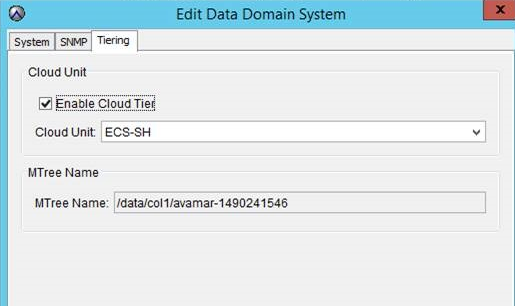
MCS UI의 "Enable Cloud Tier" 옵션:
Affected Products
Data DomainProducts
Avamar Server, Data Domain, Cloud Disaster RecoveryArticle Properties
Article Number: 000014126
Article Type: How To
Last Modified: 13 Aug 2025
Version: 8
Find answers to your questions from other Dell users
Support Services
Check if your device is covered by Support Services.