Avamar:REST APIを使用してデータ移動アプリ管理ポリシーをリセットする方法
Summary: この記事では、DDOS REST APIを使用してDDOS 6.0を搭載したAvamarのデータ移動の「アプリ管理」ポリシーをリセットする方法について説明します。
This article applies to
This article does not apply to
This article is not tied to any specific product.
Not all product versions are identified in this article.
Instructions
REST APIを使用してDDOS 6.0を搭載したAvamarのデータ移動アプリケーション管理ポリシーをリセットする方法:
環境:
-
Avamar 7.4.1-58
-
「Data Domain:6.0
トピック:
Avamarでクラウド階層機能が有効になりました。問題が発生した後、そのData Domain (DD)のAvamar UIでクラウド階層機能がオンになっていませんが、DD側では mtree アプリ管理ポリシーがあります。
Example:
data-movement policy show
Mtree                             Target(Tier/Unit Name)   Policy          Value
-------------------------------   ----------------------   -------------   -------
/data/col1/avamar-1234567891      Cloud/cloudunit1        app-managed     enabled
管理コンソール サーバー(MCS)でクラウド階層を有効にできなくなりました。
MCSで発生するエラー:
WARNING: com.avamar.asn.service.ServiceException: Failed with HTTP error code : 400 additional information : {"details": "**** Data Movement Policy exists for the mtree.", "code": 5437}
解像度:
リセット機能はDDOS 6.0のREST APIを使用してのみ使用できるため、データ移動ポリシーをリセットするにはDDOS REST APIを使用する必要があります。
DDOS REST APIを使用すると、既存のポリシーを削除してから、クラウド階層を再度有効にすることができます。
以下に、DD REST APIを呼び出す例をいくつか示します。
注:AvamarでRESTコールを実行します。実行しないと、ハンドシェイク エラーが発生する可能性があります。
host=[your dd host]
ddr_username=[your username]
ddr_password=[your password]
token=`curl --insecure -H "Content-Type: application/json" -X POST -d "{\"auth_info\":{\"username\":\"$ddr_username\",\"password\":\"$ddr_password\"}}" -w '\n' -i -s https://$host:3009/rest/v1.0/auth |grep 'X-DD-AUTH-TOKEN:'`
echo $token
#### データ移動ポリシーを一覧表示します。
curl --insecure -X GET --header 'Content-Type: application/json' --header 'Accept: application/json' --header "$token" -w '\n' "https://$host:3009/rest/v1.0/dd-systems/0/data-movement-policies"
#### 削除前にIDを設定:
#### ここで、IDは上記のいずれかのデータ移動です。IDは、 mtree_name.
id="" [root@localhost text]
curl --insecure -X DELETE --header 'Content-Type: application/json' --header 'Accept: application/json' --header "$token" -w '\n'  https://$host:3009/rest/v1.0/dd-systems/0/data-movement-policies/$id
Additional Information
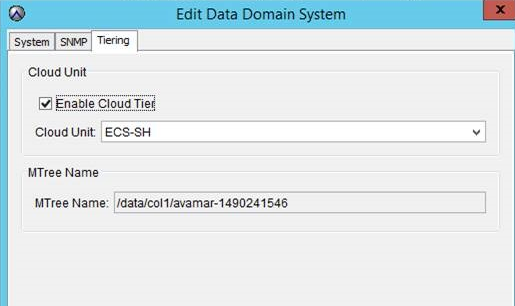
MCS UIの[Enable Cloud Tier]オプション:
Affected Products
Data DomainProducts
Avamar Server, Data Domain, Cloud Disaster RecoveryArticle Properties
Article Number: 000014126
Article Type: How To
Last Modified: 13 Aug 2025
Version: 8
Find answers to your questions from other Dell users
Support Services
Check if your device is covered by Support Services.