ECS: How to add external key management servers for key management
Summary: When adding a new external key server, the Server Host Name must match the SAN name in the SSL certificate when querying the EKM Server's Hostname/IP.
This article applies to
This article does not apply to
This article is not tied to any specific product.
Not all product versions are identified in this article.
Instructions
When adding a new external key server the filed in the Server Host Name must match the SAN name provided in the SSL certificate when querying the Hostname/IP of EKM Server.
- Collect the needed Subject Alternate Name (SAN) from the secure certificate provided by the EKM address being used.
Command:
# sudo openssl s_client -connect <External Key Server Address>:5696 < /dev/null| openssl x509 -noout -text | grep DNS:
Example:
admin@node1:~>sudo openssl s_client -connect <External Key Server Address>:5696 < /dev/null| openssl x509 -noout -text | grep DNS:
DNS:ekm.server.org.local
- In the server, add configuration add the SAN address collected from step 1.
Navigation:
Key Management > New External Key Server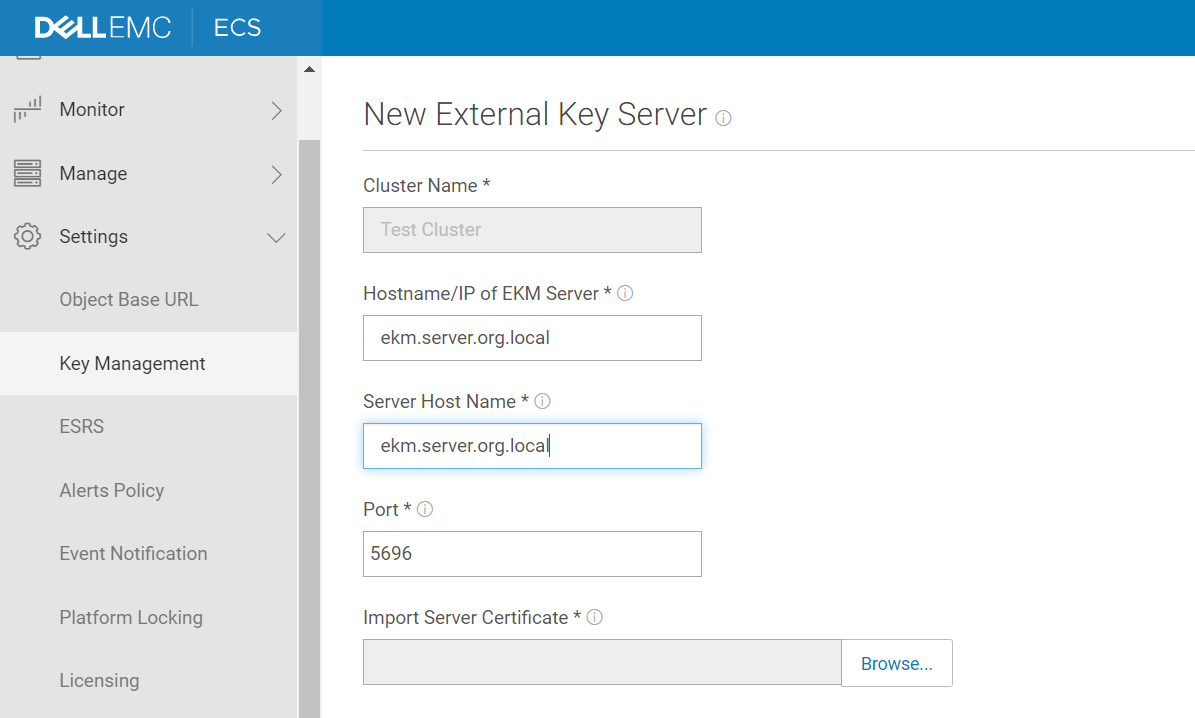
- If we encounter the following error after trying to save the request, confirm the SAN names in the certificate from step 1, and an alternate must be used from that list.
Example:
Once we have completed the configuration tasks to add the external key server the new server adds to the cluster instance ready for activation.
Affected Products
ECS ApplianceProducts
ECS Appliance, ECS Appliance Hardware Series, ECS Appliance Software with Encryption, ECS Appliance Software without EncryptionArticle Properties
Article Number: 000022633
Article Type: How To
Last Modified: 29 Mar 2025
Version: 5
Find answers to your questions from other Dell users
Support Services
Check if your device is covered by Support Services.