Support for Dell OpenManage Operations Connector for Micro Focus Operations Bridge Manager (OBM)
Summary: This article provides an overview and details of the Dell OpenManage Operations Connector for Micro Focus Operations Bridge Manager (OBM). The integration of OpenManage Enterprise or OpenManage Essentials with Micro Focus OBM helps system and IT administrators get a comprehensive view of the Dell devices in a data center. ...
Instructions

Dell OpenManage Operations Connector for Micro Focus OBM
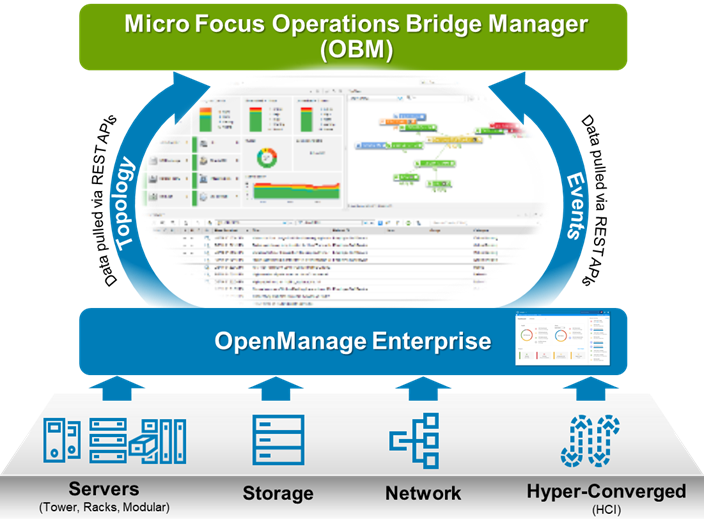
Dell OpenManage Micro Focus Operations Bridge Manager | Operations Connector provides capabilities to integrate the Dell OpenManage Enterprise and Support for Dell OpenManage Enterprise with Micro Focus Operations Bridge Manager (OBM). The OpenManage Operations Connector (OpsCx) collects systems management data about the topology and events from OpenManage Enterprise or Essentials and transfers them to the Micro Focus OBM console.
Features What's New Licensing Download Resources Community

Features and Benefits
Features
Benefits

What's New

Licensing
Dell OpenManage Operations Connector for Micro Focus OBM is available as a software download and is a licensed product. Licenses are available at server point of sale (POS) and after point of sale (APOS) using these SKUs.
| SKU | Description |
|---|---|
| 210-ALYL | POS OpenManage Connections for Third-Party Consoles |
| 634-BJRM | POS Dell OpenManage Connections for Third-Party Consoles, one NODE |
Supported Dell Devices
The OpenManage Operations Connector supports all the Dell devices that are supported by OpenManage Enterprise or OpenManage Essentials. For detailed information about the supported Dell devices, see the OpenManage Enterprise Support Matrix at Dell.com/OpenManageManuals.
Download and install
- Download the Dell Operations Connector for Micro Focus OBM self-extracting .zip files . The OpenManage Enterprise (OME) installer is packaged as Dell_EMC_OpenManage_Operations_Connector_Micro_Focus_OBM_v2.0.1_A00.exe file.
- Extract the Dell_EMC_OpenManage_Operations_Connector_Micro_Focus_OBM_v2.0.1_A00.exe file on the Operations Connector for Micro Focus OBM server. The following files are extracted:
- Dell_EMC_OpenManage_Operations_Connector_Micro_Focus OBM_v2.0.1_Setup.exe file
- Dell_EMC_OpenManage_Operations_Connector_Micro_Focus OBM_v2.0.1_IG.pdf file
- Dell_EMC_OpenManage_Operations_Connector_Micro_Focus_OBM_v2.0.1_ReadMe.txt file
- Run Dell_EMC_OpenManage_Operations_Connector_Micro_Focus OBM_v2.0.1_Setup.exe file from the directory where the files are extracted.
- Follow the install prompts.
Documentation and Videos
Documentation
See Dell OpenManage Operations Connector for Micro Focus Operations Bridge Manager for the latest documentation.
Videos
How to view devices in the console
Demonstrates how to view devices in the HPE OMi Console (legacy 1.0 version)
August 2017
How to view devices in the console
Demonstrates how to launch the OpenManage Enterprise (OME) Console in the HPE OMi Console (legacy 1.0 version)
August 2017