NVP vProxy: FLR-bladeren mislukt met foutmelding 'No mapping between account names, and security IDs was done' (Windows)
Summary: De koppeling van NetWorker VMware Protection (NVP) File Level Restore (FLR) is geslaagd voor een Windows Virtual Machine (VM). Een lokaal besturingssysteemaccount wordt opgegeven als de FLR-koppelingsgebruiker als .\gebruikersnaam.. De montagebewerking slaagt; De bladerbewerking mislukt echter: " Kan '.\xxxx' niet toewijzen als de eigenaar van 'c:\Program Files (x86)\EMC\vProxy FLR Agent\tmp\xxxxxxxxx': Er is geen toewijzing gedaan tussen accountnamen en beveiligings-ID's." ...
Symptoms
Tijdens een Windows Virtual Machine (VM) File Level Recovery (FLR) die wordt uitgevoerd met behulp van NetWorker VMware Protection (NVP), slaagt de FLR-koppeling, maar wordt de volgende fout weergegeven: De "C:\Program Files (x86)\EMC\vProxy FLR Agent\logs\vflragentd\vflragentd-agent.log" op de FLR-doel-VM meldt vergelijkbare fouten.
2025-10-14T12:55:17-04:00 INFO:   AppAgent #7: Application agent operation: FLR browse_files
2025-10-14T12:55:17-04:00 ERROR:  AppAgent #7: Unable to assign '.\Administrator' as the owner of 'C:\Program Files (x86)\EMC\vProxy FLR Agent\tmp\2521662446': No mapping between account names and security IDs was done.
2025-10-14T12:58:28-04:00 TRACE:  Discovering partitions and file systems (not under 'C:\Program Files (x86)\EMC\vProxy FLR Agent\flr\mountpoints')
2025-10-14T12:58:28-04:00 TRACE:  Discovered 3 partitions.
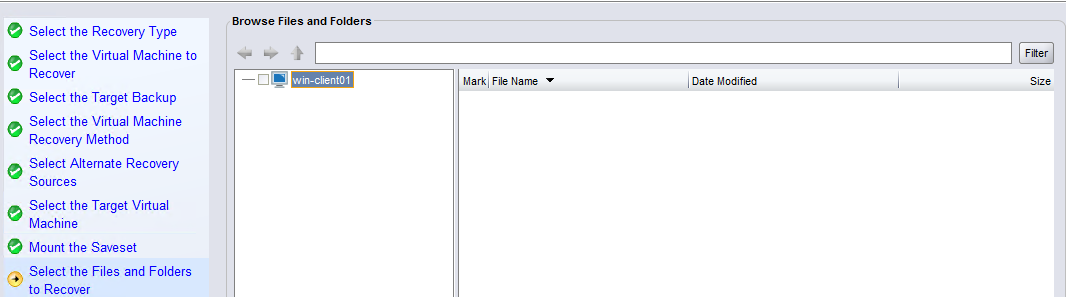
Het is niet mogelijk om vanuit de wizard Herstellen door de FLR te bladeren:
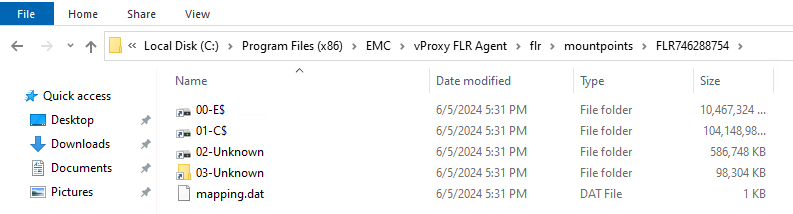
Op de VM hebt u toegang tot de FLR-koppelpunten onder "C:\Program Files (x86)\EMC\vProxy FLR Agent\flr\mountpoints\."
Cause
Tijdens de koppelingsbewerking is de koppelingsgebruiker opgegeven met behulp van .\Username.
.\username is om in te loggen als een lokaal gebruikersaccount in plaats van een domeingebruikersaccount. Dit kan worden gedaan om onderscheid te maken tussen een gebruikersnaam die zowel een domein als een lokaal account kan hebben. Bijvoorbeeld: 'Administrator'. De logica die tijdens de koppeling wordt gebruikt, maakt het mogelijk dat de gebruiker zich aanmeldt, maar de browsemachtigingen worden niet correct toegepast.
Resolution
U kunt de benodigde bestanden/mappen kopiëren van het FLR-koppelpunt onder C:\Program Files (x86)\EMC\vProxy FLR Agent\flr\mountpoints\:
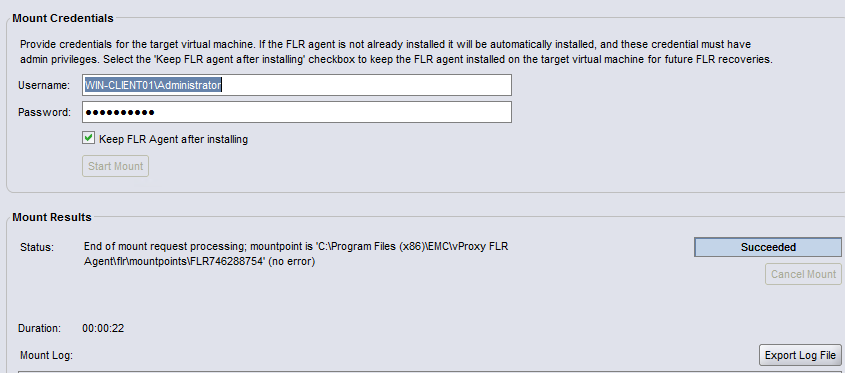
Als u de NetWorker recover wizard wilt gebruiken, sluit u de huidige FLR-taak en start u de FLR opnieuw. Voer bij het opgeven van de gebruiker geen .\ in voor de gebruikersnaam.
Als u het lokale beheerdersaccount wilt opgeven, voert u HOSTNAME\Administrator. Bijvoorbeeld: