OptiPlexおよびPrecisionデスクトップでSpeedStep、Intel TurboBoost、Speed Shift設定を同時に保存できない問題
Summary: この記事では、OptiPlexおよびPrecisionデスクトップで同時に保存できないSpeedStep、インテルTurboBoost、およびSpeed Shiftの設定について説明します。
This article applies to
This article does not apply to
This article is not tied to any specific product.
Not all product versions are identified in this article.
Symptoms
OptiPlexおよびPrecisionデスクトップで、SpeedStep、インテルTurboBoost、Speed Shiftの各設定を同時に保存できない問題が発生します。この問題は、ユーザーが「検索」機能で設定を変更すると発生します。
対象となるシステム:
- OptiPlexマイクロ7020
- OptiPlexマイクロPlus 7020
- OptiPlexスモール フォーム ファクター7020
- OptiPlexスモール フォーム ファクターPlus 7020
- OptiPlexタワー7020
- OptiPlexタワーPlus 7020
- Precision 3280 CFF
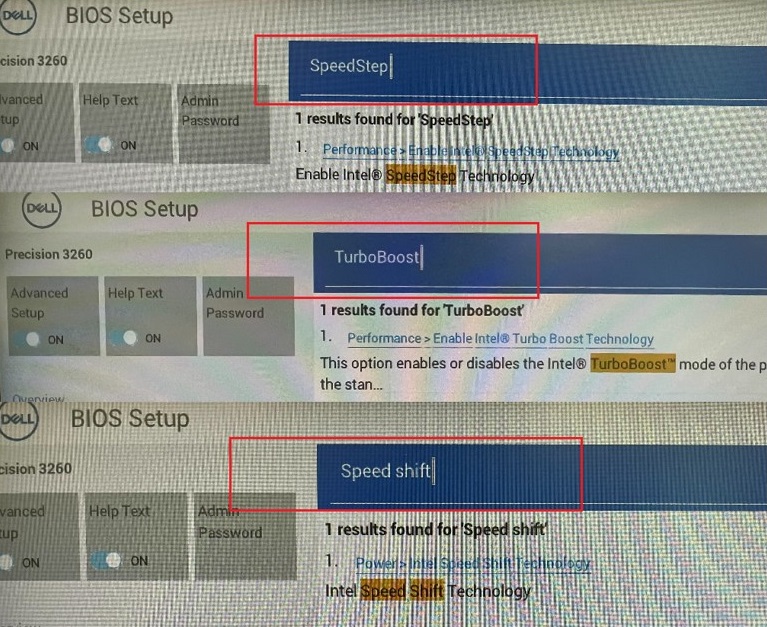
(図1 - 「検索」機能で変更した3つの設定)
Cause
この問題は、BIOSコーディングが原因で発生します。
Resolution
コンピューターの BIOSをバージョン1.2.1 以降にアップデートすると、この問題は解決します。BIOSをダウンロードしてインストールするには、『 BIOS Update Guide』を参照してください。
Affected Products
OptiPlex Micro 7020, OptiPlex Micro Plus 7020, OptiPlex Small Form Factor Plus 7020, OptiPlex Small Form Factor 7020, OptiPlex Tower 7020, OptiPlex Tower Plus 7020, Precision 3280 CompactArticle Properties
Article Number: 000223595
Article Type: Solution
Last Modified: 08 Jan 2026
Version: 6
Find answers to your questions from other Dell users
Support Services
Check if your device is covered by Support Services.