PowerProtect Data Manager - PowerScale NAS backups fails with error ABNA0022
Summary: Snapshot creation failed for file system '/ifs/path_to/share'. Reason: Could not create snapshot: 'AEC_BAD_REQUEST: snapshot path '/ifs/path_to/share' does not exist'.\n\n",
Symptoms
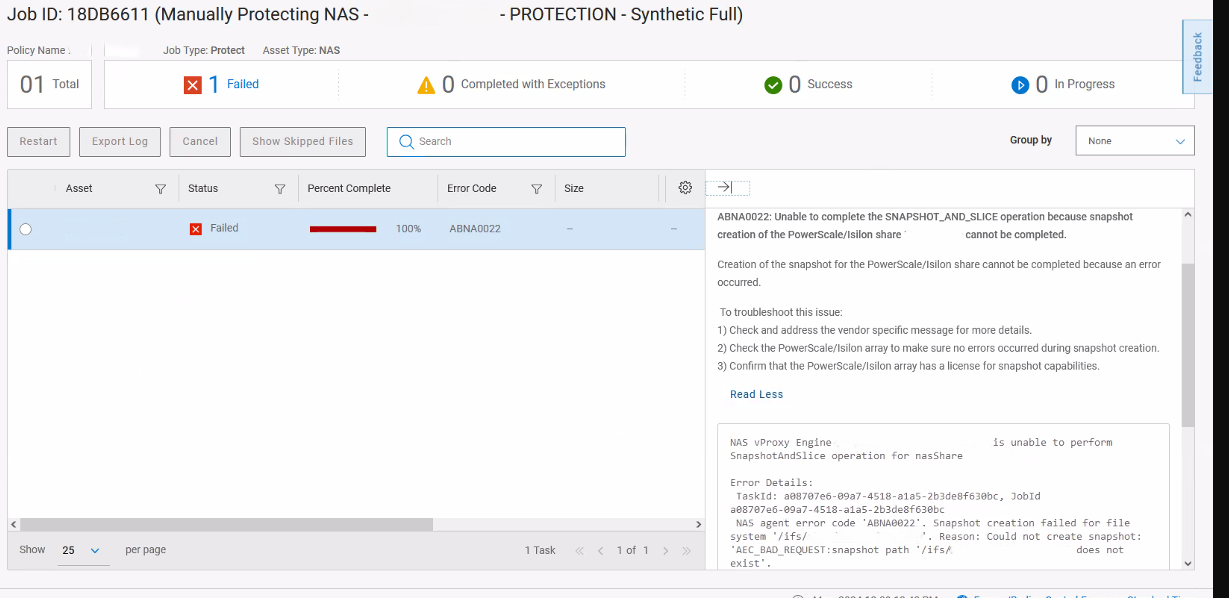
Backups are failing with the following error:
"errors": {
"errorCode": "ABNA0022",
"errorMessage": "Unable to complete the 'SNAPSHOT_AND_SLICE' operation because snapshot creation of the PowerScale/Isilon share 'SHARE_NAME' cannot be completed.",
"remediation": "",
"vendorSpecificErrorMessage": "Snapshot creation failed for file system '/ifs/PATH_TO/SHARE_NAME'. Reason: Could not create snapshot: 'AEC_BAD_REQUEST:snapshot path '/ifs/PATH_TO/SHARE_NAME' does not exist'.\n\n",
"alertArguments": [ {
Cause
The issue occurred because the share path from Isilon/PowerScale was modified in "File System," "File system explorer," but was not updated in "Protocols" and "Windows sharing (SMB)."
Because of this mismatch, the snapshot could not be created as the path it was looking for did not exist anymore.
Resolution
To fix this, from Isilon/PowerScale, got to:
"Protocols," "Windows sharing (SMB)," select your SMB share that is having the error, and update the path to reflect the correct one. (can be seen in "File System," "File System explorer" and go to the correct path.)
Once updated, go to PowerProtect Data Manager, and run a Discovery of the Isilon/PowerScale Asset Source (go to Asset Sources/NAS and select the Source and "Discover").
A new Asset is created in "Assets," "NAS." Add it to the protection policy, and remove the old Asset as it is now in "Not Detected."