PPDM 虚拟机未启动警告:dracut-initqueue:启动超时脚本
Summary: 将小型计算机系统接口 (SCSI) 控制器从“LSI 逻辑并行”更改为后,PowerProtect Data Manager (PPDM) 无法启动,并显示“警告:dracut-initqueue:启动超时脚本”
This article applies to
This article does not apply to
This article is not tied to any specific product.
Not all product versions are identified in this article.
Symptoms
PowerProtect Data Manager 的启动问题
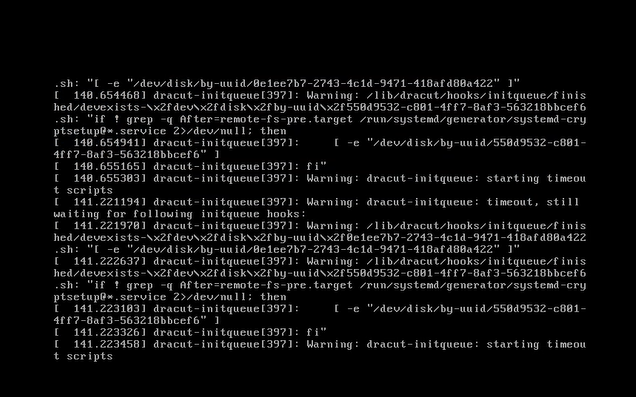
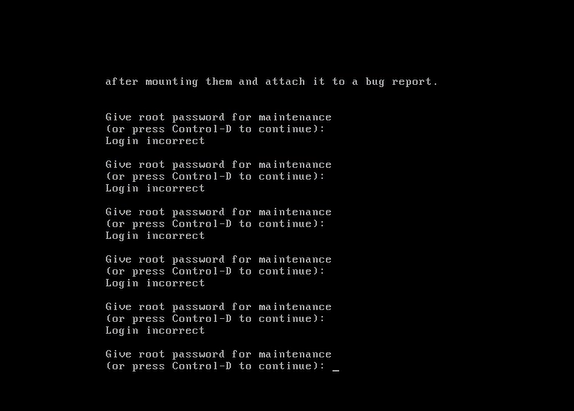
PPDM 虚拟机未启动,并在控制台中显示警告消息:”Warning: dracut-initqueue: starting timeout scripts”
Cause
问题的根本原因
问题的根本原因与 PPDM SCSI 控制器的配置有关。
- PPDM SCSI 控制器已更改为“LSI 逻辑并行”以外的其他控制器。
控制器配置中的这种更改导致了 PPDM 启动问题
Resolution
PPDM 启动问题解决。
要解决 PPDM 启动问题,请将 PPDM SCSI 控制器更改为“LSI 逻辑并行”。
这可以通过在 vSphere 中修改 PPDM 虚拟机的设置来完成。
进行此更改后,PPDM 实例应正常启动,而不会出现问题。
Affected Products
PowerProtect Data ManagerArticle Properties
Article Number: 000357133
Article Type: Solution
Last Modified: 23 May 2026
Version: 3
Find answers to your questions from other Dell users
Support Services
Check if your device is covered by Support Services.