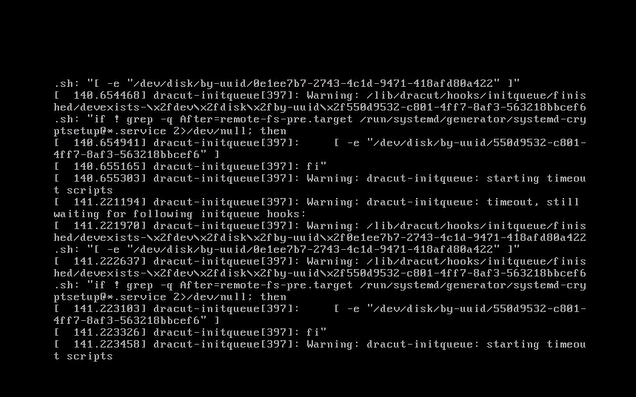
Den virtuella PPDM-maskinen startar inte Varning: dracut-initqueue: startar timeout-skript
Summary: PowerProtect Data Manager (PPDM) startar inte med "Warning: dracut-initqueue: starting timeout scripts" efter att styrenheten för Small Computer System Interface (SCSI) har ändrats från "LSI Logic Parallel" ...
This article applies to
This article does not apply to
This article is not tied to any specific product.
Not all product versions are identified in this article.
Symptoms
Startproblem med PowerProtect Data Manager
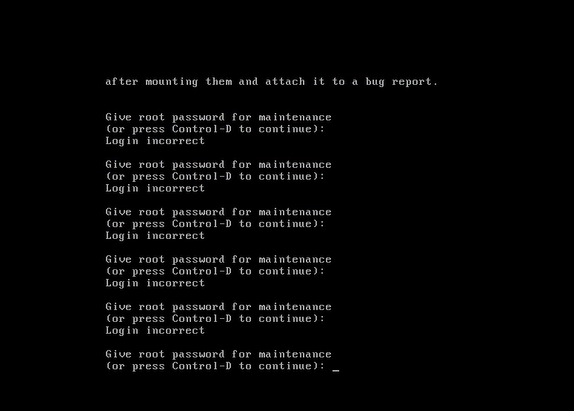
Den virtuella PPDM-maskinen startar inte och varningsmeddelandet som visas i konsolen visas: ”Warning: dracut-initqueue: starting timeout scripts”
Cause
Grundorsak till problemet
Grundorsaken till problemet är relaterad till konfigurationen av PPDM SCSI-styrenheten.
- PPDM SCSI-styrenheten har ändrats till något annat än "LSI Logic Parallel".
Den här ändringen i styrenhetens konfiguration ledde till PPDM-startproblemet
Resolution
Problemlösning för PPDM-start.
Lös problemet med PPDM-start genom att ändra PPDM SCSI-styrenheten till "LSI Logic Parallel".
Det kan du göra genom att ändra inställningarna för den virtuella PPDM-maskinen i vSphere.
När du har gjort den här ändringen bör PPDM-instansen starta utan problem.
Affected Products
PowerProtect Data ManagerArticle Properties
Article Number: 000357133
Article Type: Solution
Last Modified: 23 May 2026
Version: 3
Find answers to your questions from other Dell users
Support Services
Check if your device is covered by Support Services.