Dell EMC Unity: Järjestelmän kokoonpanon tarkasteleminen Telemetriatiedostot (käyttäjän korjattavissa)
Summary: Tietämyskannan artikkeli näyttää, miten Dell EMC Unity -kokoonpanoa tarkastellaan telemetriatiedostojen avulla.
This article applies to
This article does not apply to
This article is not tied to any specific product.
Not all product versions are identified in this article.
Instructions
Mitä telemetriatiedostot ovat?
VNX1:n/VNX2:n ArrayConfig-tiedoston tapaan nämä tiedostot sisältävät järjestelmän kokoonpanotiedot ja antavat visuaalisen kuvan järjestelmän määrityksistä (tiedostojärjestelmät, LUN:t, NAS-palvelimet, isännät, replikointiistunnot, tilannevedokset jne.)
Kuinka löytää telemetriatiedostot?
Menetelmä A: Kerätyistä tiedoista / palvelutiedoista (KB 483583):
Menetelmä B: Suoraan SP:ltä SSH-yhteyden kautta:
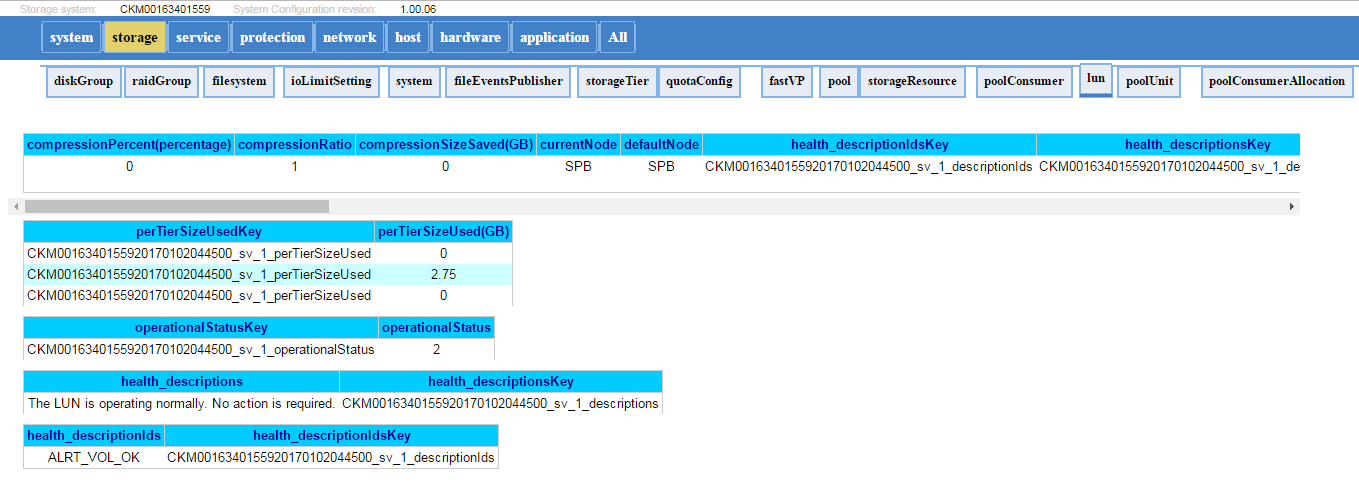
Alla on esimerkki siitä, miltä telemetriatiedosto näyttää:
VNX1:n/VNX2:n ArrayConfig-tiedoston tapaan nämä tiedostot sisältävät järjestelmän kokoonpanotiedot ja antavat visuaalisen kuvan järjestelmän määrityksistä (tiedostojärjestelmät, LUN:t, NAS-palvelimet, isännät, replikointiistunnot, tilannevedokset jne.)
Kuinka löytää telemetriatiedostot?
Menetelmä A: Kerätyistä tiedoista / palvelutiedoista (KB 483583):
- Pura tiedonkeruutiedostot. (spa.service_dc.tgz ja spb.service_dc.tgz)
- Telemetriatiedosto on kansiossa: spx\EMC\backend\service\configuration_history\
- Hae uusin telemetriatiedosto molempien tallennussuoritinten polusta (tavallisesti ensisijaisessa tallennussuorittimessa lokien keräämisen aikana)
- Pura tiedostot ja avaa .html tiedosto (esimerkki: 20170105_095114_CKM0016350xxxx_EMC-UEM-Telemetry.html)
Menetelmä B: Suoraan SP:ltä SSH-yhteyden kautta:
- Suorita svc_arrayconfig -H
- Uusi telemetriatiedosto (.html) luodaan suoraan SP:hen, jossa edellä oleva komento suoritettiin. Se kuuluu seuraaviin: /EMC/backend/service/configuration_history.
- Hae html-tiedosto SP:ltä WinSCP:llä (tai jollakin muulla tiedostonsiirtotavalla).
Alla on esimerkki siitä, miltä telemetriatiedosto näyttää:
Additional Information
Affected Products
Dell EMC Unity FamilyProducts
Dell Unity 300, Dell EMC Unity 300F, Dell EMC Unity 400, Dell EMC Unity 400F, Dell EMC Unity 500, Dell EMC Unity 500F, Dell EMC Unity 600, Dell EMC Unity 600F, Dell EMC Unity Family |Dell EMC Unity All Flash, Dell EMC Unity Family
, Dell EMC Unity Hybrid, Dell EMC UnityVSA Professional Edition/Unity Cloud Edition
...
Article Properties
Article Number: 000022764
Article Type: How To
Last Modified: 16 Oct 2025
Version: 3
Find answers to your questions from other Dell users
Support Services
Check if your device is covered by Support Services.