「Dell EMC Unity:システム構成テレメトリー ファイルを表示する方法(ユーザー修正可能)
Summary: テレメトリー ファイルを使用してDell EMC Unity構成を表示する方法を示すKB。
This article applies to
This article does not apply to
This article is not tied to any specific product.
Not all product versions are identified in this article.
Instructions
テレメトリー ファイルとは何ですか
VNX1/VNX2の「ArrayConfig」と同様に、これらのファイルにはシステム構成情報が含まれており、アレイ上の構成(ファイル システム、LUN、NASサーバー、ホスト、レプリケーション セッション、スナップショットなど)を視覚的に表現します
テレメトリー ファイルの検索方法
メソッドA: From Data Collects/Service Data (KB 483583):
方法B: SSH接続を介してSPから直接:
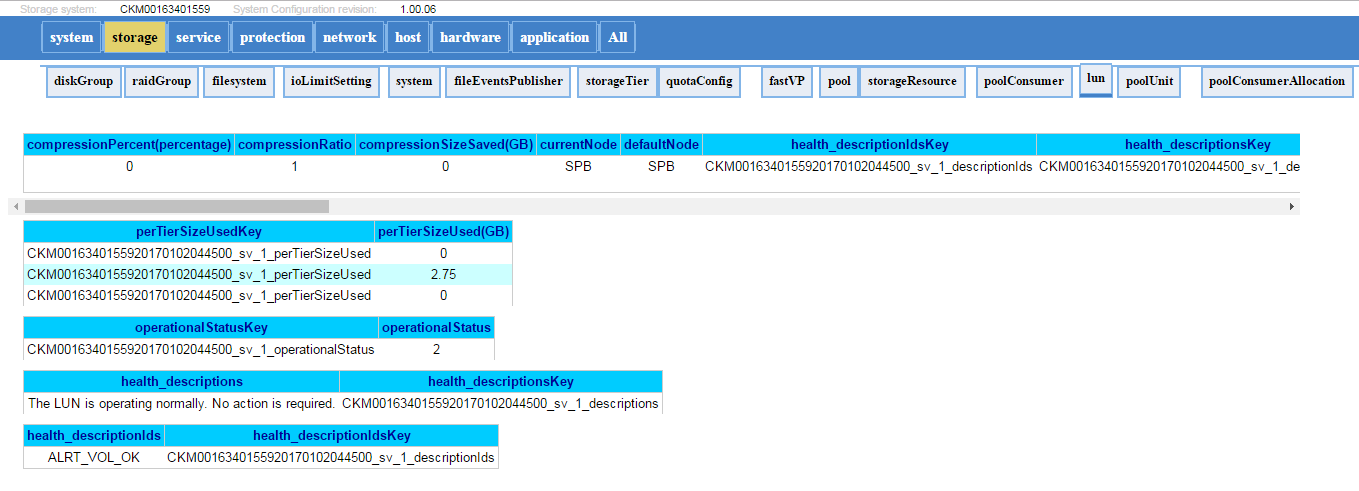
テレメトリー ファイルの例を次に示します。
VNX1/VNX2の「ArrayConfig」と同様に、これらのファイルにはシステム構成情報が含まれており、アレイ上の構成(ファイル システム、LUN、NASサーバー、ホスト、レプリケーション セッション、スナップショットなど)を視覚的に表現します
テレメトリー ファイルの検索方法
メソッドA: From Data Collects/Service Data (KB 483583):
- データ収集ファイルを解凍します。(spa.service_dc.tgz および spb.service_dc.tgz)
- テレメトリー ファイルは、spx\EMC\backend\service\configuration_history\にあります。
- 両方のSPのパスを確認して、最新のテレメトリー ファイルを取得します(通常、ログの収集中にプライマリーSPに存在します)
- ファイルを解凍し、.htmlファイルを開きます(例: 20170105_095114_CKM0016350xxxx_EMC-UEM-Telemetry.html)
方法B: SSH接続を介してSPから直接:
- svc_arrayconfig-Hを実行します
- 新しいテレメトリー ファイル(.html)は、上記のコマンドが実行されたSPに直接作成されます。これは、次の場所にあります。/EMC/backend/service/configuration_historyにあります。
- WinSCP(または任意のファイル転送方法)を使用して、SPからhtmlファイルを取得します。
テレメトリー ファイルの例を次に示します。
Additional Information
Affected Products
Dell EMC Unity FamilyProducts
Dell Unity 300, Dell EMC Unity 300F, Dell EMC Unity 400, Dell EMC Unity 400F, Dell EMC Unity 500, Dell EMC Unity 500F, Dell EMC Unity 600, Dell EMC Unity 600F, Dell EMC Unity Family |Dell EMC Unity All Flash, Dell EMC Unity Family
, Dell EMC Unity Hybrid, Dell EMC UnityVSA Professional Edition/Unity Cloud Edition
...
Article Properties
Article Number: 000022764
Article Type: How To
Last Modified: 16 Oct 2025
Version: 3
Find answers to your questions from other Dell users
Support Services
Check if your device is covered by Support Services.