Dell EMC Unity: 시스템 구성 텔레메트리 파일을 보는 방법(사용자 수정 가능)
Summary: 텔레메트리 파일을 사용하여 Dell EMC Unity 구성을 보는 방법을 보여주는 KB
This article applies to
This article does not apply to
This article is not tied to any specific product.
Not all product versions are identified in this article.
Instructions
텔레메트리 파일이란?
VNX1/VNX2의 "ArrayConfig"와 마찬가지로 이 파일은 시스템 구성 정보를 포함하며 어레이의 구성(파일 시스템, LUN, NAS 서버, 호스트, 복제 세션, 스냅샷 등)을 시각적으로 보여 줍니다.
텔레메트리 파일을
찾는 방법방법 A: 데이터 수집/서비스 데이터(KB 483583):
방법 B : SSH 연결을 통해 SP에서 직접:
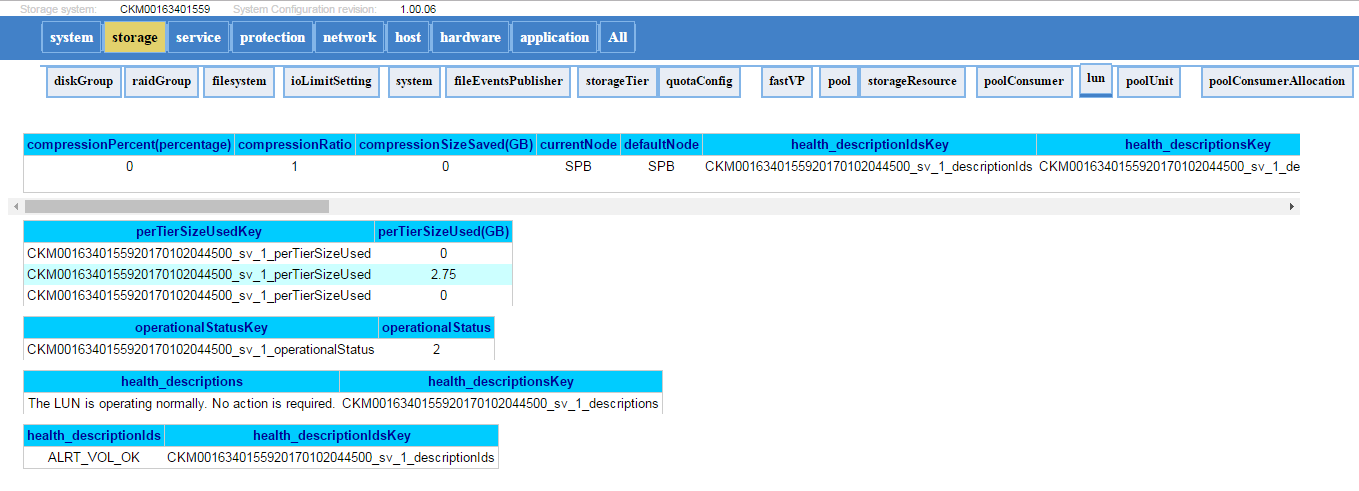
다음은 텔레메트리 파일 모양의 예입니다.
VNX1/VNX2의 "ArrayConfig"와 마찬가지로 이 파일은 시스템 구성 정보를 포함하며 어레이의 구성(파일 시스템, LUN, NAS 서버, 호스트, 복제 세션, 스냅샷 등)을 시각적으로 보여 줍니다.
텔레메트리 파일을
찾는 방법방법 A: 데이터 수집/서비스 데이터(KB 483583):
- 데이터 수집 파일의 압축을 풉니다. (spa.service_dc.tgz 및 spb.service_dc.tgz)
- 텔레메트리 파일은 spx\EMC\backend\service\configuration_history\에 있습니다.
- 두 SP의 경로를 확인하여 최신 텔레메트리 파일을 가져옵니다(일반적으로 로그를 수집하는 동안 주 SP에 있음).
- 파일의 압축을 풀고 .html 파일을 엽니다(예: 20170105_095114_CKM0016350xxxx_EMC-UEM-Telemetry.html)
방법 B : SSH 연결을 통해 SP에서 직접:
- svc_arrayconfig -H를 실행합니다.
- 새 텔레메트리 파일(.html)은 위의 명령이 실행된 SP에 직접 생성됩니다. 그것은 아래에있을 것입니다 : /EMC/backend/service/configuration_history에 있습니다.
- WinSCP(또는 파일 전송 방법)를 사용하여 SP에서 html 파일을 검색합니다.
다음은 텔레메트리 파일 모양의 예입니다.
Additional Information
Affected Products
Dell EMC Unity FamilyProducts
Dell Unity 300, Dell EMC Unity 300F, Dell EMC Unity 400, Dell EMC Unity 400F, Dell EMC Unity 500, Dell EMC Unity 500F, Dell EMC Unity 600, Dell EMC Unity 600F, Dell EMC Unity Family |Dell EMC Unity All Flash, Dell EMC Unity Family
, Dell EMC Unity Hybrid, Dell EMC UnityVSA Professional Edition/Unity Cloud Edition
...
Article Properties
Article Number: 000022764
Article Type: How To
Last Modified: 16 Oct 2025
Version: 3
Find answers to your questions from other Dell users
Support Services
Check if your device is covered by Support Services.