Dell EMC Unity:如何檢視系統組態遙測檔案 (使用者可修正)
Summary: KB,說明如何使用遙測檔案檢視 Dell EMC Unity 組態。
This article applies to
This article does not apply to
This article is not tied to any specific product.
Not all product versions are identified in this article.
Instructions
什麼是遙測檔?
與 VNX1/VNX2 的「ArrayConfig」類似,這些檔案包含系統組態資訊,並以視覺化方式呈現陣列上的組態 (檔案系統、LUN、NAS 伺服器、主機、複寫工作階段、快照等)。
如何尋找遙測檔案?
方法 A:從資料收集/服務資料 (KB 483583):
方法 B:直接從 SP 透過 SSH 連線:
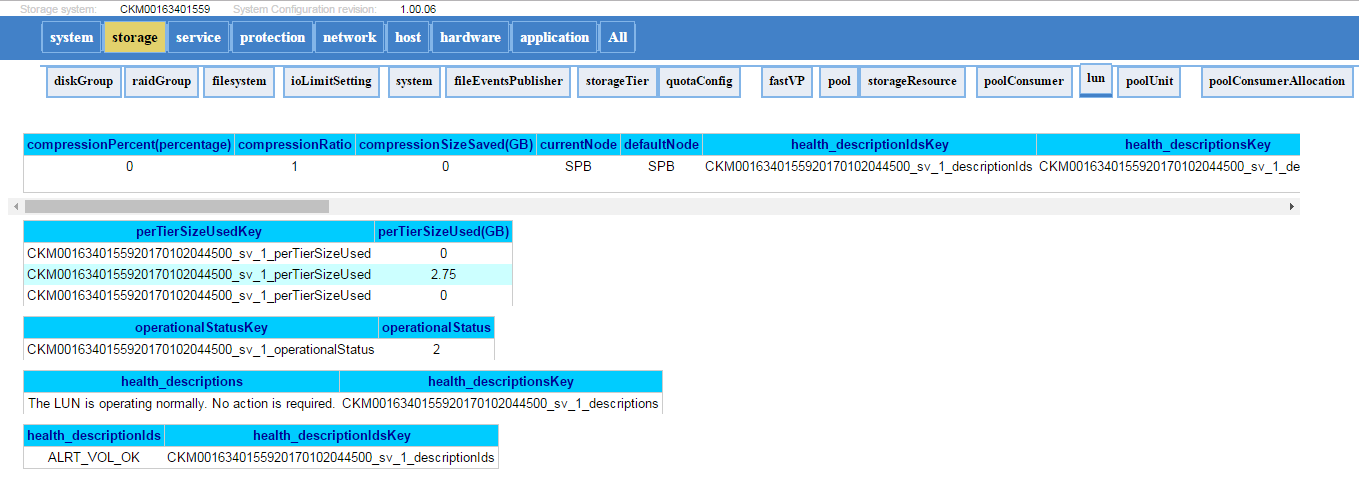
下面是遙測檔的外觀範例:
與 VNX1/VNX2 的「ArrayConfig」類似,這些檔案包含系統組態資訊,並以視覺化方式呈現陣列上的組態 (檔案系統、LUN、NAS 伺服器、主機、複寫工作階段、快照等)。
如何尋找遙測檔案?
方法 A:從資料收集/服務資料 (KB 483583):
- 解壓縮資料收集檔案。(spa.service_dc.tgz 和 spb.service_dc.tgz)
- 遙測檔案將位於:spx\EMC\backend\service\configuration_history\
- 檢查兩個 SP 的路徑以取得最新的遙測檔案 (通常在收集記錄時出現在主要 SP 上)
- 解壓縮檔案並開啟.html檔案 (例如:20170105_095114_CKM0016350xxxx_EMC-UEM-Telemetry.html)
方法 B:直接從 SP 透過 SSH 連線:
- 執行svc_arrayconfig -H
- 新的遙測檔案 (.html) 將直接在執行上述命令的 SP 上建立。它將在以下位置:/EMC/backend/service/configuration_history。
- 使用 WinSCP (或任何檔案傳輸方法) 從 SP 擷取 html 檔案。
下面是遙測檔的外觀範例:
Additional Information
Affected Products
Dell EMC Unity FamilyProducts
Dell Unity 300, Dell EMC Unity 300F, Dell EMC Unity 400, Dell EMC Unity 400F, Dell EMC Unity 500, Dell EMC Unity 500F, Dell EMC Unity 600, Dell EMC Unity 600F, Dell EMC Unity Family |Dell EMC Unity All Flash, Dell EMC Unity Family
, Dell EMC Unity Hybrid, Dell EMC UnityVSA Professional Edition/Unity Cloud Edition
...
Article Properties
Article Number: 000022764
Article Type: How To
Last Modified: 16 Oct 2025
Version: 3
Find answers to your questions from other Dell users
Support Services
Check if your device is covered by Support Services.