WindowsでDell Encryptionスイープを強制する方法
Summary: この記事では、Dell Encryption Enterprise(旧Dell Data Protection |Enterprise Edition)またはDell Encryption Personal(旧Dell Data Protection |Personal Edition)。
This article applies to
This article does not apply to
This article is not tied to any specific product.
Not all product versions are identified in this article.
Symptoms
対象製品:
- Dell Encryption Enterprise
- デルのデータ保護 |エンタープライズ
- Dell Encryption Personal
- Dell Data Protection | Personal Edition
対象オペレーティング システム:
- Windows
Cause
-
Resolution
Dell Encryption EnterpriseおよびDell Encryption Personalでは、Windowsシステム プローブ(WSProbe.exe)を使用して、マシン全体を強制的にスイープし、最新の暗号化ポリシーへの準拠を確認します。
Warning: 暗号化スイープにより、パフォーマンスがわずかに低下する可能性があります。デル・テクノロジーズでは、
WSProbe.exe 必要に応じて。
WSProbe.exeを実行するには、次の手順を実行します。
- 次のリンクにアクセスする:
C:\Program Files\Dell\Dell Data Protection\Encryption.
注:
- インストール中に変更した場合、ディレクトリーは異なる場合があります。
WSProbe.exeは、ソフトウェアのバージョン7.3以降にのみ含まれています。以前のバージョンについては、 Dell Data Security ProSupportにお問い合わせください。
- ダブルクリック
WSProbe.exe」
注:CLIを使用している場合は、ドライブ文字(たとえば、
WSProbe.exe C:\。
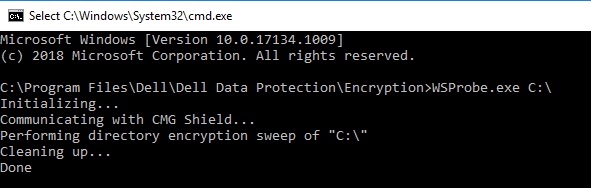
図1: (英語のみ)型 WSProbe.exe C:\
サポートに問い合わせるには、「Dell Data Securityのインターナショナル サポート電話番号」を参照してください。
TechDirectにアクセスして、テクニカル サポート リクエストをオンラインで生成します。
さらに詳しい情報やリソースについては、「デル セキュリティ コミュニティー フォーラム」に参加してください。
Affected Products
Dell EncryptionArticle Properties
Article Number: 000130499
Article Type: Solution
Last Modified: 03 Apr 2024
Version: 11
Find answers to your questions from other Dell users
Support Services
Check if your device is covered by Support Services.